<?xml version="1.0" encoding="utf-8"?><feed xmlns="http://www.w3.org/2005/Atom" ><generator uri="https://jekyllrb.com/" version="3.10.0">Jekyll</generator><link href="http://jalammar.github.io/feed.xml" rel="self" type="application/atom+xml" /><link href="http://jalammar.github.io/" rel="alternate" type="text/html" /><updated>2025-11-03T14:59:50+00:00</updated><id>http://jalammar.github.io/feed.xml</id><title type="html">Jay Alammar</title><subtitle>Visualizing machine learning one concept at a time.</subtitle><entry><title type="html">Moving To Substack</title><link href="http://jalammar.github.io/moving_to_substack/" rel="alternate" type="text/html" title="Moving To Substack" /><published>2025-03-26T00:00:00+00:00</published><updated>2025-03-26T00:00:00+00:00</updated><id>http://jalammar.github.io/moving_to_substack</id><content type="html" xml:base="http://jalammar.github.io/moving_to_substack/"><![CDATA[<p>I’m freezing this blog and starting to post on <a href="https://newsletter.languagemodels.co/">my Substack</a> instead. The authoring experience is much more convenient for me there. Please follow me there, and check out <a href="https://newsletter.languagemodels.co/p/the-illustrated-deepseek-r1">The Illustrated DeepSeek R-1</a> if you haven’t yet.</p>

<p>And check out our <a href="https://bit.ly/4aRnn7Z">How Transformer LLMs Work</a> course!</p>

<iframe width="560" height="315" style="
width: 100%;
max-width: 560px;" src="https://www.youtube.com/embed/k1ILy23t89E?si=M84_P9i1mAzCtTDD" title="YouTube video player" frameborder="0" allow="accelerometer; autoplay; clipboard-write; encrypted-media; gyroscope; picture-in-picture; web-share" referrerpolicy="strict-origin-when-cross-origin" allowfullscreen=""></iframe>]]></content><author><name></name></author><summary type="html"><![CDATA[I’m freezing this blog and starting to post on my Substack instead. The authoring experience is much more convenient for me there. Please follow me there, and check out The Illustrated DeepSeek R-1 if you haven’t yet. And check out our How Transformer LLMs Work course!]]></summary></entry><entry><title type="html">Generative AI and AI Product Moats</title><link href="http://jalammar.github.io/generative-ai-and-ai-product-moats/" rel="alternate" type="text/html" title="Generative AI and AI Product Moats" /><published>2023-05-09T00:00:00+00:00</published><updated>2023-05-09T00:00:00+00:00</updated><id>http://jalammar.github.io/generative-ai-and-ai-product-moats</id><content type="html" xml:base="http://jalammar.github.io/generative-ai-and-ai-product-moats/"><![CDATA[<div class="img-div-any-width">
  <img src="/images/gen-ai-hero-image.jpg" />
  <br />
</div>

<p>Here are eight observations I’ve shared recently on the Cohere blog and videos that go over them.:</p>

<p>Article: <a href="https://txt.cohere.com/generative-ai-future-or-present/">What’s the big deal with Generative AI? Is it the future or the present?</a></p>
<iframe width="560" height="315" src="https://www.youtube.com/embed/AeW9r3lopp0" style="
width: 100%;
max-width: 560px;" title="YouTube video player" frameborder="0" allow="accelerometer; autoplay; clipboard-write; encrypted-media; gyroscope; picture-in-picture; web-share" allowfullscreen=""></iframe>

<p>Article: <a href="https://txt.cohere.com/ai-is-eating-the-world/">AI is Eating The World</a></p>
<iframe width="560" height="315" src="https://www.youtube.com/embed/oTqG2DbXl2Y" tyle="
width: 100%;
max-width: 560px;" title="YouTube video player" frameborder="0" allow="accelerometer; autoplay; clipboard-write; encrypted-media; gyroscope; picture-in-picture; web-share" allowfullscreen=""></iframe>]]></content><author><name></name></author><summary type="html"><![CDATA[Here are eight observations I’ve shared recently on the Cohere blog and videos that go over them.: Article: What’s the big deal with Generative AI? Is it the future or the present? Article: AI is Eating The World]]></summary></entry><entry><title type="html">Remaking Old Computer Graphics With AI Image Generation</title><link href="http://jalammar.github.io/ai-image-generation-tools/" rel="alternate" type="text/html" title="Remaking Old Computer Graphics With AI Image Generation" /><published>2023-01-01T00:00:00+00:00</published><updated>2023-01-01T00:00:00+00:00</updated><id>http://jalammar.github.io/ai-image-generation-tools</id><content type="html" xml:base="http://jalammar.github.io/ai-image-generation-tools/"><![CDATA[<p>Can AI Image generation tools make re-imagined, higher-resolution versions of old video game graphics?</p>

<p>Over the last few days, I used AI image generation to reproduce one of my childhood nightmares. I wrestled with Stable Diffusion, Dall-E and Midjourney to see how these commercial AI generation tools can help retell an old visual story - the intro cinematic to an old video game (<a href="https://en.wikipedia.org/wiki/Nemesis_2_(MSX)">Nemesis 2 on the MSX</a>). This post describes the process and my experience in using these models/services to retell a story in higher fidelity graphics.</p>

<h2 id="meet-dr-venom">Meet Dr. Venom</h2>

<div class="img-div">
  <img src="/images/image-gen/nemesis-2-intro-06.png" />
  <br />
</div>

<p>This fine-looking gentleman is the villain in a video game. Dr. Venom appears in the intro cinematic of Nemesis 2, a 1987 video game. This image, in particular, comes at a dramatic reveal in the cinematic.</p>

<p>Let’s update these graphics with visual generative AI tools and see how they compare and where each succeeds and fails.</p>

<h2 id="remaking-old-computer-graphics-with-ai-image-generation">Remaking Old Computer graphics with AI Image Generation</h2>

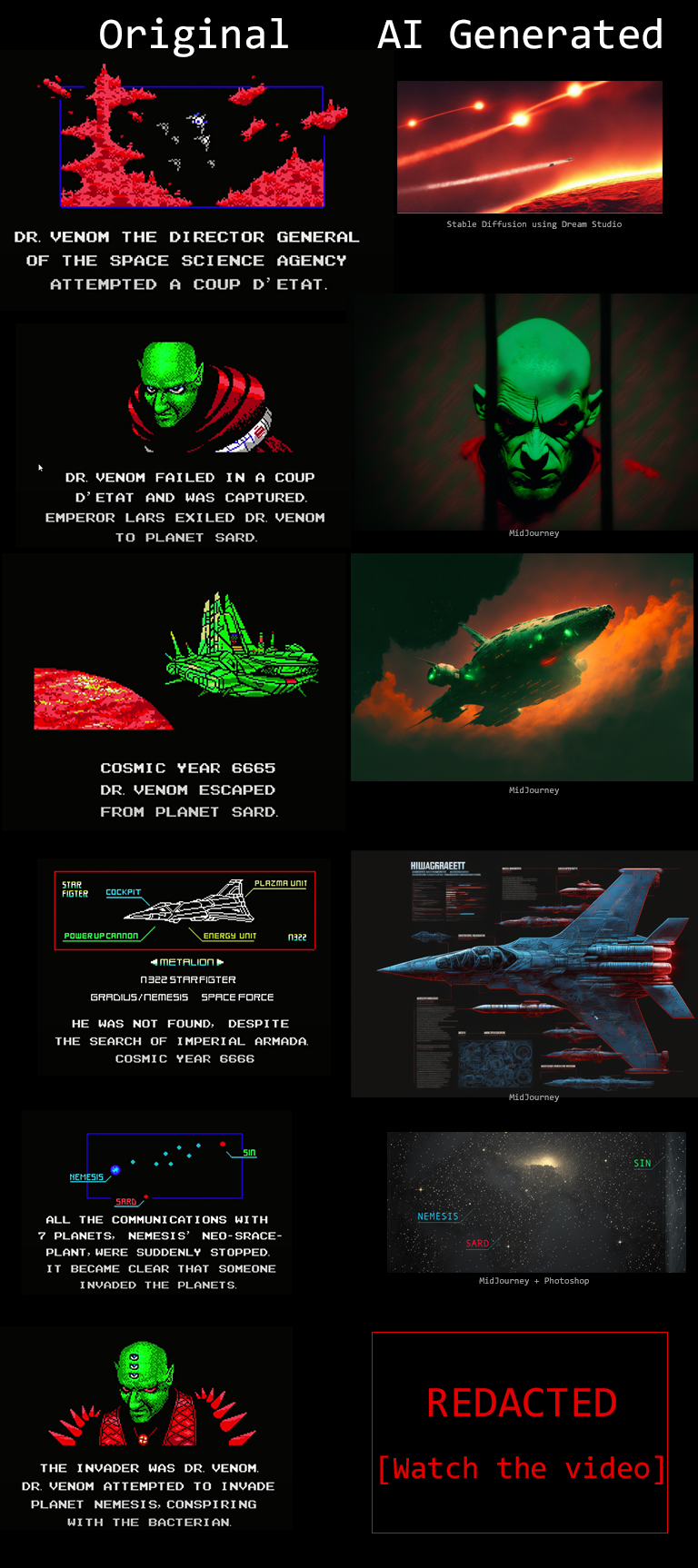
<p>Here’s a side-by-side look at the panels from the original cinematic (left column) and the final ones generated by the AI tools (right column):</p>

<div class="img-div-any-width">
  <img src="/images/image-gen/nemesis-2-intro-storyboard-image-gen.png" />
  <br />
</div>

<p>This figure does not show the final Dr. Venom graphic because I want you to witness it as I had, in the proper context and alongside the appropriate music. You can watch that here:</p>

<iframe width="560" height="315" src="https://www.youtube.com/embed/43bsSVnioI0" style="
width: 100%;
max-width: 560px;" title="YouTube video player" frameborder="0" allow="accelerometer; autoplay; clipboard-write; encrypted-media; gyroscope; picture-in-picture" allowfullscreen=""></iframe>

<!--more-->

<h3 id="panel-1">Panel 1</h3>
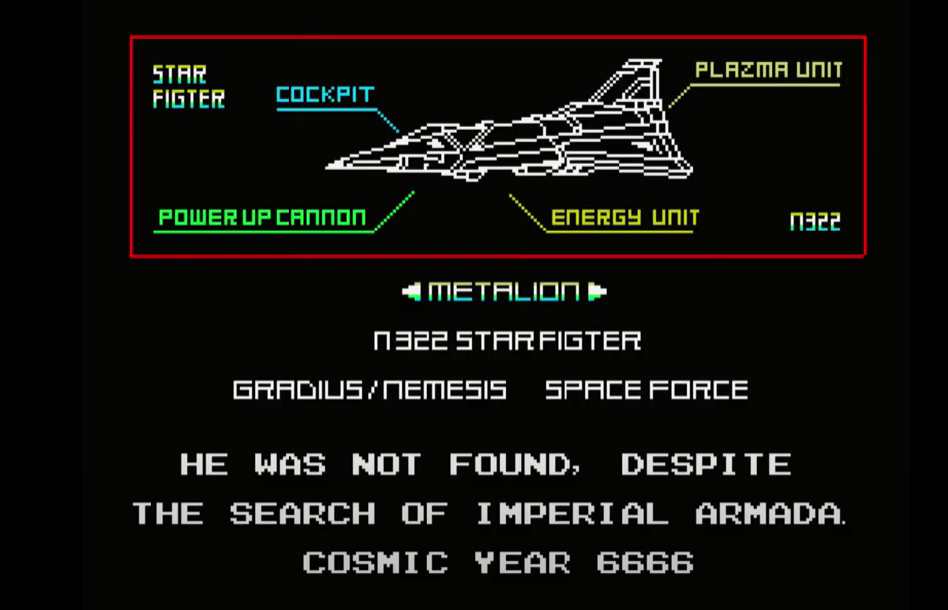
<p>Original image</p>
<div class="img-div-any-width">
  <img src="/images/image-gen/nemesis-2-intro-01.png" />
  <br />
</div>

<p>The final image was generated by Stable Diffusion using Dream Studio.</p>

<div class="img-div-any-width">
  <img src="/images/image-gen/nemesis-2-intro-01-gen-sd-2.png" />
  <br />
</div>

<p>The road to this image, however, goes through generating over 30 images and tweaking prompts. The first kind of prompt I’d use is something like:</p>

<blockquote>
  <p>fighter jets flying over a red planet in space with stars in the black sky</p>
</blockquote>

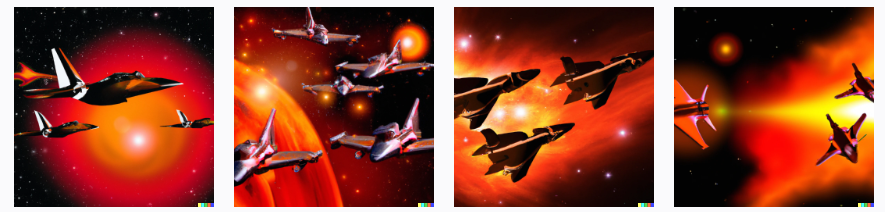
<p>This leads Dall-E to generate these candidates</p>

<div class="img-div-any-width">
  <img src="/images/image-gen/nemesis-2-intro-01-gen-dalle-1.png" />
  <br />
  Dall-E prompt: fighter jets flying over a red planet in space with stars in the black sky

</div>

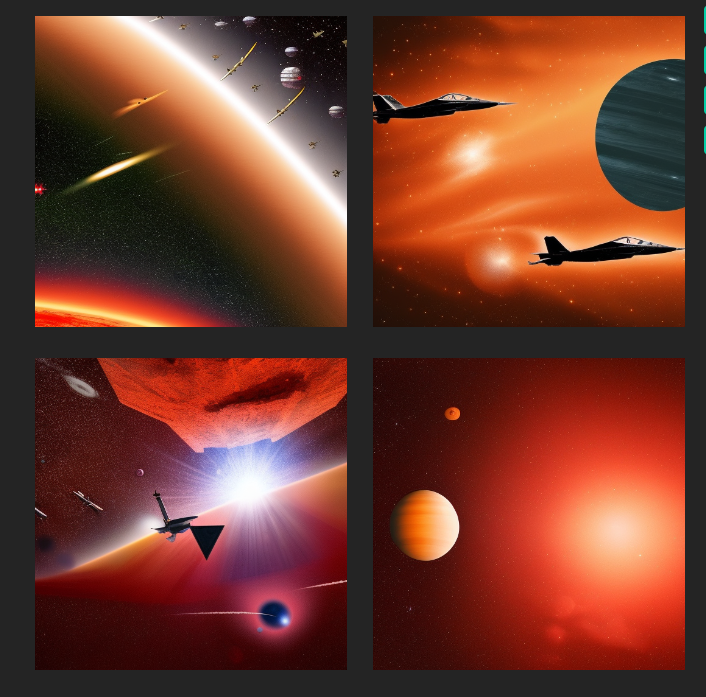
<p>Pasting a similar prompt into Dream Studio generates these candidates:</p>

<div class="img-div-any-width">
  <img src="/images/image-gen/nemesis-2-intro-01-gen-sd-3.png" />
  <br />
Stable Diffusion prompt: fighter jets flying over a red planet in space with stars in the black sky
</div>

<p>This showcases a reality of the current batch of image generation models. It is not enough for your prompt to describe the subject of the image. Your image creation prompt/spell needs to mention the exact arcane keywords that guide the model toward a specific style.</p>

<h3 id="searching-for-prompts-on-lexica">Searching for prompts on Lexica</h3>

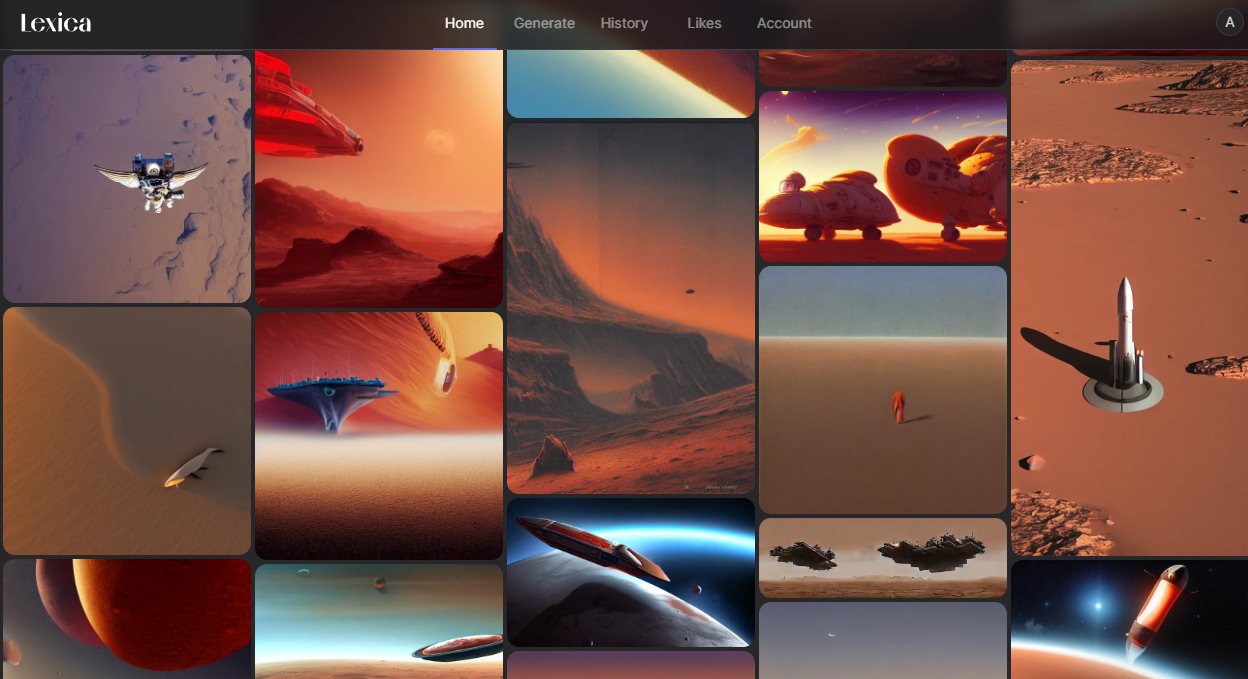
<p>The current solution is to either go through a prompt guide and learn the styles people found successful in the past, or search a gallery like <a href="https://lexica.art">Lexica</a> that contains millions of examples and their respective prompts. I go for the latter as learning arcane keywords that would work on specific versions of specific models is not a winning strategy for the long term.</p>

<div class="img-div-any-width">
  <img src="/images/image-gen/nemesis-2-intro-01-gen-lexica-1.png" />
  <br />
</div>

<p>From here, I find an image that I like, and edit it with my subject keeping the style portion of the prompt, so finally it looks like:</p>

<blockquote>
  <p>fighter jets flying over a red planet in space flaming jets behind them, stars on a black sky, lava, ussr, soviet, as a realistic scifi spaceship!!!, floating in space, wide angle shot art, vintage retro scifi, realistic space, digital art, trending on artstation, symmetry!!! dramatic lighting.</p>
</blockquote>

<h2 id="midjourney">MidJourney</h2>
<p>The results of Midjourney have always stood out as especially beautiful. I tried it with the original prompt containing only the subject. The results were amazing.</p>

<div class="img-div-any-width">
  <img src="/images/image-gen/nemesis-2-intro-01-gen-midjourney-3.png" />
  <br />
</div>

<p>While these look incredible, they don’t capture the essence of the original image as well as the Stable Diffusion one does. But this convinced me to try Midjourney first for the remainder of the story. I had about eight images to generate and only a limited time to get an okay result for each.</p>

<h2 id="panel-2">Panel 2</h2>
<p>Original Image:</p>
<div class="img-div">
  <img src="/images/image-gen/nemesis-2-intro-02.png" />
  <br />
</div>

<p>Final Image:</p>

<div class="img-div">
  <img src="/images/image-gen/nemesis-2-intro-02-gen-midjourney-1.png" />
  <br />
Midjourney prompt: realistic portrait of a single scary green skinned bald man with red eyes wearing a red coat with shoulder spikes, looking from behind the bars of a prison cell, black background, dramatic green lighting --ar 3:2
</div>

<h3 id="failed-attempts">Failed attempts</h3>
<p>While Midjourney could approximate the appearance of Dr. Venom, it was difficult to get the pose and restraint. My attempts at that looked like this:</p>

<div class="img-div">
  <img src="/images/image-gen/nemesis-2-intro-02-gen-midjourney-2.png" />
  <br />
Midjourney prompt: portrait of a single scary green skinned bald man with red eyes wearing a red coat in handcuffs and wrapped in chains, black background, dramatic green lighting
</div>

<p>That’s why I tweaked the image to show him behind bars instead.</p>

<h2 id="panel-3">Panel 3</h2>

<p>Original Image:</p>
<div class="img-div">
  <img src="/images/image-gen/nemesis-2-intro-03.png" />
  <br />
</div>

<p>Final Image:</p>

<div class="img-div">
  <img src="/images/image-gen/nemesis-2-intro-03-gen-midjourney-1.png" />
  <br />
Midjourney prompt: long shot of an angular ugly green space ship in orbit over a red planet in space in the black sky , dramatic --ar 3:2
</div>

<p>To instruct the model to generate a wide image, the <em>–ar 3:2</em> command specifies the desired aspect ratio.</p>

<h2 id="panel-4">Panel 4</h2>

<p>Original Image:</p>
<div class="img-div">
  <img src="/images/image-gen/nemesis-2-intro-04.png" />
  <br />
</div>

<p>Final Image:</p>

<div class="img-div">
  <img src="/images/image-gen/nemesis-2-intro-04-midjourney.png" />
  <br />
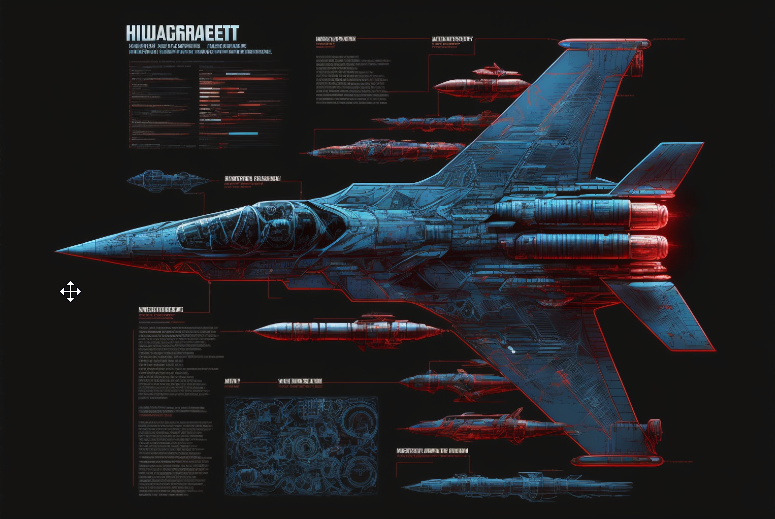
Midjourney prompt: massive advanced space fighter jet schematic blueprint on a black background, different cross-sections and perspectives, blue streaks and red missles, star fighter , vic viper gradius --ar 3:2
</div>

<p>Midjourney really captures the cool factor in a lot of fighter jet schematics. The text will not make sense, but that can work in your favor if you’re going for something alien.</p>

<p>In this workflow, it’ll be difficult to reproduce the same plane in future panels. Recent, more advanced methods like textual inversion or photobooth could aid in this, but at this time they are more difficult to use than text-to-image services.</p>

<h2 id="panel-5">Panel 5</h2>

<p>Original Image:</p>
<div class="img-div">
  <img src="/images/image-gen/nemesis-2-intro-05.png" />
  <br />
</div>

<p>Final Image:</p>

<div class="img-div">
  <img src="/images/image-gen/nemesis-2-intro-05-midjourney.png" />
  <br />
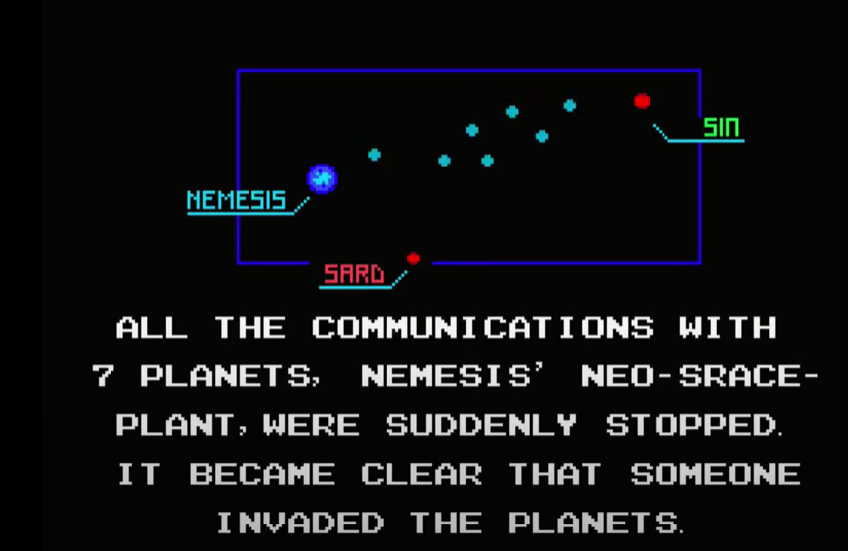
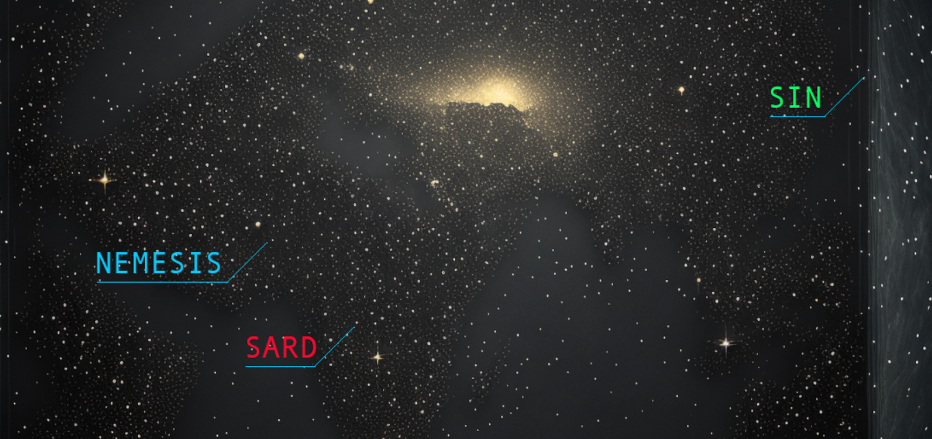
Midjourney prompt: rectangular starmap --ar 3:2 
</div>

<p>This image shows a limitation in what is possible with the current batch of AI image tools:</p>

<p>1- Reproducing text correctly in images is still not yet widely available (although technically possible as demonstrated in <a href="https://imagen.research.google/">Google’s Imagen</a>)</p>

<p>2- Text-to-image is not the best paradigm if you need a specific placement or manipulation of elements</p>

<p>So to get this final image, I had to import the stars image into photoshop and add the text and lines there.</p>

<h2 id="panel-6">Panel 6</h2>

<p>Original Image:</p>
<div class="img-div">
  <img src="/images/image-gen/nemesis-2-intro-06.png" />
  <br />
</div>

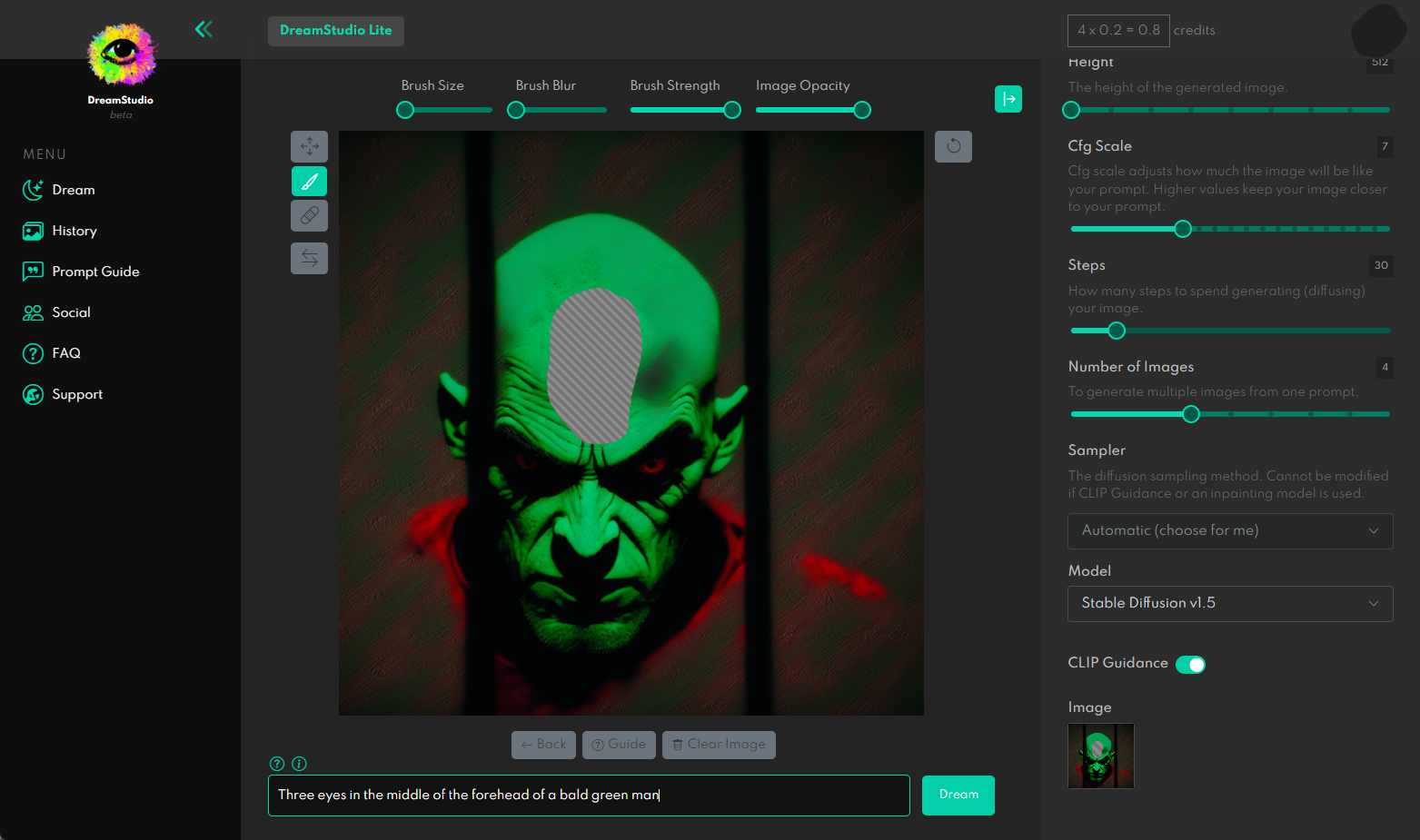
<p>I failed at reproducing the most iconic portion of this image, the three eyes. The models wouldn’t generate the look using any of the prompts I’ve tried.</p>

<p>I then proceeded to try in-painting in Dream Studio.</p>

<div class="img-div">
  <img src="/images/image-gen/in-painting-01.png" />
  <br />
</div>

<p>In-painting instructs the model to only generate an image for a portion of the image, in this case, it’s the portion I deleted with the brush inside of Dream Studio above.</p>

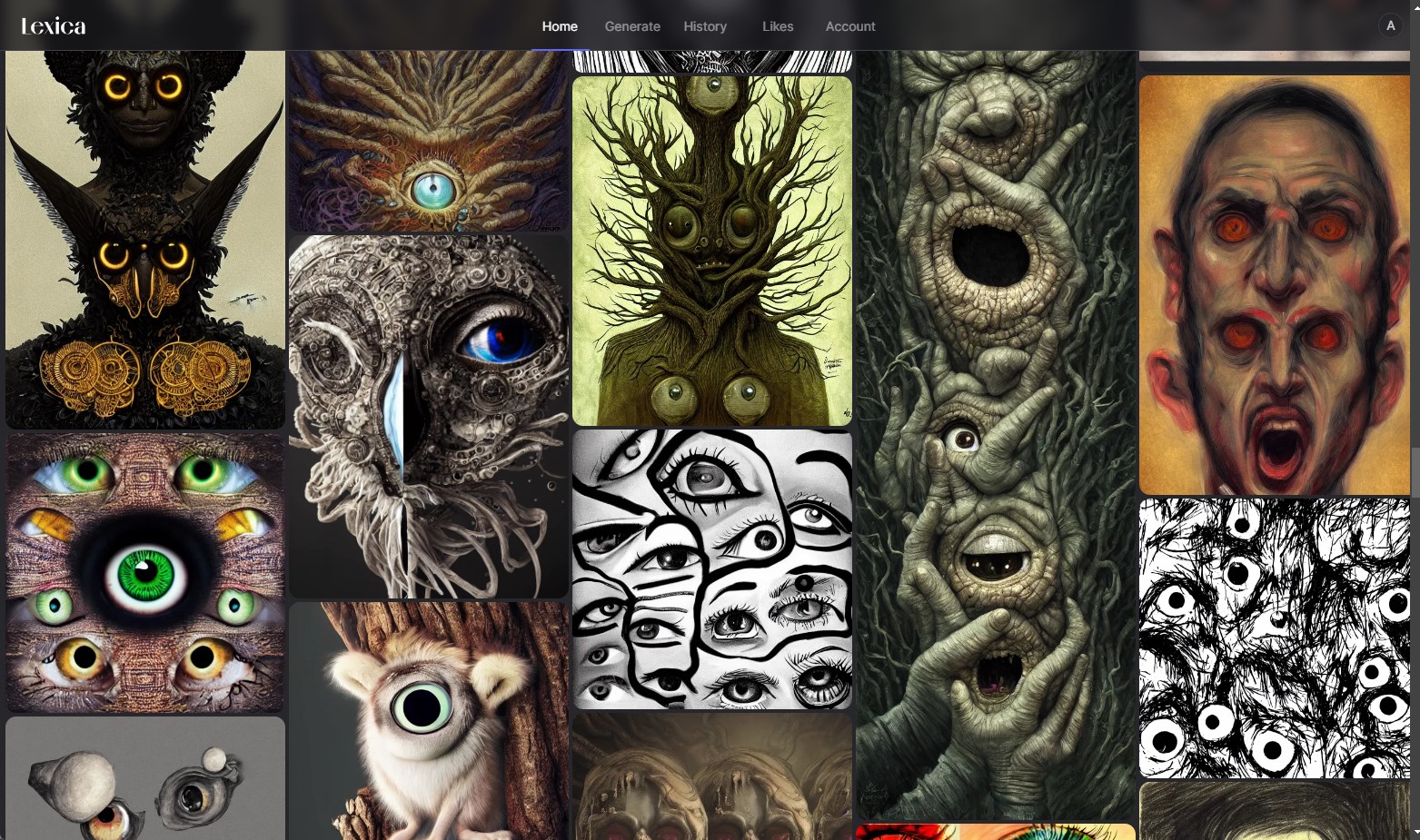
<p>I couldn’t get to a good result in time. Although looking at the gallery, the models are quite capable of generating horrific imagery involving eyes.</p>

<div class="img-div">
  <img src="/images/image-gen/eyes.jpg" />
  <br />
</div>

<h2 id="panel-7">Panel 7</h2>

<p>Original Image:</p>
<div class="img-div">
  <img src="/images/image-gen/nemesis-2-intro-07.png" />
  <br />
</div>

<p>Candidate generations:</p>

<div class="img-div">
  <img src="/images/image-gen/nemesis-2-intro-07-midjourney-2.jpg" />
  <br />
Midjourney prompt: front-view of the vic viper space fighter jet on its launch platform, wide wings, black background, blue highlights, red missles --ar 3:2
</div>

<h2 id="panel-8">Panel 8</h2>

<p>Original Image:</p>
<div class="img-div">
  <img src="/images/image-gen/nemesis-2-intro-08.png" />
  <br />
</div>

<p>Candidate generations:</p>

<div class="img-div">
  <img src="/images/image-gen/nemesis-2-intro-08-gen-midjourney-1.png" />
  <br />
Midjourney prompt: front close-up of the black eyes of a space pilot Mr. James Burton peering through the visor of a white helmet, blue lighting, the stars reflected on the glass --ar 3:2
</div>

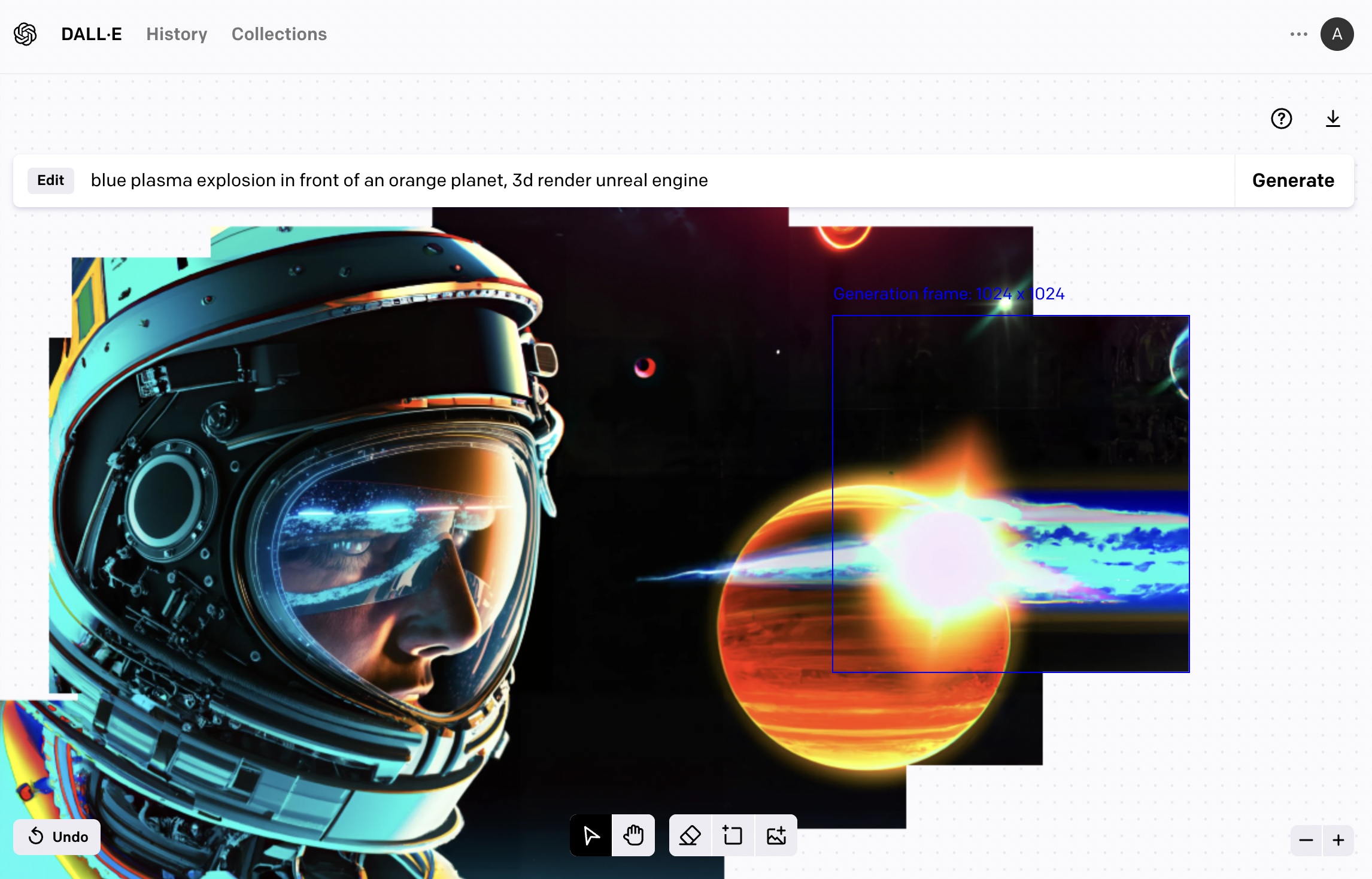
<p>This image provided a good opportunity to try out DALL-E’s outpainting tool to expand the canvas and fill-in the surrounding space with content.</p>

<h2 id="expanding-the-canvas-with-dall-e-outpainting">Expanding the Canvas with DALL-E Outpainting</h2>

<p>Say we decided to go with this image for the ship’s captain</p>
<div class="img-div">
  <img src="/images/image-gen/nemesis-2-intro-08-gen-midjourney-2.png" />
  <br />
</div>

<p>We can upload it to DALL-E’s outpainting editor and over a number of generations continue to expand the imagery around the image (taking into consideration a part of the image so we keep some continuity).</p>

<div class="img-div">
  <img src="/images/image-gen/panel-9-outpainting.jpg" />
  <br />
</div>

<p>The outpainting workflow is different from the text2image in that the prompt has to be changed to describe the portion you’re crafting at each portion of the image.</p>

<h2 id="my-current-impressions-of-commercial-ai-image-generation-tools">My Current Impressions of Commercial AI Image Generation Tools</h2>

<p>It’s been a few months since the vast majority of people started having broad access to AI image generation tools. The major milestone here is the open source release of Stable Diffusion (although some people had access to DALL-E before, and models like <a href="https://github.com/openai/glide-text2im">OpenAI GLIDE</a> were publicly available but slower and less capable). During this time, I’ve gotten to use three of these image generation services.</p>

<h3 id="dream-studio-by-stability-ai">Dream Studio by Stability AI</h3>

<div class="img-div-any-width">
  <img src="/images/image-gen/
2464700474_Two_astronauts_exploring_the_dark__cavernous_interior_of_a_huge_derelict_spacecraft__digital_art__ne.png" />
  <br />
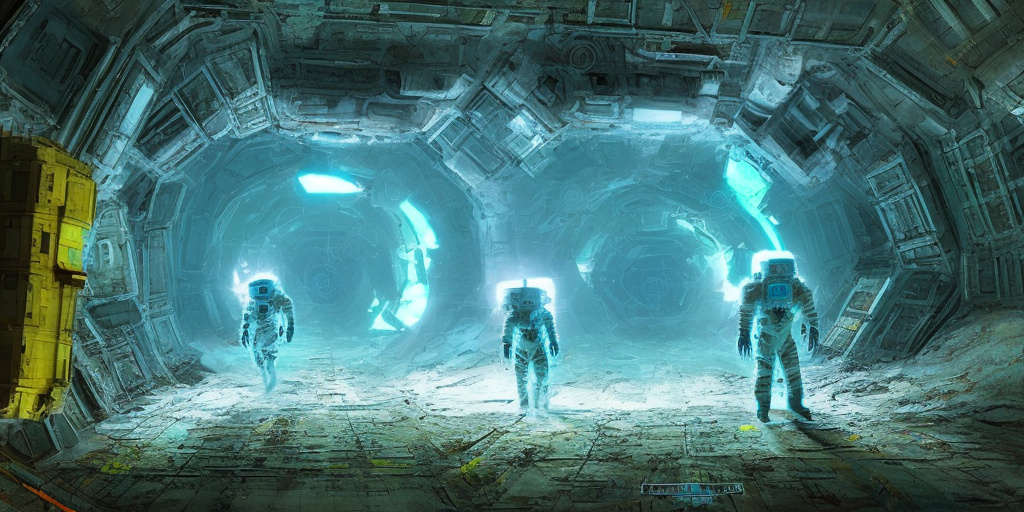
Stable Diffusion v2.1 prompt: Two astronauts exploring the dark, cavernous interior of a huge derelict spacecraft, digital art, neon blue glow, yellow crystal artifacts
</div>

<p>This is what I have been using the most over the last few months.</p>

<h4 id="pros">Pros</h4>

<ul>
  <li>They made Stable Diffusion and serve a managed version of it – a major convenience and improvement in workflow.</li>
  <li>They have an API and so the models can be accessed programmatically. A key point for extending the capability and building more advanced systems that use an image generation component.</li>
  <li>Being the makers of Stable Diffusion, it is expected they will continue to be the first to offer the managed version of upcoming versions which are expected to keep getting better.</li>
  <li>The fact that Stable Diffusion is open source is another big point in their favor. The managed model can be used as a prototyping ground (or a production tool for certain use cases), yet you have the knowledge that if your use cases requires fine-tuning your own model you can revert to the open source versions.</li>
  <li>Currently the best user interface with the most options (without being overwhelming like some of the open source UIs). It has the key sliders you need to tweak and you can pick how many candidates to generate. They were quick to add user interface components for advanced features like in-painting.</li>
</ul>

<h4 id="cons">Cons</h4>

<ul>
  <li>Dream Studio still does not robustly keep a history of all the images the user generates.</li>
  <li>Older versions of Stable Diffusion (e.g. 1.4 and 1.5) remain easier to get better results with (aided by galleries like Lexica). The newer models are still being figured out by the community, it seems.</li>
</ul>

<h3 id="midjourney-1">Midjourney</h3>

<div class="img-div-any-width">
  <img src="/images/image-gen/Two_astronauts_exploring_the_dark_cavernous_interio_8fae1463-94ab-45fd-be0f-2860d0873eef.png" />
  <br />
Midjourney v4 prompt: Two astronauts exploring the dark, cavernous interior of a huge derelict spacecraft, digital art, neon blue glow, yellow crystal artifacts --ar 3:2
</div>

<h4 id="pros-1">Pros</h4>

<ul>
  <li>By far the best generation quality with the least amount of prompt tweaking</li>
  <li>The UI saves the archive of generation</li>
  <li>Community tab feed in the website is a great showcase of the artwork the community is pumping out. In a way, it is Midjourney’s own Lexica.</li>
</ul>

<h4 id="cons-1">Cons</h4>

<ul>
  <li>Can only be accessed via Discord, as far as I can tell. I don’t find that to be a compelling channel. As a trial user, you need to generate images in public “Newbie” channels (which didn’t work for me when I tried them a few months ago – understandable given the meteoric growth the platform has experienced). I revisited the service only recently and paid for a subscription that would allow me to directly generate images using a bot.</li>
  <li>No UI components to pick image size or other options. Options are offered as commands to add to the prompt. I found that to be less discoverable than Dream Studio’s UI which shows the main sliders and describes them.</li>
  <li>Can’t access it via API (as far as I can tell) or generate images in the browser.</li>
</ul>

<h3 id="dall-e">DALL-E</h3>

<div class="img-div-any-width">
  <img src="/images/image-gen/DALL·E 2023-01-01 11.19.24 - cavernous interior of a huge derelict spacecraft, digital art, neon blue glow, yellow crystal artifacts.png" />
  <br />
One generation plus two outpainting generations to expand the sides. DALL-E prompt: Two astronauts exploring the dark, cavernous interior of a huge derelict spacecraft, digital art, neon blue glow, yellow crystal artifacts
</div>

<h4 id="pros-2">Pros</h4>
<ul>
  <li>DALL-E was the first to dazzle the world with the capabilities of  this batch of image generation models.</li>
  <li>Inpainting and outpainting support</li>
  <li>Keeps the entire history of generated images</li>
  <li>Has an <a href="https://openai.com/blog/dall-e-api-now-available-in-public-beta/">API</a></li>
</ul>

<h4 id="cons-2">Cons</h4>
<ul>
  <li>Feels a little slower than Stable Diffusion, but good that it generates four candidate images</li>
  <li>Because it lags behind Midjourney in quality of images generated in response to simple prompts, and behind Stable Diffusion in community adoption and tooling (in my perception), I haven’t found a reason to spend a lot of time exploring DALL-E. Outpainting feels kinda magical, however. I think that’s where I may spend some more time exploring.</li>
</ul>

<p>That said, do not discount DALL-E just yet, however. OpenAI are quite the pioneers and I’d expect the next versions of the model to dramatically improve generation quality.</p>

<h2 id="conclusion">Conclusion</h2>

<p>This is a good place to end this post although there are a bunch of other topics I had wanted to address. Let me know what you think on <a href="https://twitter.com/JayAlammar">@JayAlammar</a> or <a href="https://sigmoid.social/@JayAlammar">@JayAlammar@sigmoid.social</a>.</p>]]></content><author><name></name></author><summary type="html"><![CDATA[Can AI Image generation tools make re-imagined, higher-resolution versions of old video game graphics? Over the last few days, I used AI image generation to reproduce one of my childhood nightmares. I wrestled with Stable Diffusion, Dall-E and Midjourney to see how these commercial AI generation tools can help retell an old visual story - the intro cinematic to an old video game (Nemesis 2 on the MSX). This post describes the process and my experience in using these models/services to retell a story in higher fidelity graphics. Meet Dr. Venom This fine-looking gentleman is the villain in a video game. Dr. Venom appears in the intro cinematic of Nemesis 2, a 1987 video game. This image, in particular, comes at a dramatic reveal in the cinematic. Let’s update these graphics with visual generative AI tools and see how they compare and where each succeeds and fails. Remaking Old Computer graphics with AI Image Generation Here’s a side-by-side look at the panels from the original cinematic (left column) and the final ones generated by the AI tools (right column): This figure does not show the final Dr. Venom graphic because I want you to witness it as I had, in the proper context and alongside the appropriate music. You can watch that here:]]></summary></entry><entry><title type="html">The Illustrated Stable Diffusion</title><link href="http://jalammar.github.io/illustrated-stable-diffusion/" rel="alternate" type="text/html" title="The Illustrated Stable Diffusion" /><published>2022-10-04T00:00:00+00:00</published><updated>2022-10-04T00:00:00+00:00</updated><id>http://jalammar.github.io/illustrated-stable-diffusion</id><content type="html" xml:base="http://jalammar.github.io/illustrated-stable-diffusion/"><![CDATA[<p><span class="discussion">Translations: <a href="https://blog.csdn.net/yujianmin1990/article/details/129143157">Chinese</a>, <a href="https://trituenhantao.io/kien-thuc/minh-hoa-stable-diffusion/">Vietnamese</a>.

</span></p>

<p>(<strong>V2 Nov 2022</strong>: Updated images for more precise description of forward diffusion. A few more images in this version)</p>

<p>AI image generation is the most recent AI capability blowing people’s minds (mine included). The ability to create striking visuals from text descriptions has a magical quality to it and points clearly to a shift in how humans create art. The release of <a href="https://stability.ai/blog/stable-diffusion-public-release">Stable Diffusion</a> is a clear milestone in this development because it made a high-performance model available to the masses (performance in terms of image quality, as well as speed and relatively low resource/memory requirements).</p>

<iframe width="560" height="315" src="https://www.youtube.com/embed/MXmacOUJUaw" title="YouTube video player" frameborder="0" allow="accelerometer; autoplay; clipboard-write; encrypted-media; gyroscope; picture-in-picture; web-share" style="
 width: 100%;
 max-width: 560px;" allowfullscreen=""></iframe>

<p>After experimenting with AI image generation, you may start to wonder how it works.</p>

<p>This is a gentle introduction to how Stable Diffusion works.</p>

<div class="img-div-any-width">
  <img src="/images/stable-diffusion/stable-diffusion-text-to-image.png" />
  <br />

</div>

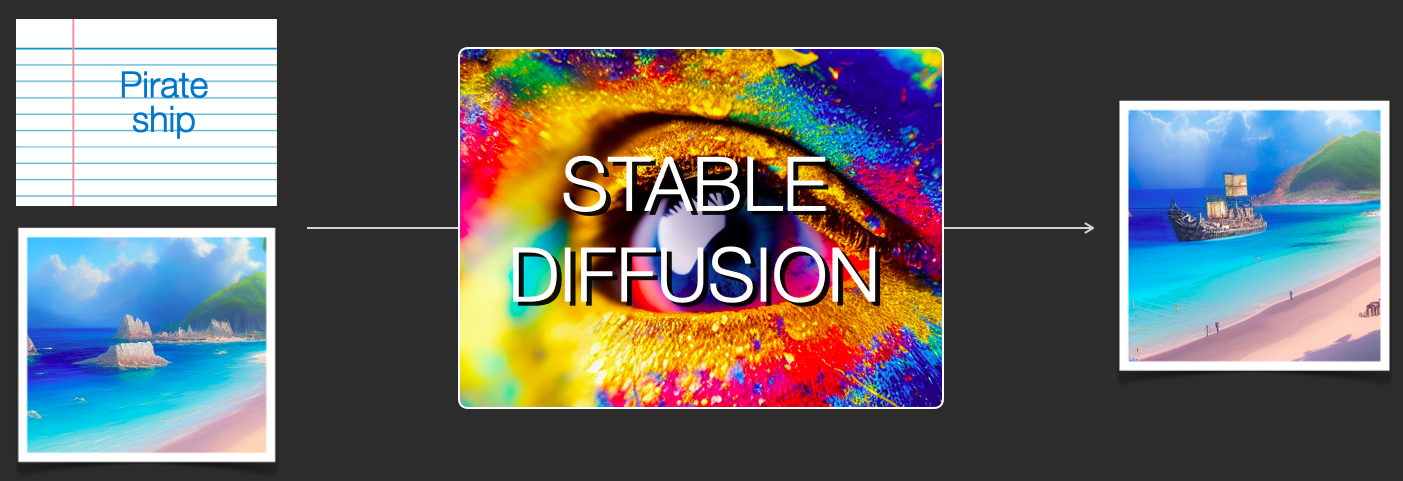
<p>Stable Diffusion is versatile in that it can be used in a number of different ways. Let’s focus at first on image generation from text only (text2img). The image above shows an example text input and the resulting generated image (The actual complete prompt is here). Aside from text to image, another main way of using it is by making it alter images (so inputs are text + image).</p>

<!--more-->

<div class="img-div-any-width">
  <img src="/images/stable-diffusion/stable-diffusion-img2img-image-to-image.png" />
  <br />

</div>

<p>Let’s start to look under the hood because that helps explain the components, how they interact, and what the image generation options/parameters mean.</p>

<h2 id="the-components-of-stable-diffusion">The Components of Stable Diffusion</h2>

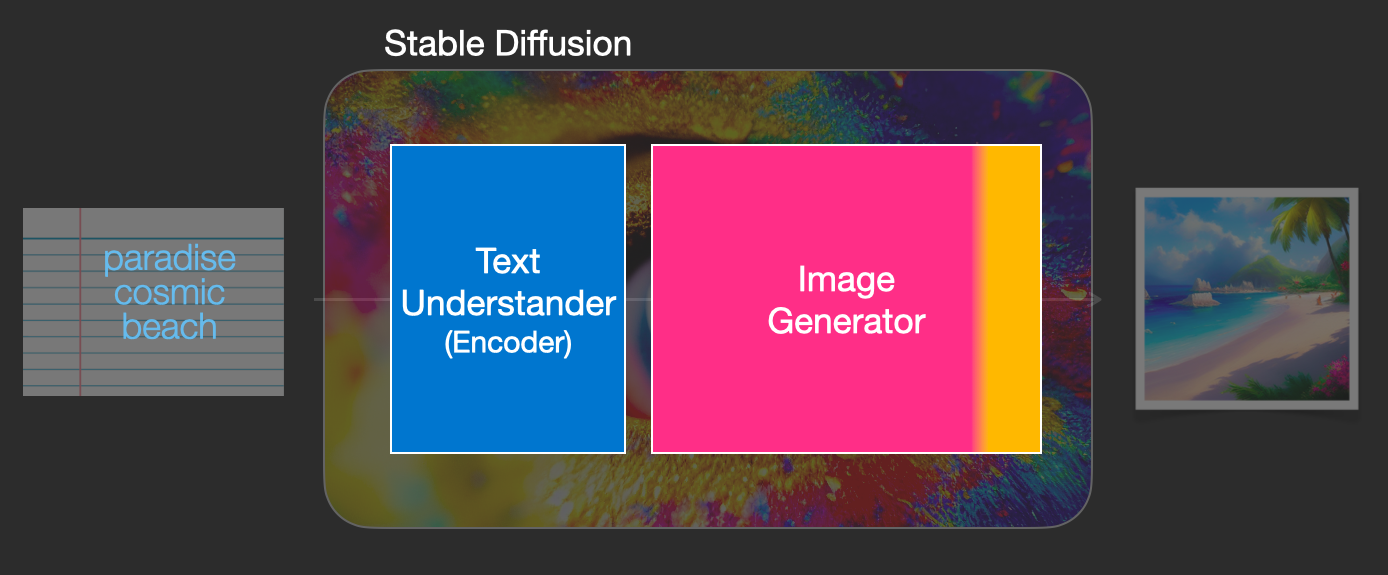
<p>Stable Diffusion is a system made up of several components and models. It is not one monolithic model.</p>

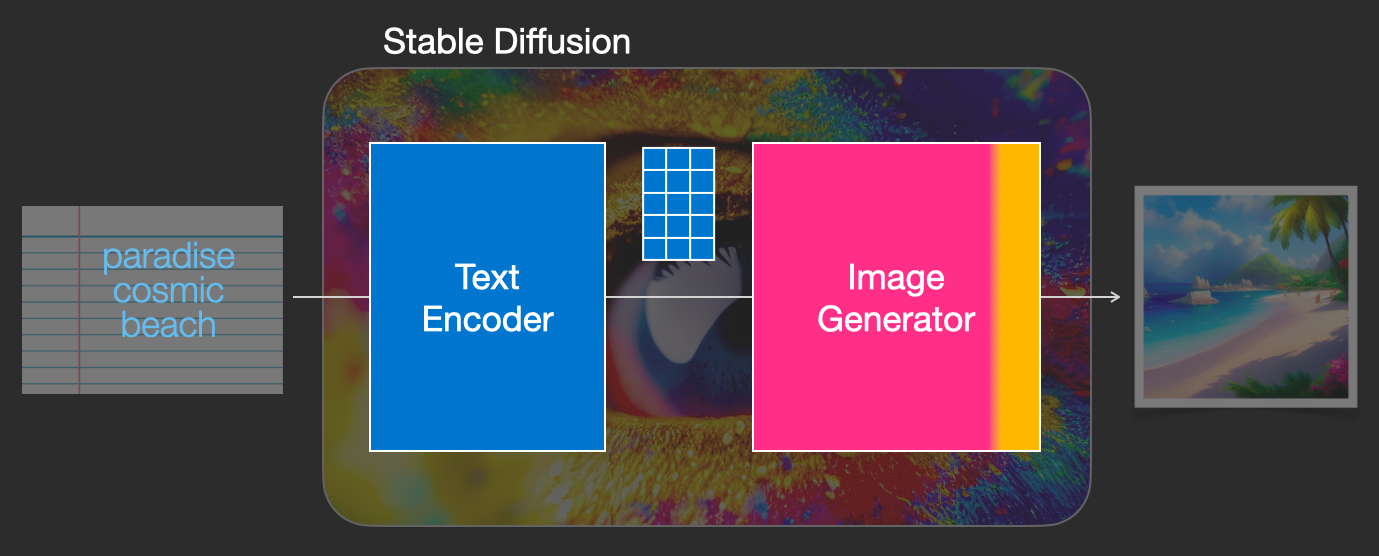
<p>As we look under the hood, the first observation we can make is that there’s a text-understanding component that translates the text information into a numeric representation that captures the ideas in the text.</p>

<div class="img-div-any-width">
  <img src="/images/stable-diffusion/stable-diffusion-text-understanding-component-image-generation.png" />
  <br />

</div>

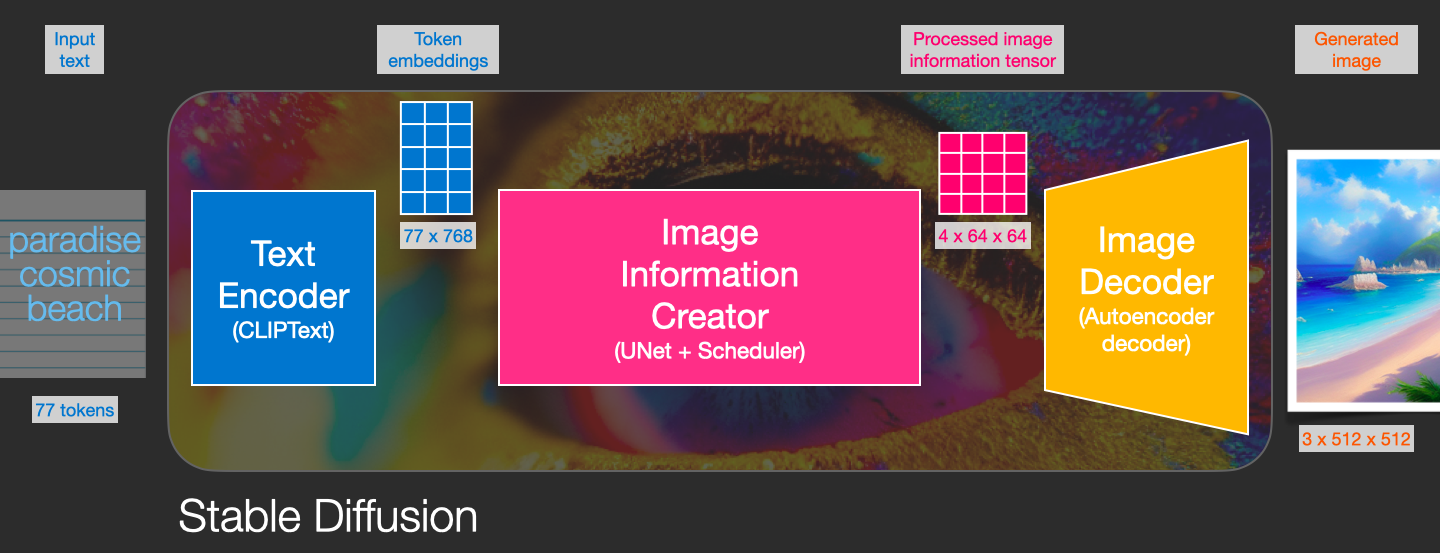
<p>We’re starting with a high-level view and we’ll get into more machine learning details later in this article. However, we can say that this text encoder is a special Transformer language model (technically: the text encoder of a CLIP model). It takes the input text and outputs a list of numbers representing each word/token in the text  (a vector per token).</p>

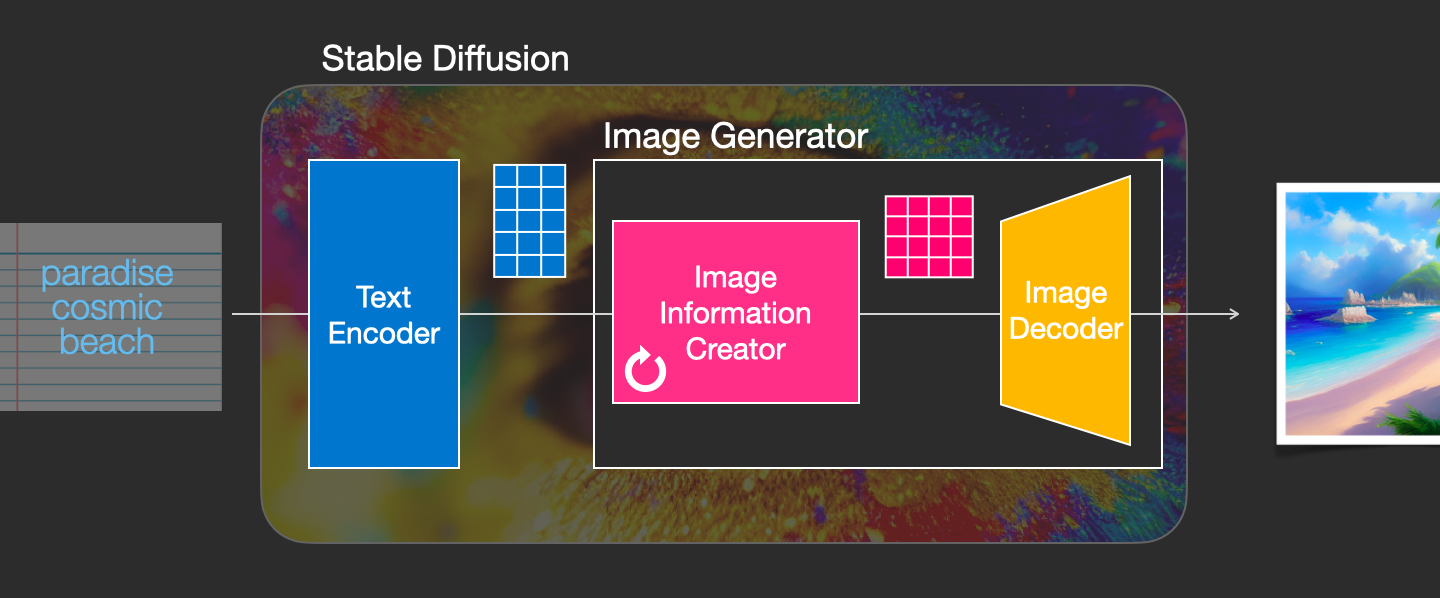
<p>That information is then presented to the Image Generator, which is composed of a couple of components itself.</p>

<div class="img-div-any-width">
  <img src="/images/stable-diffusion/Stable-diffusion-text-info-to-image-generator.png" />
  <br />

</div>

<p>The image generator goes through two stages:</p>

<p>1- <strong>Image information creator</strong></p>

<p>This component is the secret sauce of Stable Diffusion. It’s where a lot of the performance gain over previous models is achieved.</p>

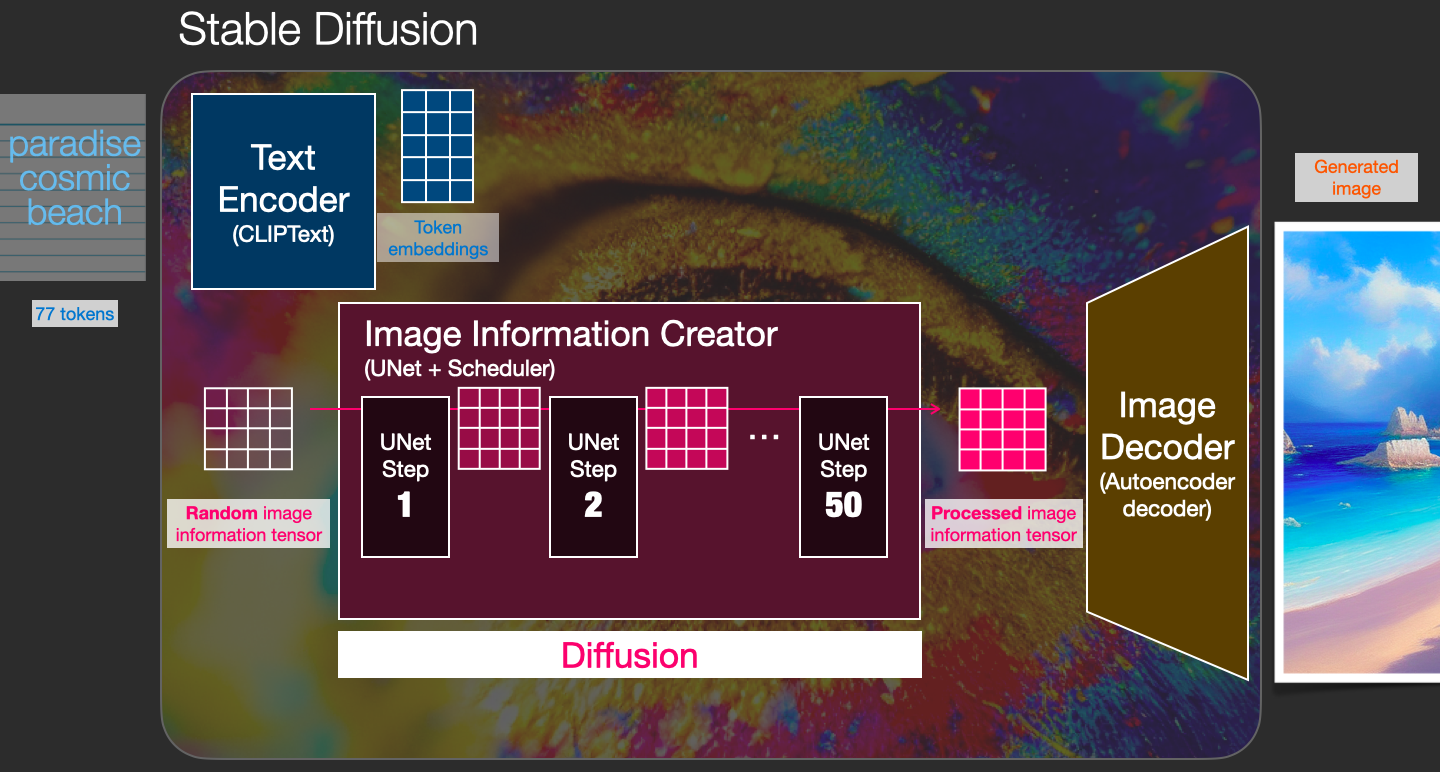
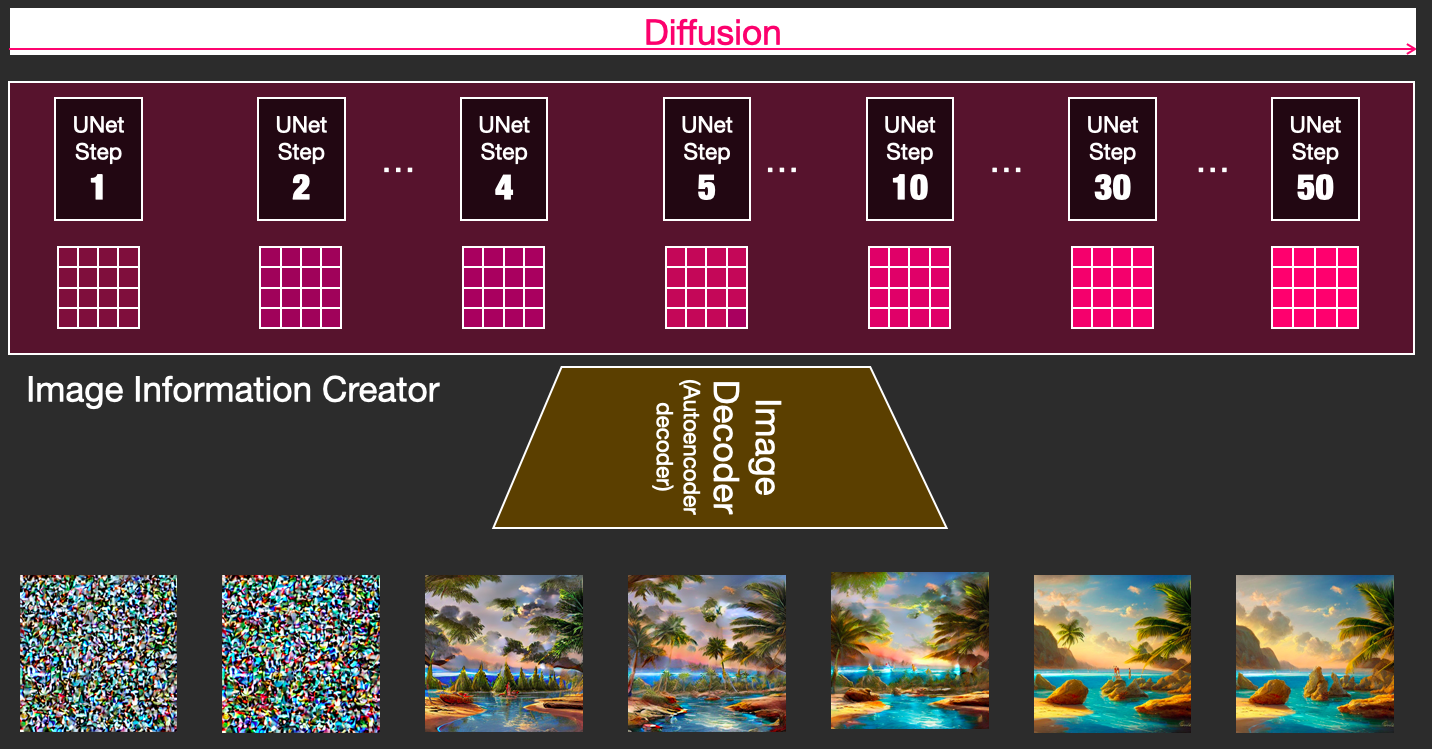
<p>This component runs for multiple steps to generate image information. This is the <em>steps</em> parameter in Stable Diffusion interfaces and libraries which often defaults to 50 or 100.</p>

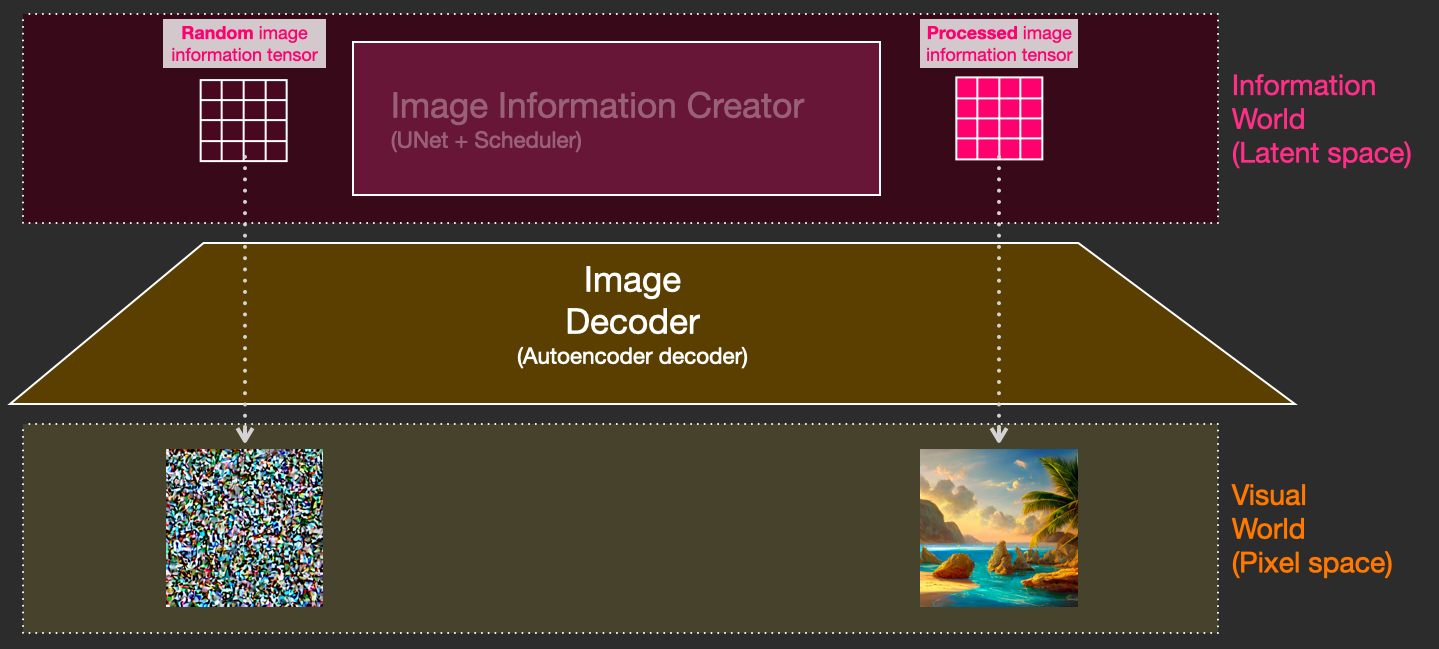
<p>The image information creator works completely in the <em>image information space</em> (or <em>latent</em> space). We’ll talk more about what that means later in the post. This property makes it faster than previous diffusion models that worked in pixel space. In technical terms, this component is made up of a UNet neural network and a scheduling algorithm.</p>

<p>The word “diffusion” describes what happens in this component. It is the step by step processing of information that leads to a high-quality image being generated in the end (by the next component, the image decoder).</p>

<div class="img-div-any-width">
  <img src="/images/stable-diffusion/Stable-diffusion-image-generator-information-creator.png" />
  <br />

</div>

<p>2- <strong>Image Decoder</strong></p>

<p>The image decoder paints a picture from the information it got from the information creator. It runs only once at the end of the process to produce the final pixel image.</p>

<div class="img-div-any-width">
  <img src="/images/stable-diffusion/stable-diffusion-cliptext-unet-autoencoder-decoder.png" />
  <br />

</div>

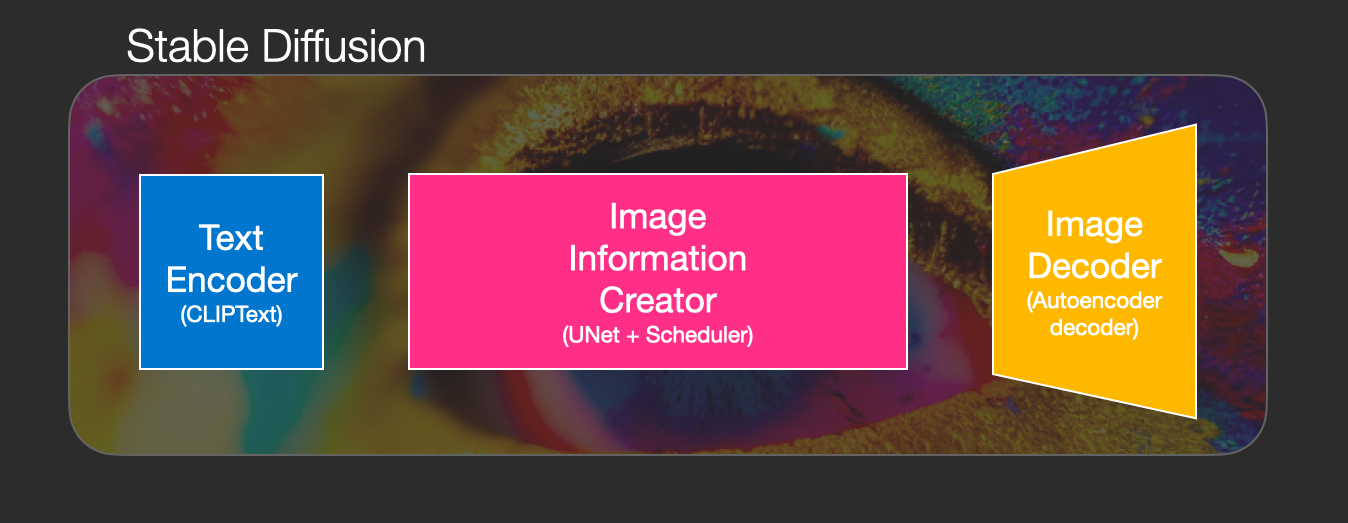
<p>With this we come to see the three main components (each with its own neural network) that make up Stable Diffusion:</p>

<ul>
  <li>
    <p><strong>ClipText</strong> for text encoding. <br />
Input: text. <br />
Output: 77 token embeddings vectors, each in 768 dimensions.</p>
  </li>
  <li>
    <p><strong>UNet + Scheduler</strong> to gradually process/diffuse information in the information (latent) space. <br />
Input: text embeddings and a starting multi-dimensional array (structured lists of numbers, also called a <em>tensor</em>) made up of noise.<br />
Output: A processed information array</p>
  </li>
  <li>
    <p><strong>Autoencoder Decoder</strong> that paints the final image using the processed information array.<br />
Input: The processed information array (dimensions: (4,64,64))  <br />
Output: The resulting image (dimensions: (3, 512, 512) which are (red/green/blue, width, height))</p>
  </li>
</ul>

<div class="img-div-any-width">
  <img src="/images/stable-diffusion/stable-diffusion-components-and-tensors.png" />
  <br />

</div>

<h2 id="what-is-diffusion-anyway">What is Diffusion Anyway?</h2>

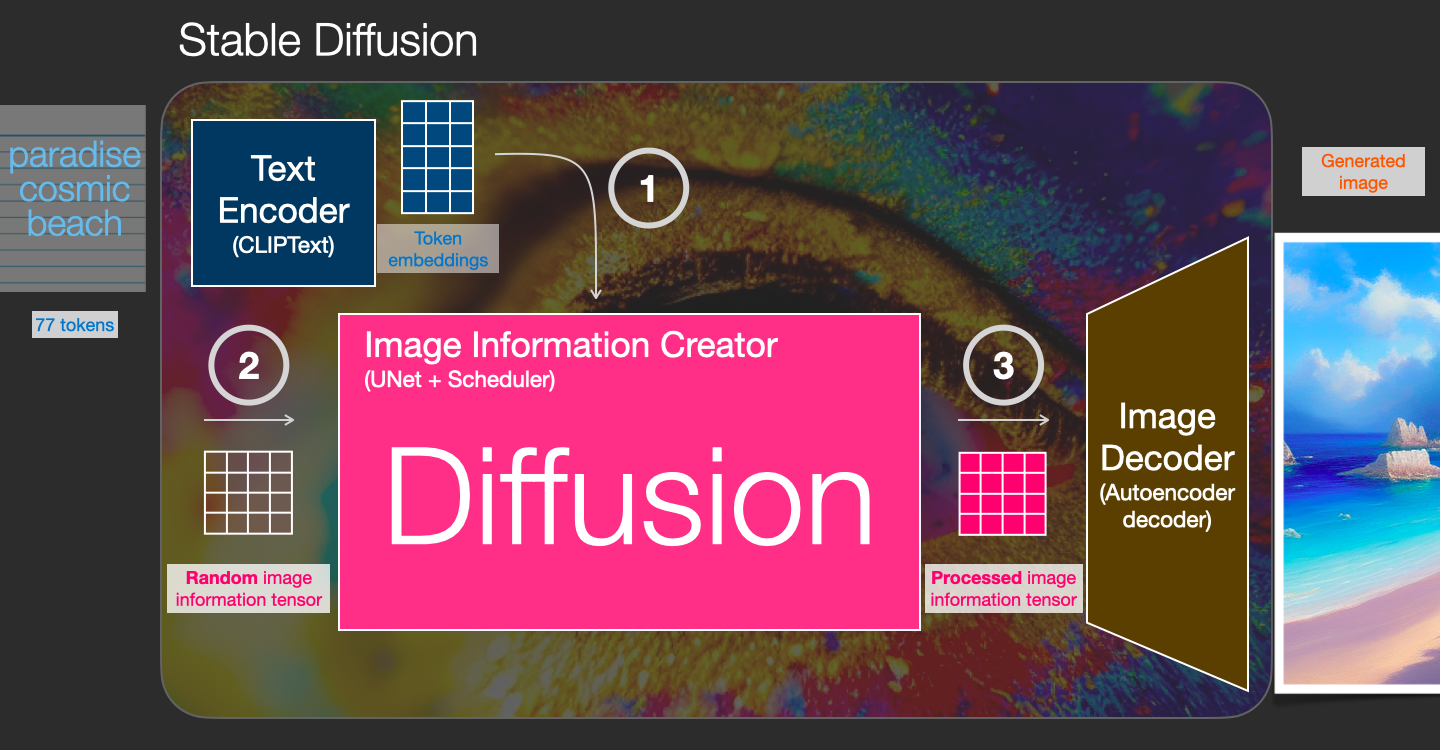
<p>Diffusion is the process that takes place inside the pink “image information creator” component. Having the token embeddings that represent the input text, and a random starting <em>image information array</em> (these are also called <em>latents</em>), the process produces an information array that the image decoder uses to paint the final image.</p>

<div class="img-div-any-width">
  <img src="/images/stable-diffusion/stable-diffusion-diffusion-process.png" />
  <br />

</div>

<p>This process happens in a step-by-step fashion. Each step adds more relevant information. To get an intuition of the process, we can inspect the random latents array, and see that it translates to visual noise. Visual inspection in this case is passing it through the image decoder.</p>

<div class="img-div-any-width">
  <img src="/images/stable-diffusion/stable-diffusion-latent-space-pixel-space.png" />
  <br />

</div>

<p>Diffusion happens in multiple steps, each step operates on an input latents array, and produces another latents array that better resembles the input text and all the visual information the model picked up from all images the model was trained on.</p>

<div class="img-div-any-width">
  <img src="/images/stable-diffusion/stable-diffusion-unet-steps.png" />
  <br />

</div>

<p>We can visualize a set of these latents to see what information gets added at each step.</p>

<div class="img-div-any-width">
  <img src="/images/stable-diffusion/stable-diffusion-denoising-steps-latents.png" />
  <br />

</div>

<p>The process is quite breathtaking to look at.</p>

<div class="img-div-any-width">
<video height="auto" loop="" autoplay="" controls="">
  <source src="/images/stable-diffusion/diffusion-steps-all-loop.webm" type="video/webm" />
  Your browser does not support the video tag.
</video>
</div>

<p>Something especially fascinating happens between steps 2 and 4 in this case. It’s as if the outline emerges from the noise.</p>

<div class="img-div-any-width">
<video height="auto" loop="" autoplay="" controls="">
  <source src="/images/stable-diffusion/stable-diffusion-steps-2-4.webm" type="video/webm" />
  Your browser does not support the video tag.
</video>
</div>

<h3 id="how-diffusion-works">How diffusion works</h3>
<p>The central idea of generating images with diffusion models relies on the fact that we have powerful computer vision models. Given a large enough dataset, these models can learn complex operations. Diffusion models approach image generation by framing the problem as following:</p>

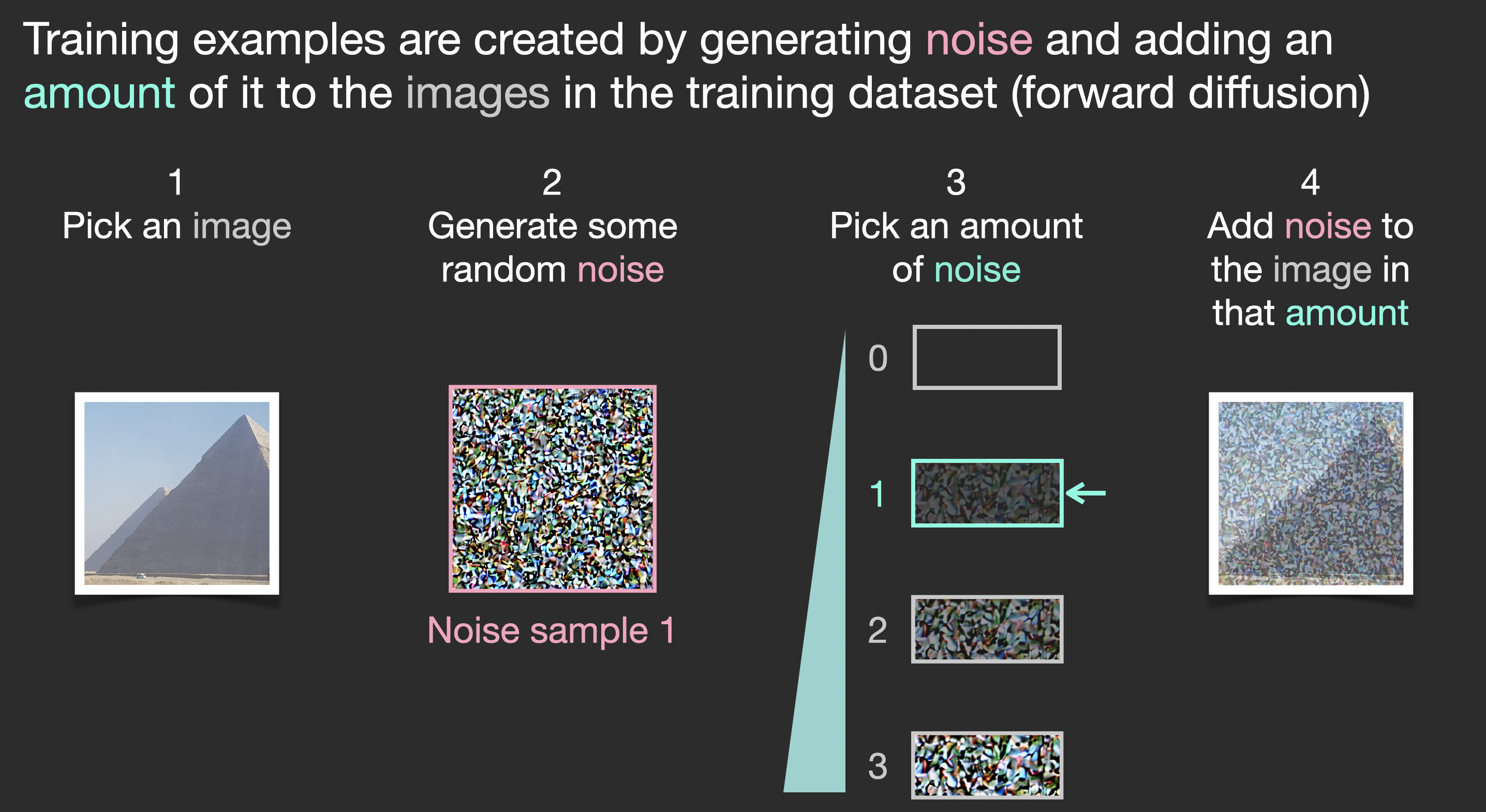
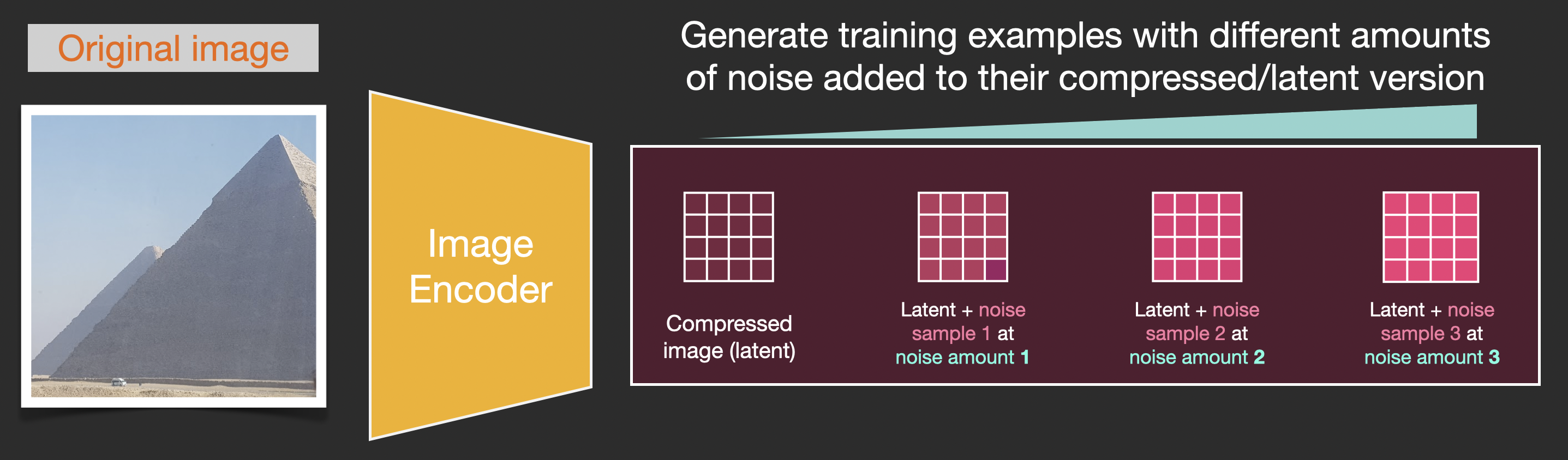
<p>Say we have an image, we generate some noise, and add it to the image.</p>

<div class="img-div">
  <img src="/images/stable-diffusion/stable-diffusion-forward-diffusion-training-example.png" />
  <br />

</div>
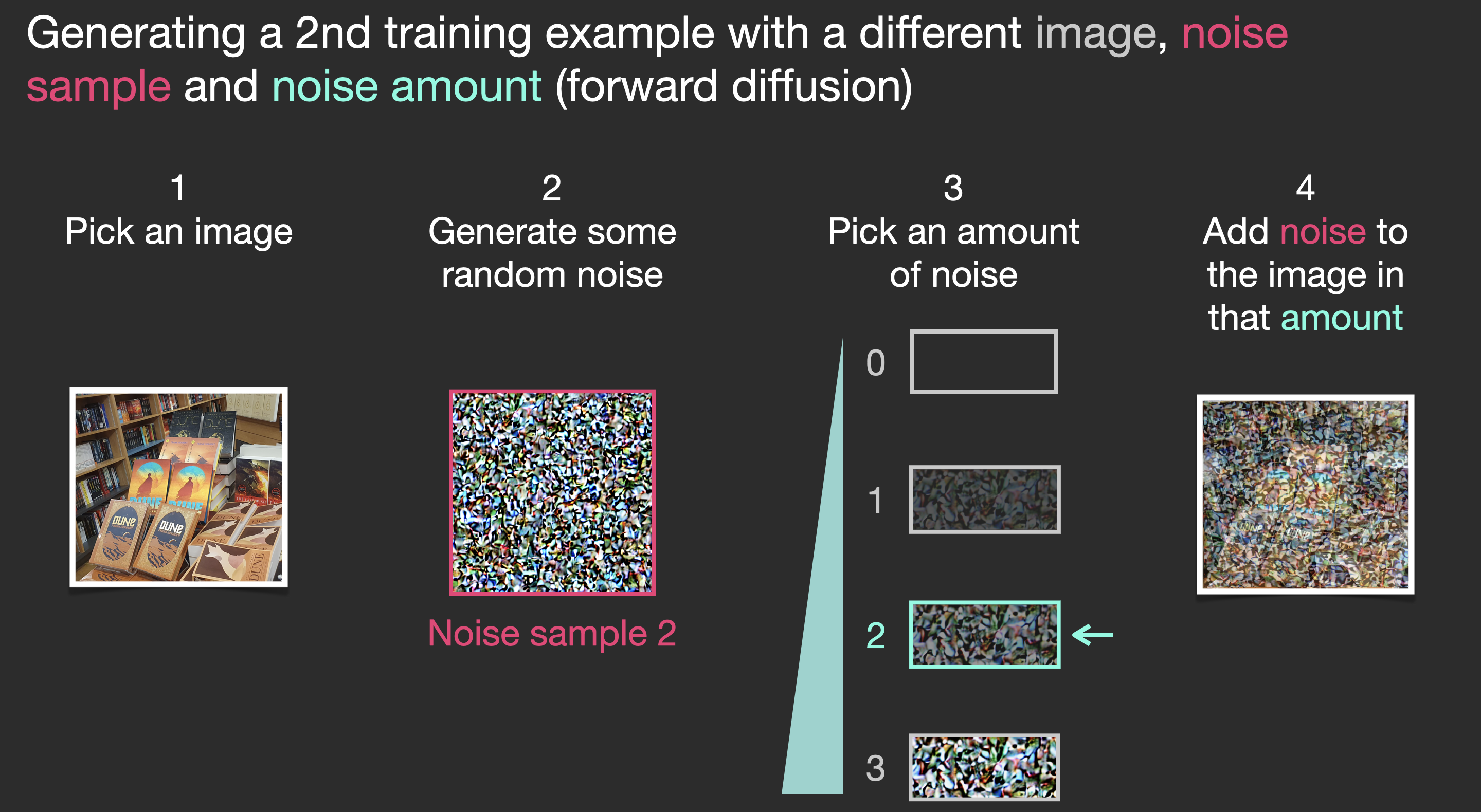
<p>This can now be considered a training example. We can use this same formula to create lots of training examples to train the central component of our image generation model.</p>

<div class="img-div">
  <img src="/images/stable-diffusion/stable-diffusion-forward-diffusion-training-example-2.png" />
  <br />

</div>

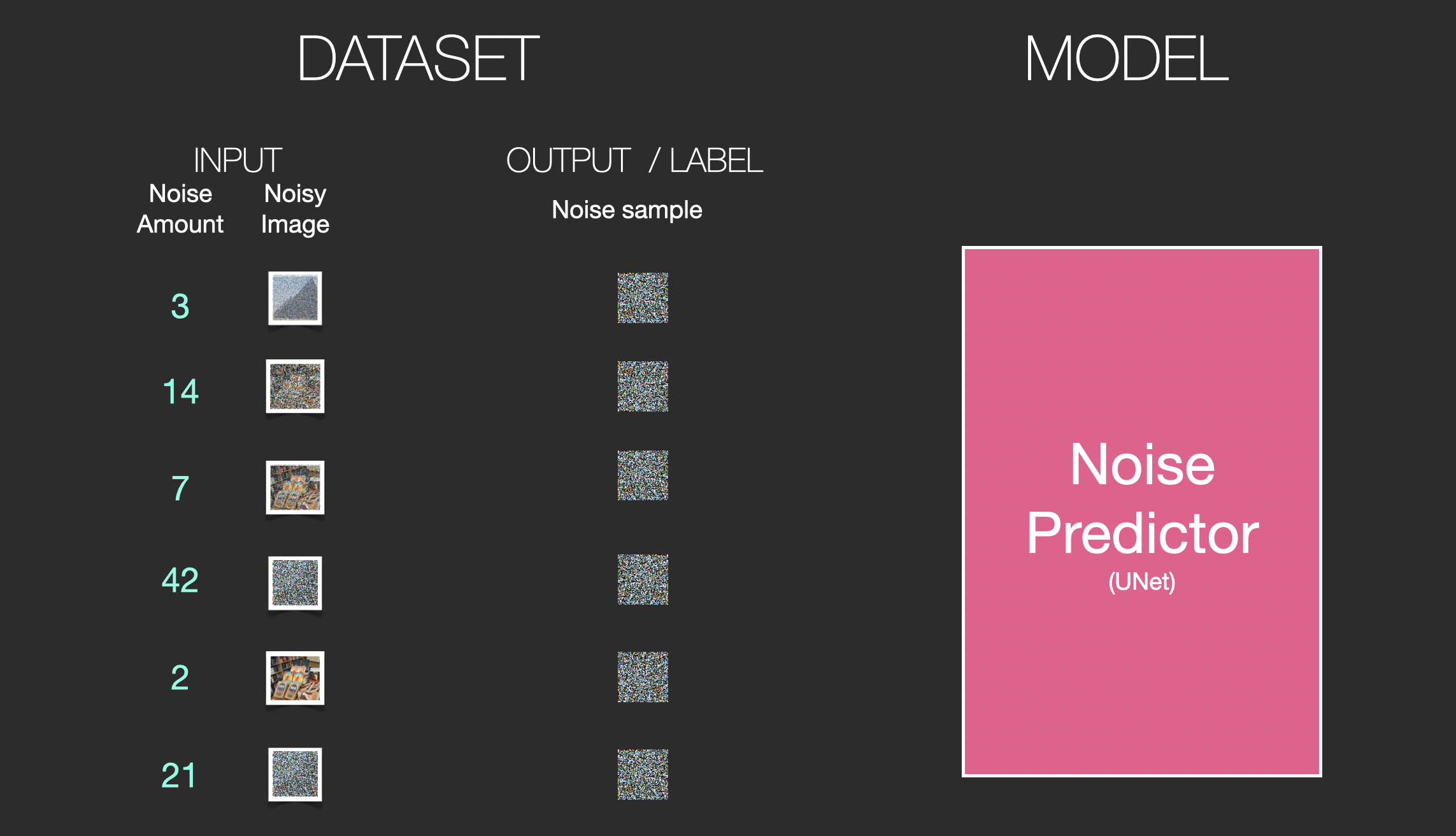
<p>While this example shows a few noise amount values from image (amount 0, no noise) to total noise (amount 4, total noise), we can easily control how much noise to add to the image, and so we can spread it over tens of steps, creating tens of training examples per image for all the images in a training dataset.</p>

<div class="img-div">
  <img src="/images/stable-diffusion/stable-diffusion-u-net-noise-training-examples-2.png" />
  <br />

</div>

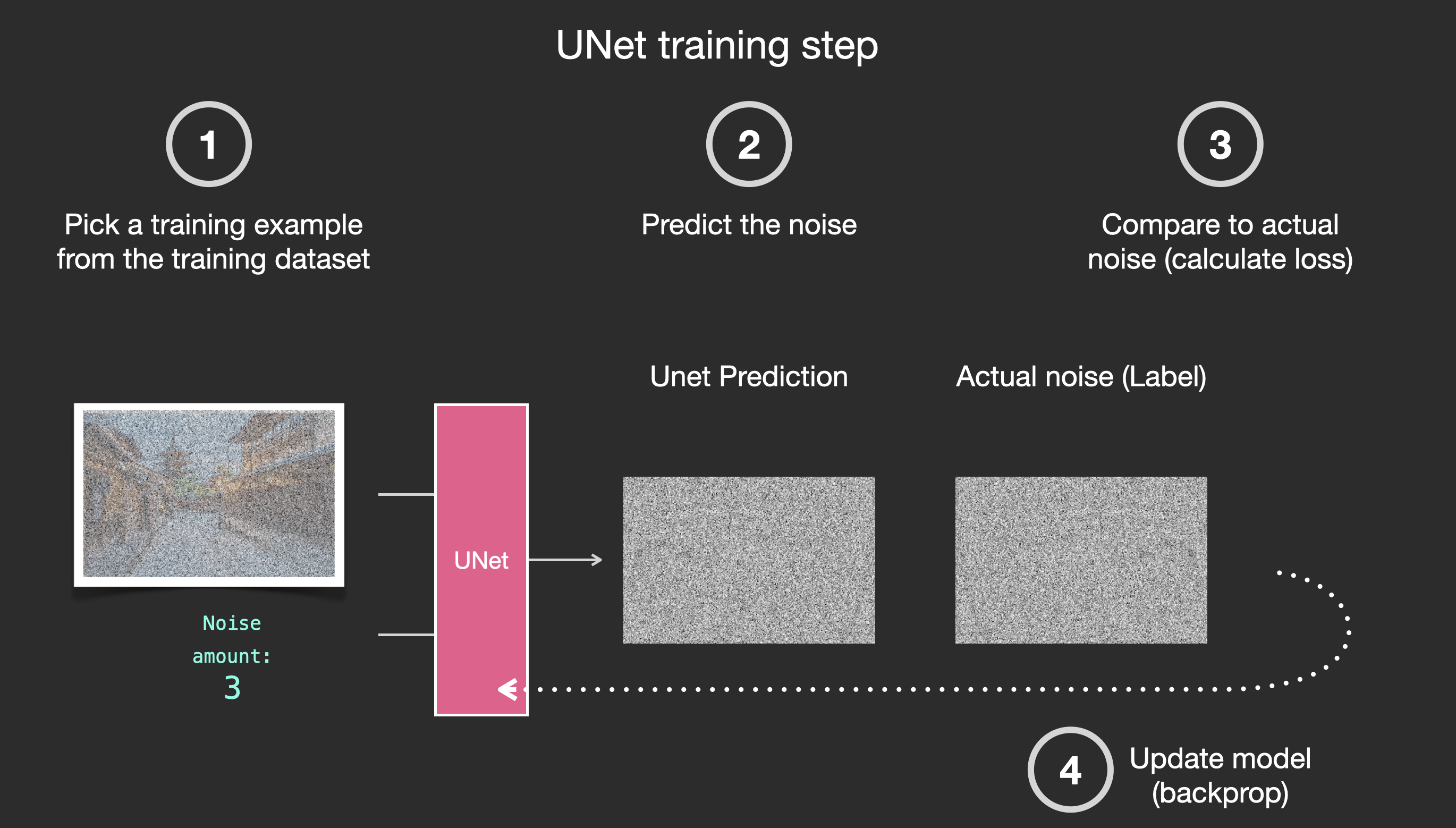
<p>With this dataset, we can train the noise predictor and end up with a great noise predictor that actually creates images when run in a certain configuration. A training step should look familiar if you’ve had ML exposure:</p>

<div class="img-div">
<a href="/images/stable-diffusion/stable-diffusion-u-net-noise-training-step.png">
  <img src="/images/stable-diffusion/stable-diffusion-u-net-noise-training-step.png" />
  </a><br />

</div>

<p>Let’s now see how this can generate images.</p>

<h3 id="painting-images-by-removing-noise">Painting images by removing noise</h3>

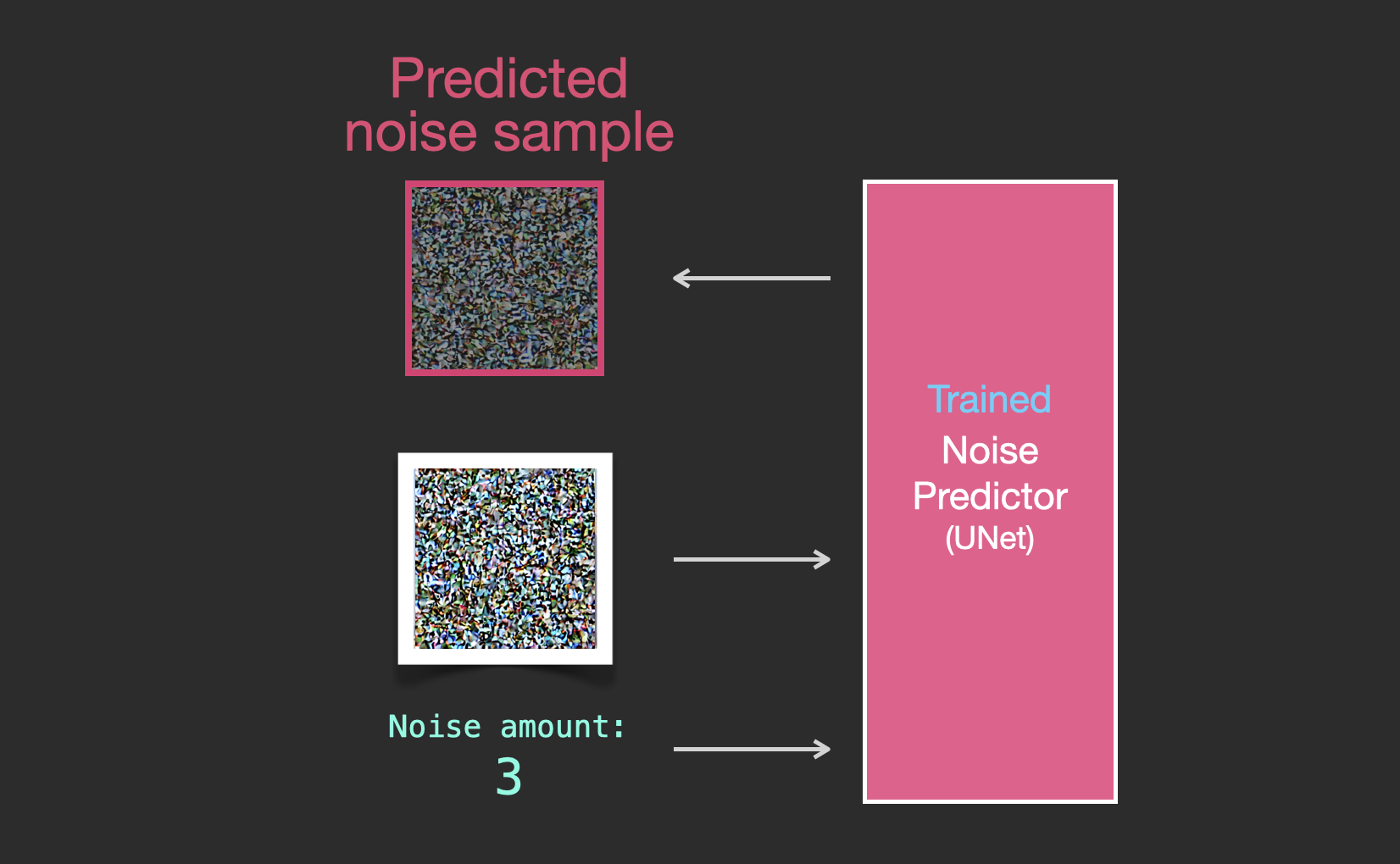
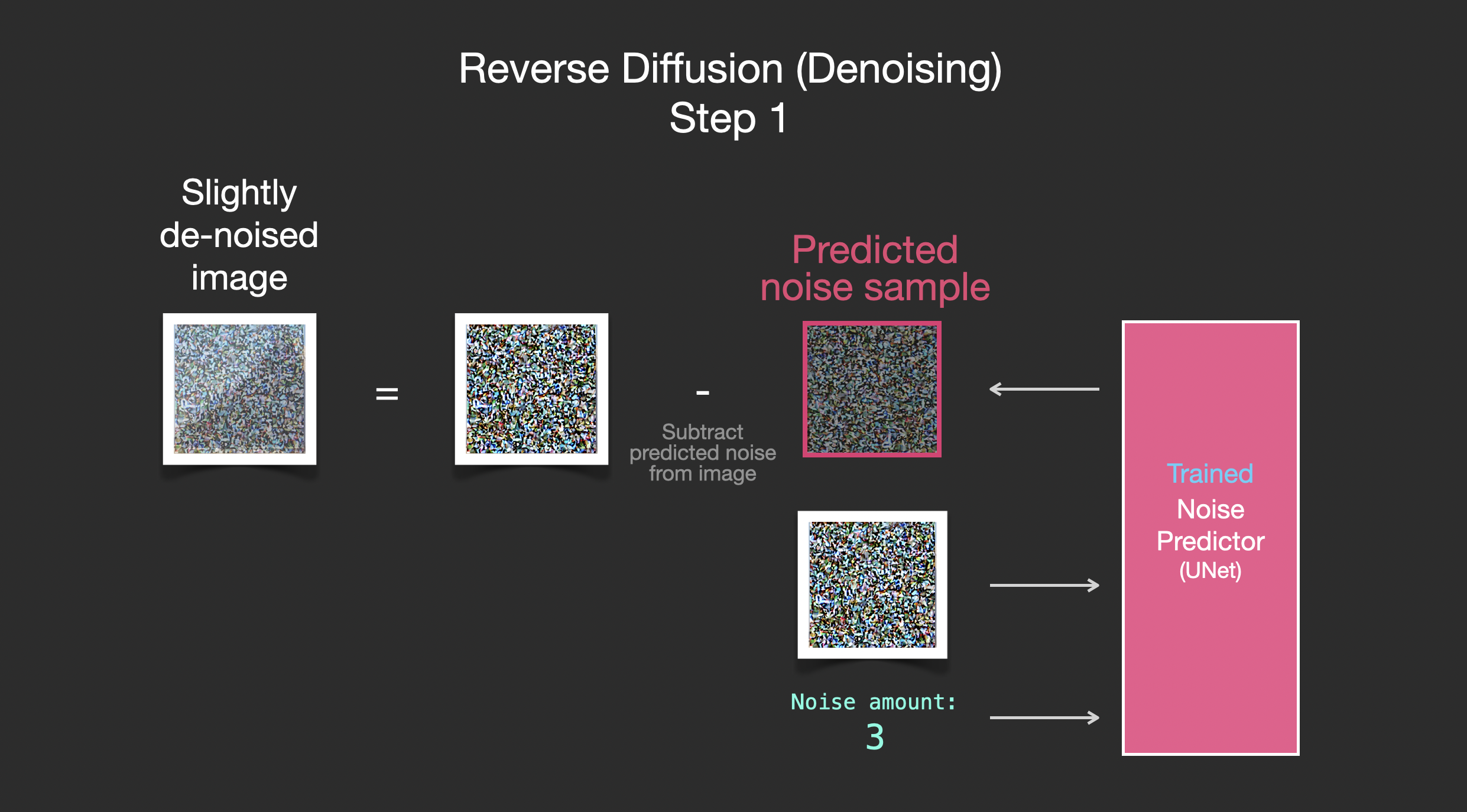
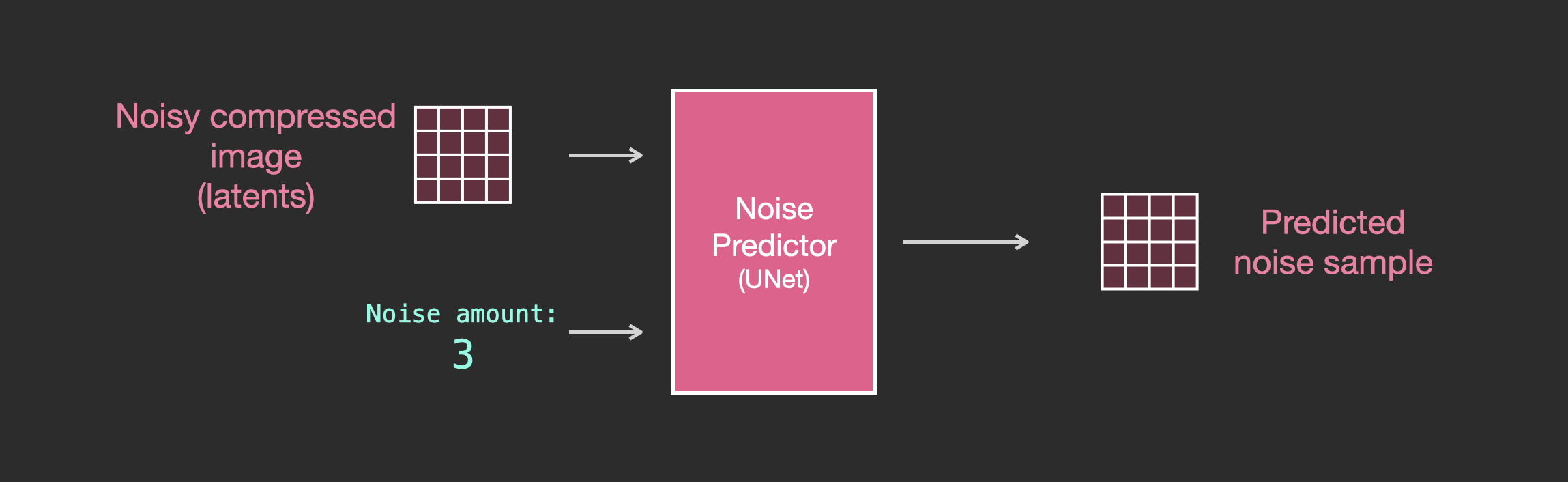
<p>The trained noise predictor can take a noisy image, and the number of the denoising step, and is able to predict a slice of noise.</p>
<div class="img-div">
  <img src="/images/stable-diffusion/stable-diffusion-denoising-step-1v2.png" />
  <br />

</div>

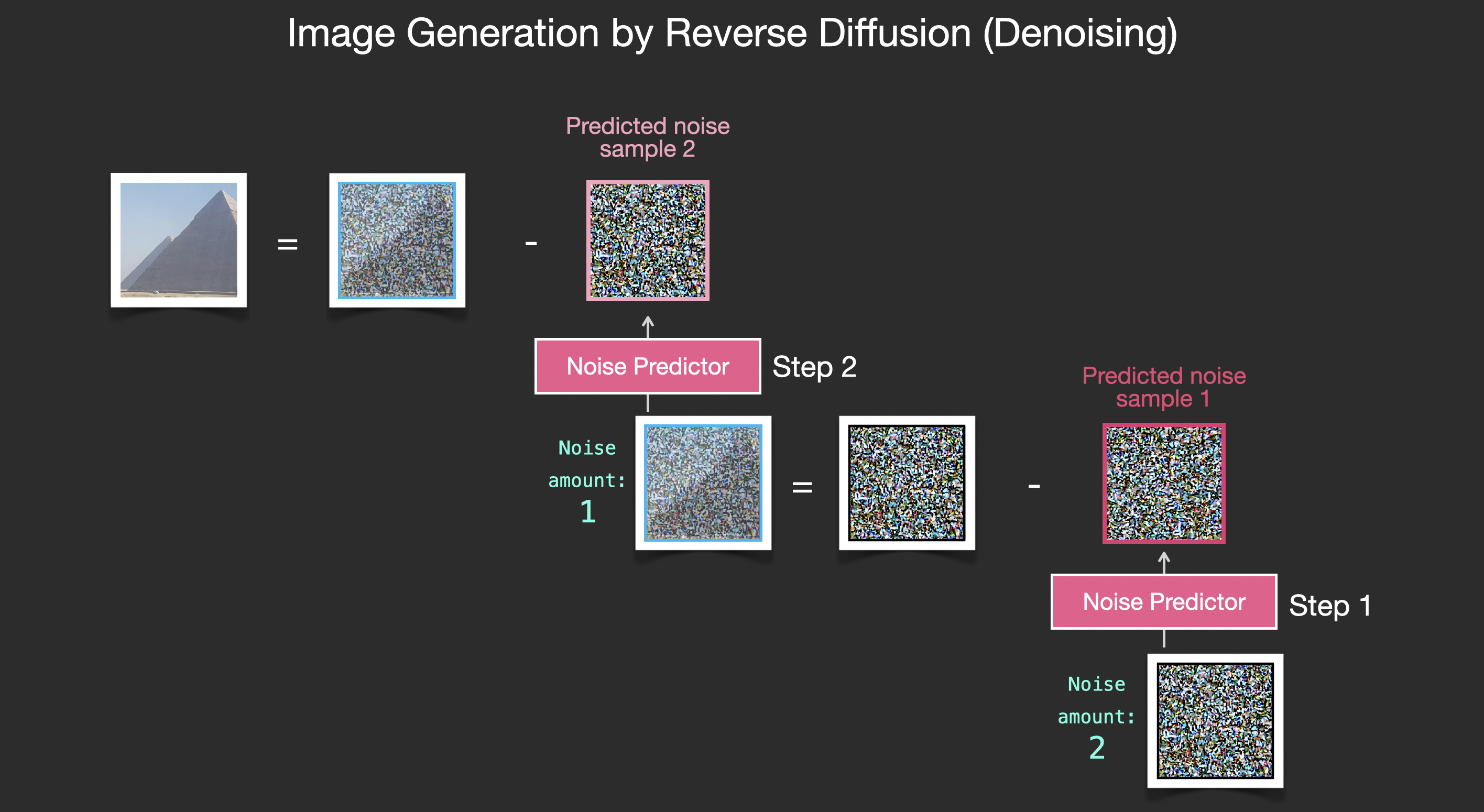
<p>The sampled noise is predicted so that if we subtract it from the image, we get an image that’s closer to the images the model was trained on (not the exact images themselves, but the <em>distribution</em> - the world of pixel arrangements where the sky is usually blue and above the ground, people have two eyes, cats look a certain way – pointy ears and clearly unimpressed).</p>

<div class="img-div">
  <a href="/images/stable-diffusion/stable-diffusion-denoising-step-2v2.png"><img src="/images/stable-diffusion/stable-diffusion-denoising-step-2v2.png" /></a>
  <br />

</div>

<p>If the training dataset was of aesthetically pleasing images (e.g., <a href="https://laion.ai/blog/laion-aesthetics/">LAION Aesthetics</a>, which Stable Diffusion was trained on), then the resulting image would tend to be aesthetically pleasing. If the we train it on images of logos, we end up with a logo-generating model.</p>

<div class="img-div">
<a href="/images/stable-diffusion/stable-diffusion-image-generation-v2.png">
  <img src="/images/stable-diffusion/stable-diffusion-image-generation-v2.png" />
</a>
  <br />

</div>

<p>This concludes the description of image generation by diffusion models mostly as described in <a href="https://arxiv.org/abs/2006.11239">Denoising Diffusion Probabilistic Models</a>. Now that you have this intuition of diffusion, you know the main components of not only Stable Diffusion, but also Dall-E 2 and Google’s Imagen.</p>

<p>Note that the diffusion process we described so far generates images without using any text data. So if we deploy this model, it would generate great looking images, but we’d have no way of controlling if it’s an image of a pyramid or a cat or anything else. In the next sections we’ll describe how text is incorporated in the process in order to control what type of image the model generates.</p>

<h2 id="speed-boost-diffusion-on-compressed-latent-data-instead-of-the-pixel-image">Speed Boost: Diffusion on Compressed (Latent) Data Instead of the Pixel Image</h2>

<p>To speed up the image generation process, the Stable Diffusion paper runs the diffusion process not on the pixel images themselves, but on a compressed version of the image. <a href="https://arxiv.org/abs/2112.10752">The paper</a> calls this “Departure to Latent Space”.</p>

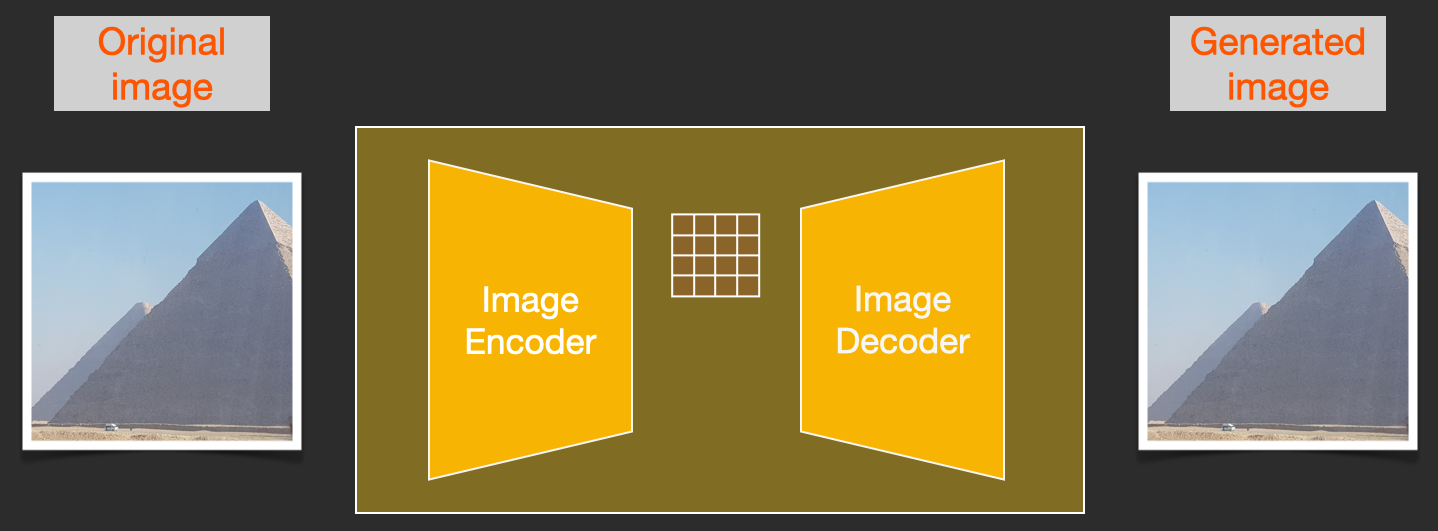
<p>This compression (and later decompression/painting) is done via an autoencoder. The autoencoder compresses the image into the latent space using its encoder, then reconstructs it using only the compressed information using the decoder.</p>

<div class="img-div">
  <img src="/images/stable-diffusion/stable-diffusion-autoencoder.png" />
  <br />

</div>

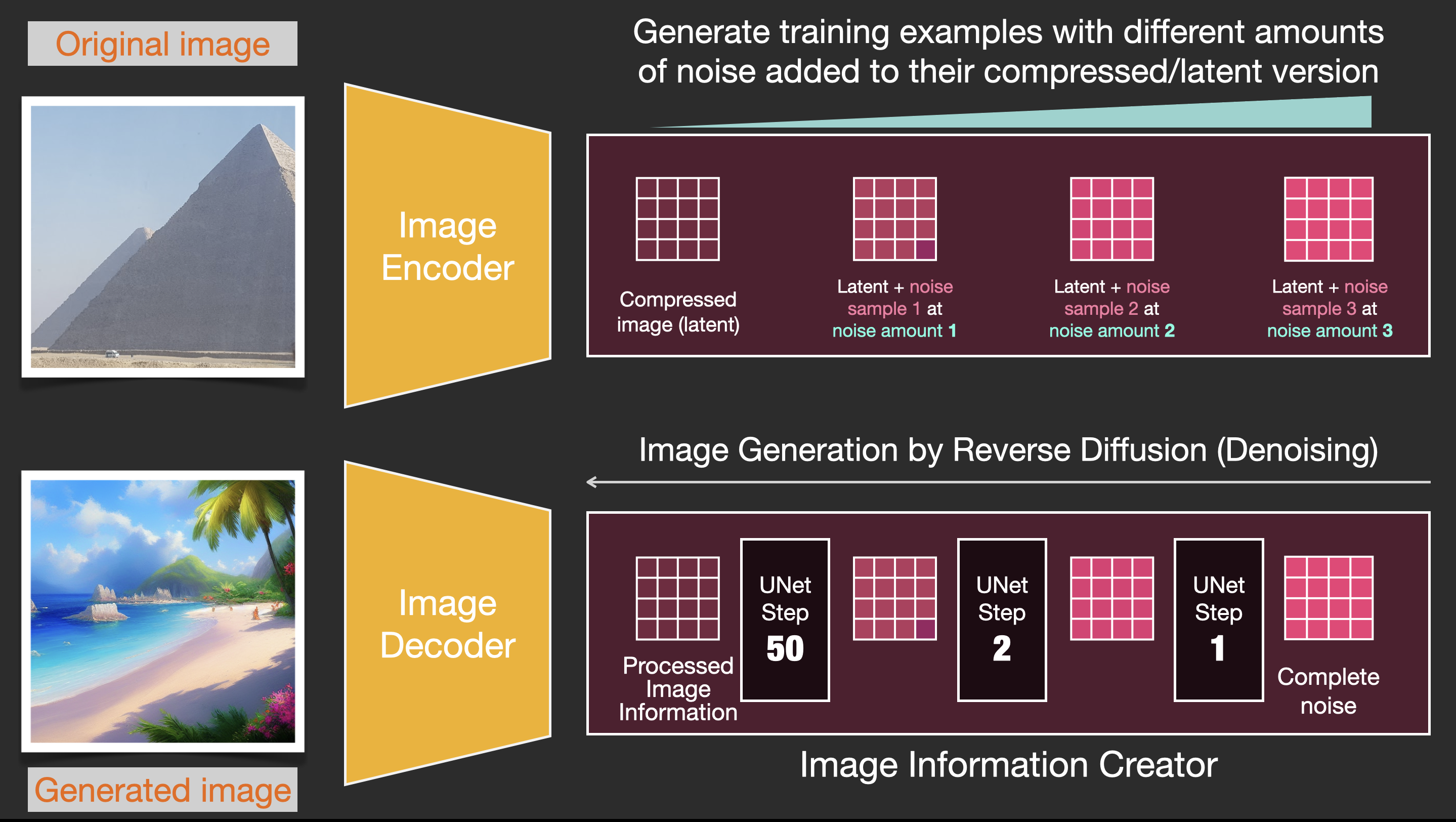
<p>Now the forward diffusion process is done on the compressed latents. The slices of noise are of noise applied to those latents, not to the pixel image. And so the noise predictor is actually trained to predict noise in the compressed representation (the latent space).</p>

<div class="img-div">
<a href="/images/stable-diffusion/stable-diffusion-latent-forward-process-v2.png">
  <img src="/images/stable-diffusion/stable-diffusion-latent-forward-process-v2.png" />
</a>
  <br />

</div>

<p>The forward process (using the autoencoder’s encoder) is how we generate the data to train the noise predictor. Once it’s trained, we can generate images by running the reverse process (using the autoencoder’s decoder).</p>

<div class="img-div">
<a href="/images/stable-diffusion/stable-diffusion-forward-and-reverse-process-v2.png">
  <img src="/images/stable-diffusion/stable-diffusion-forward-and-reverse-process-v2.png" />
</a>
  <br />

</div>

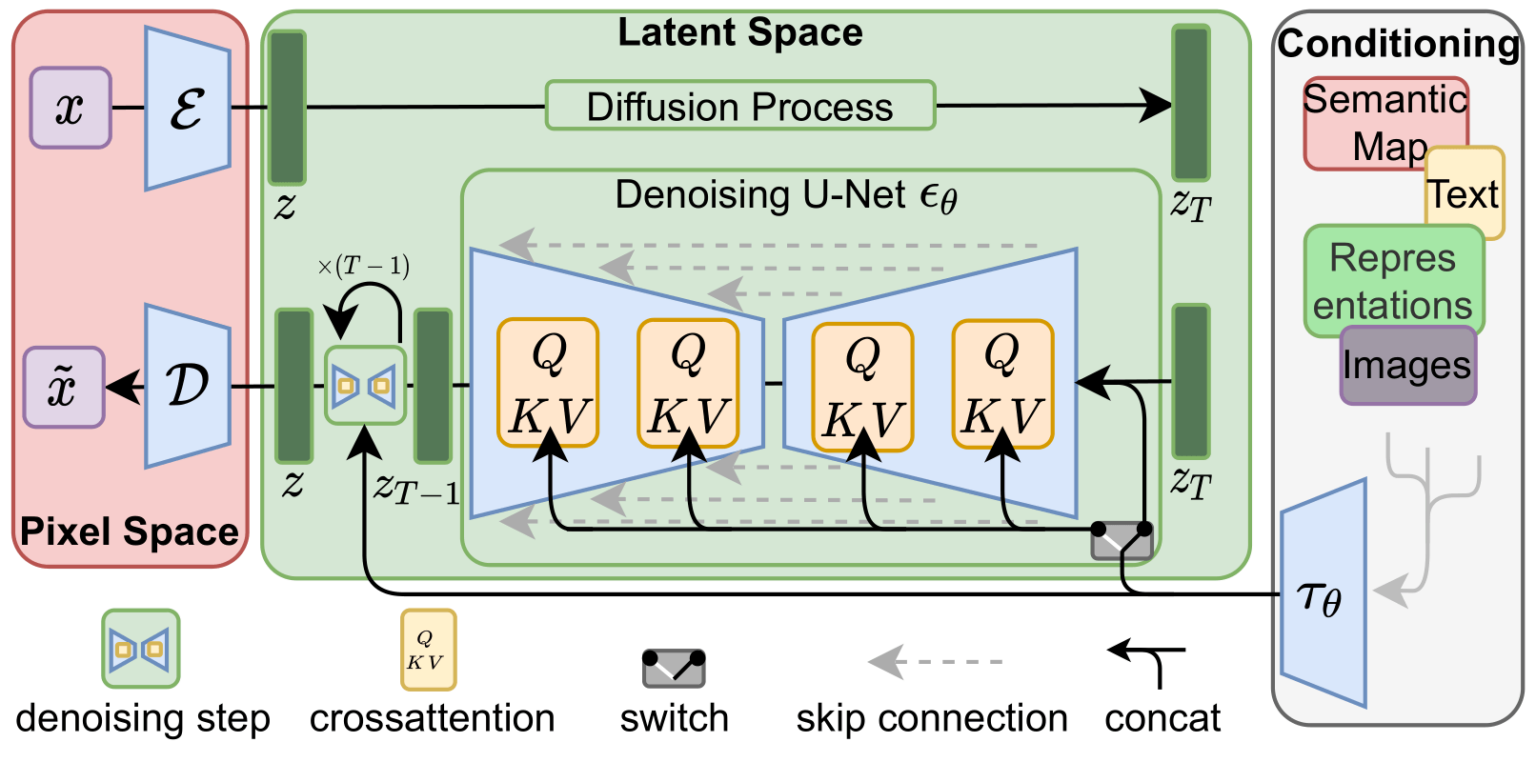
<p>These two flows are what’s shown in Figure 3 of the LDM/Stable Diffusion paper:</p>

<div class="img-div">
  <img src="/images/stable-diffusion/article-Figure3-1-1536x762.png" />
  <br />

</div>

<p>This figure additionally shows the “conditioning” components, which in this case is the text prompts describing what image the model should generate. So let’s dig into the text components.</p>

<h3 id="the-text-encoder-a-transformer-language-model">The Text Encoder: A Transformer Language Model</h3>

<p>A Transformer language model is used as the language understanding component that takes the text prompt and produces token embeddings. The released Stable Diffusion model uses ClipText (A <a href="/illustrated-gpt2/">GPT-based model</a>), while the paper used <a href="/illustrated-bert/">BERT</a>.</p>

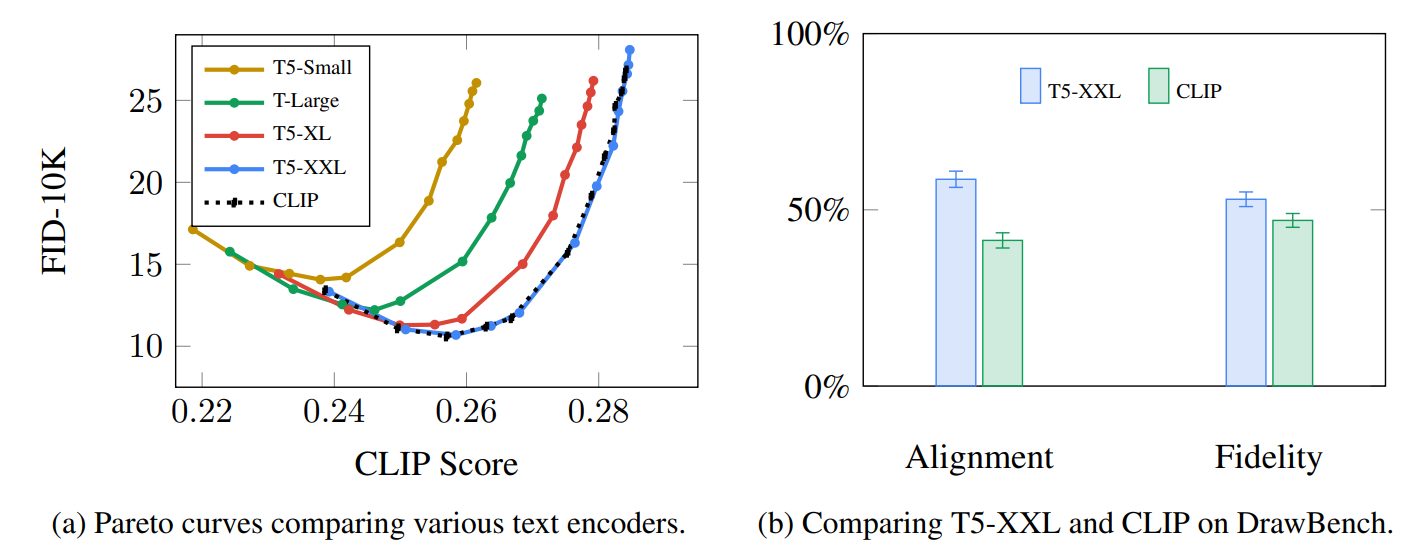
<p>The choice of language model is shown by the Imagen paper to be an important one. Swapping in larger language models had more of an effect on generated image quality than larger image generation components.</p>

<div class="img-div">
  <img src="/images/stable-diffusion/text-language-models-clip-image-generation.png" />
  <br />

  Larger/better language models have a significant effect on the quality of image generation models. Source: <a href="https://arxiv.org/abs/2205.11487">Google Imagen paper by Saharia et. al.</a>. Figure A.5.

</div>

<p>The early Stable Diffusion models just plugged in the pre-trained ClipText model released by OpenAI. It’s possible that future models may switch to the newly released and much larger <a href="https://laion.ai/blog/large-openclip/">OpenCLIP</a> variants of CLIP (Nov2022 update: True enough, <a href="https://stability.ai/blog/stable-diffusion-v2-release">Stable Diffusion V2 uses OpenClip</a>). This new batch includes text models of sizes up to 354M parameters, as opposed to the 63M parameters in ClipText.</p>

<h4 id="how-clip-is-trained">How CLIP is trained</h4>

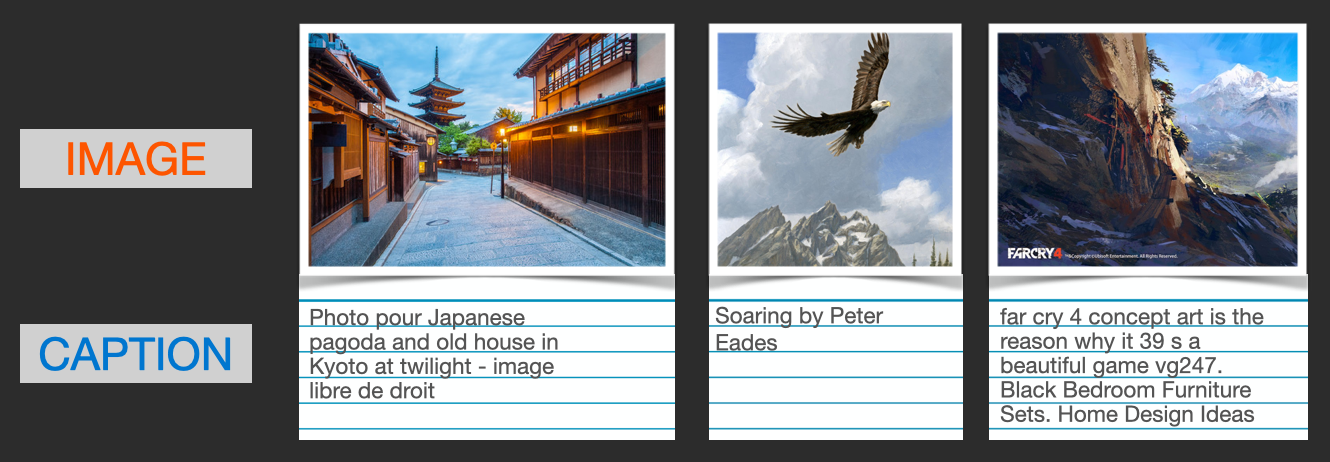
<p>CLIP is trained on a dataset of images and their captions. Think of a dataset looking like this, only with 400 million images and their captions:</p>

<div class="img-div">
  <img src="/images/stable-diffusion/images-and-captions-dataset.png" />
  <br />
  A dataset of images and their captions.
</div>

<p>In actuality, CLIP was trained on images crawled from the web along with their “alt” tags.</p>

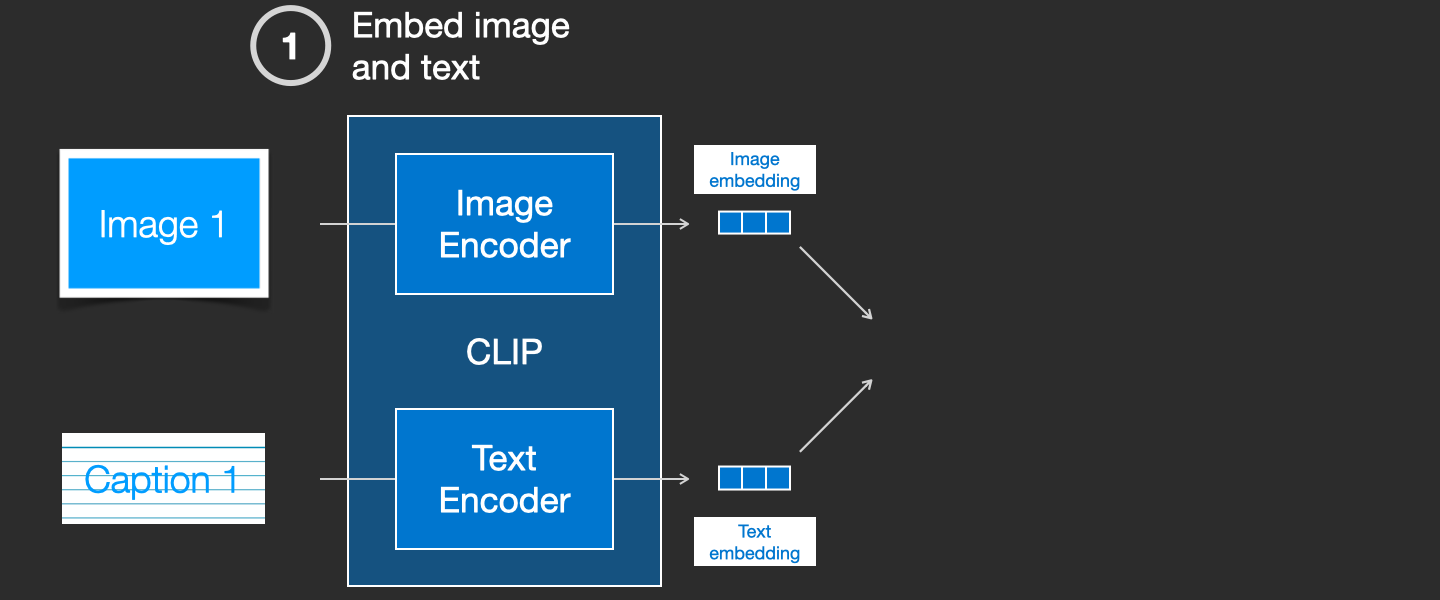
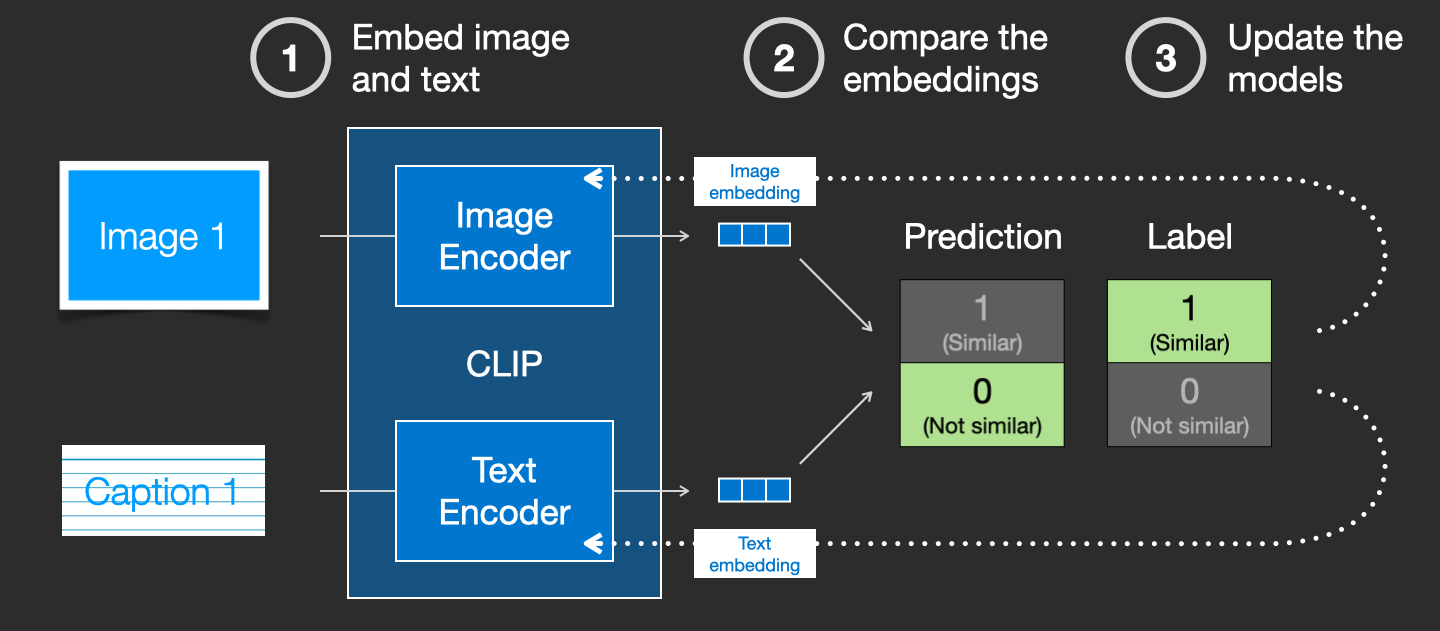
<p>CLIP is a combination of an image encoder and a text encoder. Its training process can be simplified to thinking of taking an image and its caption. We encode them both with the image and text encoders respectively.</p>

<div class="img-div">
  <img src="/images/stable-diffusion/clip-training-step-1.png" />
  <br />
  
</div>

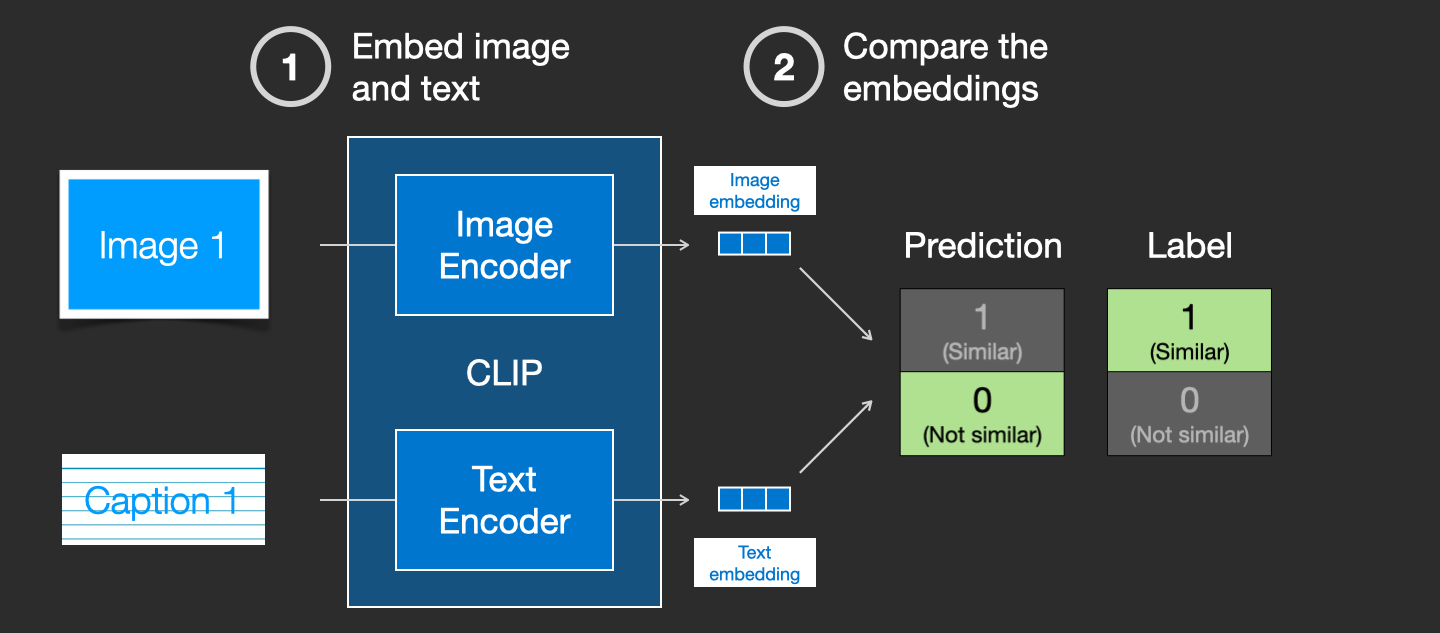
<p>We then compare the resulting embeddings using cosine similarity. When we begin the training process, the similarity will be low, even if the text describes the image correctly.</p>

<div class="img-div">
  <img src="/images/stable-diffusion/clip-training-step-2.png" />
  <br />
  
</div>

<p>We update the two models so that the next time we embed them, the resulting embeddings are similar.</p>

<div class="img-div">
  <img src="/images/stable-diffusion/clip-training-step-3.png" />
  <br />
  
</div>

<p>By repeating this across the dataset and with large batch sizes, we end up with the encoders being able to produce embeddings where an image of a dog and the sentence “a picture of a dog” are similar. Just like in <a href="/illustrated-word2vec/">word2vec</a>, the training process also needs to include <strong>negative examples</strong> of images and captions that don’t match, and the model needs to assign them low similarity scores.</p>

<h2 id="feeding-text-information-into-the-image-generation-process">Feeding Text Information Into The Image Generation Process</h2>

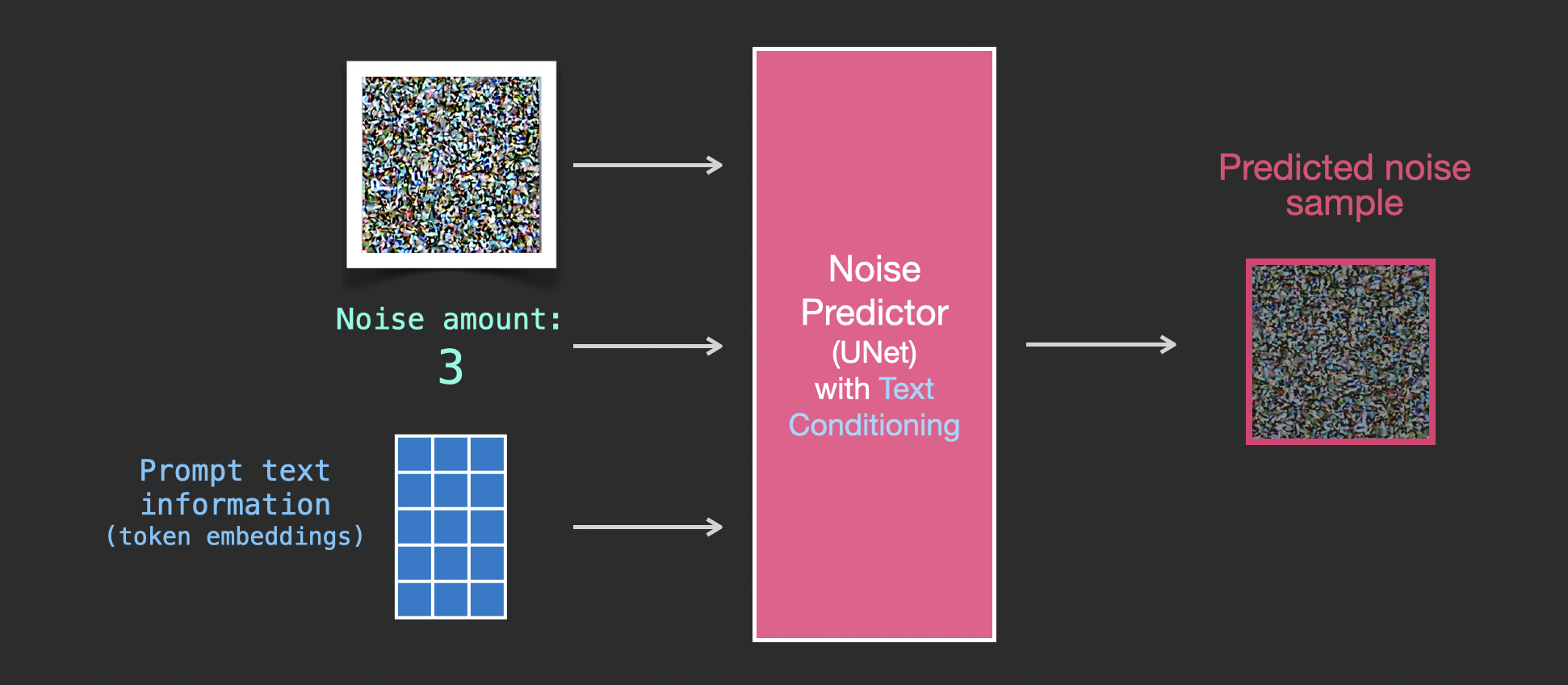
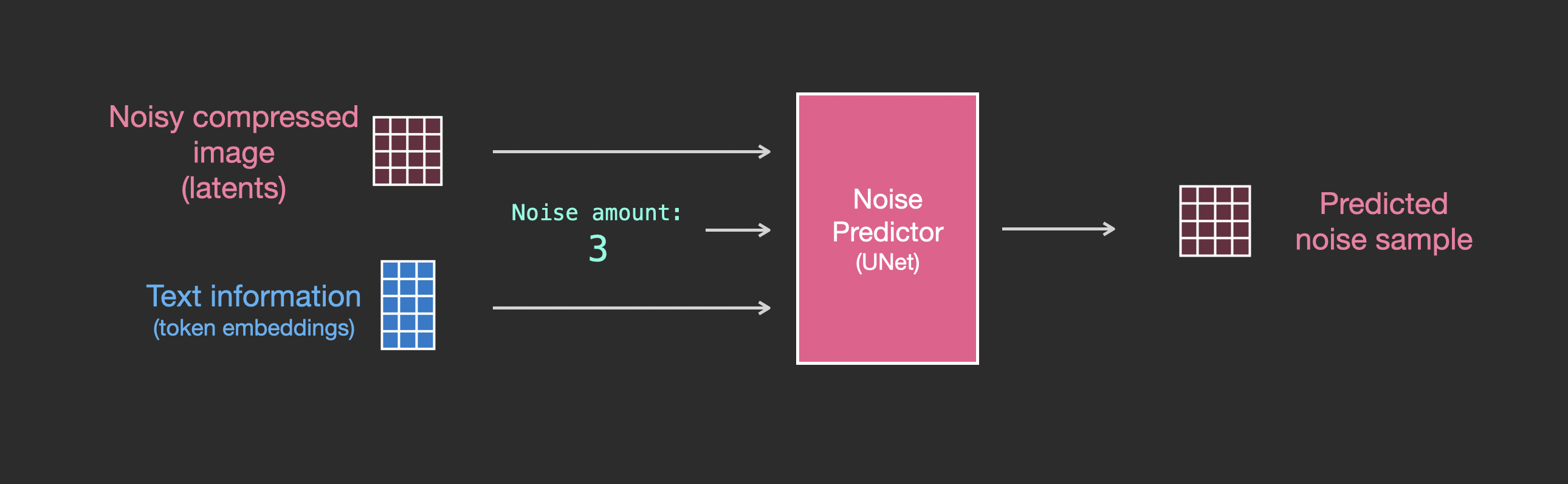
<p>To make text a part of the image generation process, we have to adjust our noise predictor to use the text as an input.</p>

<div class="img-div">
<a href="/images/stable-diffusion/stable-diffusion-unet-inputs-v2.png">
  <img src="/images/stable-diffusion/stable-diffusion-unet-inputs-v2.png" />
  </a><br />

</div>

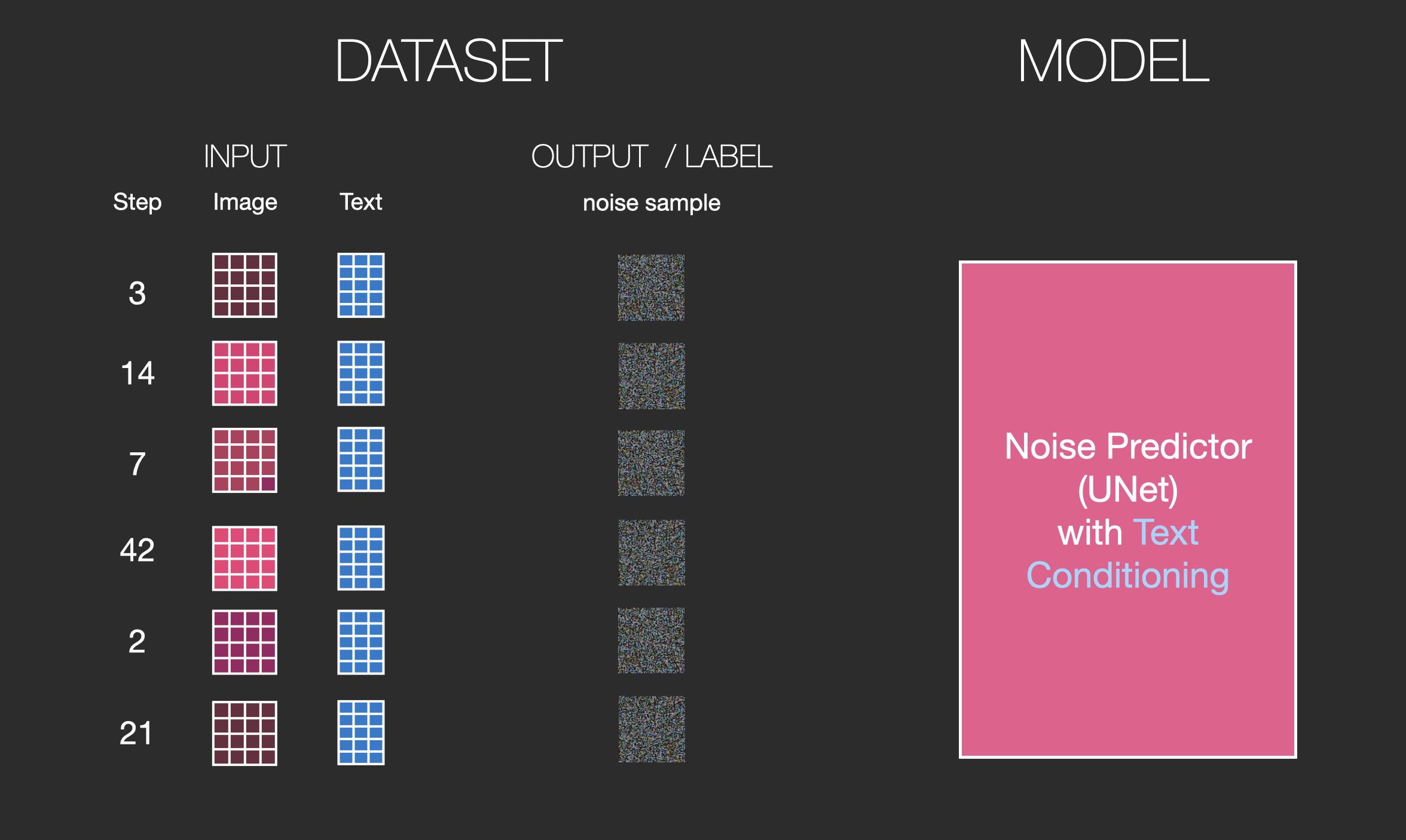
<p>Our dataset now includes the encoded text. Since we’re operating in the latent space, both the input images and predicted noise are in the latent space.</p>

<div class="img-div">
  <img src="/images/stable-diffusion/stable-diffusion-text-dataset-v2.png" />
  <br />

</div>

<p>To get a better sense of how the text tokens are used in the Unet, let’s look deeper inside the Unet.</p>

<h3 id="layers-of-the-unet-noise-predictor-without-text">Layers of the Unet Noise predictor (without text)</h3>

<p>Let’s first look at a diffusion Unet that does not use text. Its inputs and outputs would look like this:</p>

<div class="img-div-any-width">
  <img src="/images/stable-diffusion/unet-inputs-outputs-v2.png" />
  <br />

</div>

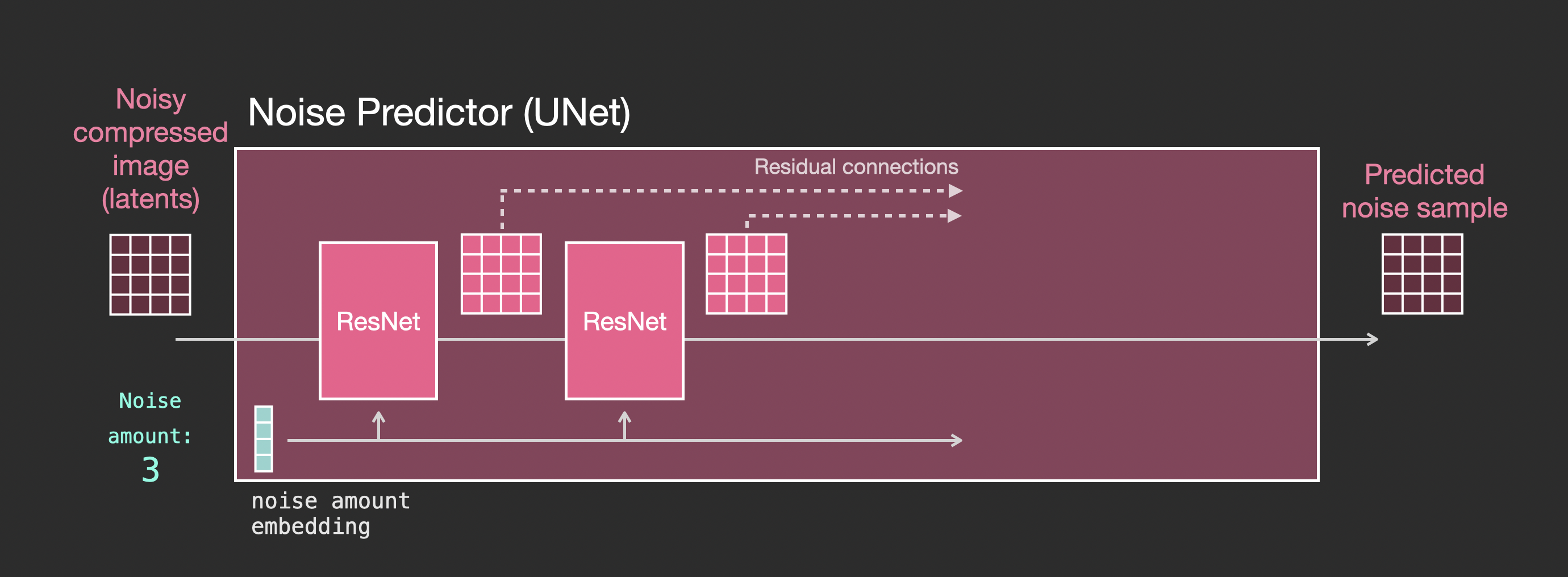
<p>Inside, we see that:</p>

<ul>
  <li>The Unet is a series of layers that work on transforming the latents array</li>
  <li>Each layer operates on the output of the previous layer</li>
  <li>Some of the outputs are fed (via residual connections) into the processing later in the network</li>
  <li>The timestep is transformed into a time step embedding vector, and that’s what gets used in the layers</li>
</ul>

<div class="img-div-any-width">
  <img src="/images/stable-diffusion/unit-resnet-steps-v2.png" />
  <br />

</div>

<h3 id="layers-of-the-unet-noise-predictor-with-text">Layers of the Unet Noise predictor WITH text</h3>

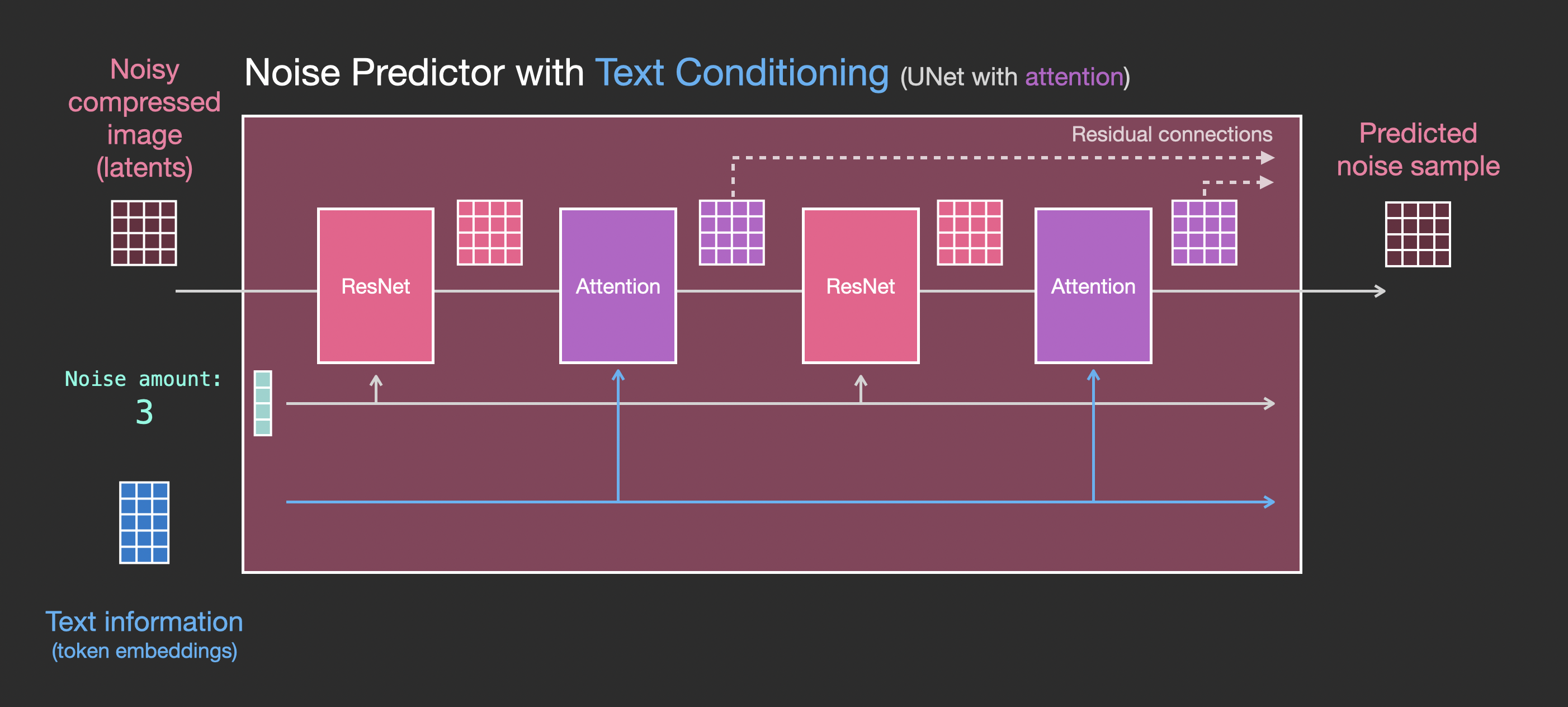
<p>Let’s now look how to alter this system to include attention to the text.</p>

<div class="img-div-any-width">
  <img src="/images/stable-diffusion/unet-with-text-inputs-outputs-v2.png" />
  <br />

</div>

<p>The main change to the system we need to add support for text inputs (technical term: text conditioning) is to add an attention layer between the ResNet blocks.</p>

<div class="img-div-any-width">
  <img src="/images/stable-diffusion/unet-with-text-steps-v2.png" />
  <br />

</div>

<p>Note that the ResNet block doesn’t directly look at the text. But the attention layers merge those text representations in the latents. And now the next ResNet can utilize that incorporated text information in its processing.</p>

<h2 id="conclusion">Conclusion</h2>

<p>I hope this gives you a good first intuition about how Stable Diffusion works. Lots of other concepts are involved, but I believe they’re easier to understand once you’re familiar with the building blocks above. The resources below are great next steps that I found useful. Please reach out to me on <a href="https://twitter.com/JayAlammar">Twitter</a> for any corrections or feedback.</p>

<h2 id="resources">Resources</h2>

<ul>
  <li>I have a <a href="https://youtube.com/shorts/qL6mKRyjK-0?feature=share">one-minute YouTube short</a> on using <a href="https://beta.dreamstudio.ai/">Dream Studio</a> to generate images with Stable Diffusion.</li>
  <li><a href="https://huggingface.co/blog/stable_diffusion">Stable Diffusion with 🧨 Diffusers</a></li>
  <li><a href="https://huggingface.co/blog/annotated-diffusion">The Annotated Diffusion Model</a></li>
  <li><a href="https://www.youtube.com/watch?v=J87hffSMB60">How does Stable Diffusion work? – Latent Diffusion Models EXPLAINED</a> [Video]</li>
  <li><a href="https://www.youtube.com/watch?v=ltLNYA3lWAQ">Stable Diffusion - What, Why, How?</a> [Video]</li>
  <li><a href="https://ommer-lab.com/research/latent-diffusion-models/">High-Resolution Image Synthesis with Latent Diffusion Models</a> [The Stable Diffusion paper]</li>
  <li>For a more in-depth look at the algorithms and math, see Lilian Weng’s <a href="https://lilianweng.github.io/posts/2021-07-11-diffusion-models/">What are Diffusion Models?</a></li>
  <li>Watch the <a href="https://www.youtube.com/watch?v=_7rMfsA24Ls&amp;ab_channel=JeremyHoward">great Stable Diffusion videos from fast.ai</a></li>
</ul>

<h2 id="acknowledgements">Acknowledgements</h2>

<p>Thanks to Robin Rombach, Jeremy Howard, Hamel Husain, Dennis Soemers, Yan Sidyakin, Freddie Vargus, Anna Golubeva, and the <a href="https://cohere.for.ai/">Cohere For AI</a> community for feedback on earlier versions of this article.</p>

<h2 id="contribute">Contribute</h2>
<p>Please help me make this article better. Possible ways:</p>

<ul>
  <li>Send any feedback or corrections on <a href="https://twitter.com/JayAlammar">Twitter</a> or as a <a href="https://github.com/jalammar/jalammar.github.io">Pull Request</a></li>
  <li>Help make the article more accessible by suggesting captions and alt-text to the visuals (best as a pull request)</li>
  <li>Translate it to another language and post it to your blog. Send me the link and I’ll add a link to it here. Translators of previous articles have always mentioned how much deeper they understood the concepts by going through the translation process.</li>
</ul>

<h2 id="discuss">Discuss</h2>

<p>If you’re interested in discussing the overlap of image generation models with language models, feel free to post in the #images-and-words channel in the <a href="https://discord.gg/co-mmunity">Cohere community on Discord</a>. There, we discuss areas of overlap, including:</p>

<ul>
  <li>fine-tuning language models to produce good image generation prompts</li>
  <li>Using LLMs to split the subject, and style components of an image captioning prompt</li>
  <li>Image-to-prompt (via tools like <a href="https://colab.research.google.com/github/pharmapsychotic/clip-interrogator/blob/main/clip_interrogator.ipynb">Clip Interrogator</a>)</li>
</ul>

<h2 id="citation">Citation</h2>

<p>If you found this work helpful for your research, please cite it as following:</p>

<div class="cite">

  <pre><code class="language-code">@misc{alammar2022diffusion, 
  title={The Illustrated Stable Diffusion},
  author={Alammar, J},
  year={2022},
  url={https://jalammar.github.io/illustrated-stable-diffusion/}
}
</code></pre>

</div>]]></content><author><name></name></author><summary type="html"><![CDATA[Translations: Chinese, Vietnamese. (V2 Nov 2022: Updated images for more precise description of forward diffusion. A few more images in this version) AI image generation is the most recent AI capability blowing people’s minds (mine included). The ability to create striking visuals from text descriptions has a magical quality to it and points clearly to a shift in how humans create art. The release of Stable Diffusion is a clear milestone in this development because it made a high-performance model available to the masses (performance in terms of image quality, as well as speed and relatively low resource/memory requirements). After experimenting with AI image generation, you may start to wonder how it works. This is a gentle introduction to how Stable Diffusion works. Stable Diffusion is versatile in that it can be used in a number of different ways. Let’s focus at first on image generation from text only (text2img). The image above shows an example text input and the resulting generated image (The actual complete prompt is here). Aside from text to image, another main way of using it is by making it alter images (so inputs are text + image).]]></summary></entry><entry><title type="html">Applying massive language models in the real world with Cohere</title><link href="http://jalammar.github.io/applying-large-language-models-cohere/" rel="alternate" type="text/html" title="Applying massive language models in the real world with Cohere" /><published>2022-03-07T00:00:00+00:00</published><updated>2022-03-07T00:00:00+00:00</updated><id>http://jalammar.github.io/applying-large-language-models-cohere</id><content type="html" xml:base="http://jalammar.github.io/applying-large-language-models-cohere/"><![CDATA[<p>A little less than a year ago, I joined the awesome <a href="https://cohere.ai">Cohere</a> team. The company trains massive language models (both GPT-like and BERT-like) and offers them as an API (which also supports finetuning). Its founders include Google Brain alums including co-authors of the original Transformers paper. It’s a fascinating role where I get to help companies and developers put these massive models to work solving real-world problems.</p>
<p>I love that I get to share some of the intuitions developers need to start problem-solving with these models. Even though I’ve been working very closely on pretrained Transformers for the past several years (for this blog and in developing <a href="https://github.com/jalammar/ecco">Ecco</a>), I’m enjoying the convenience of problem-solving with managed language models as it frees up the restrictions of model loading/deployment and memory/GPU management.</p>

<p>These are some of the articles I wrote and collaborated on with colleagues over the last few months:</p>

<h3 id="intro-to-large-language-models-with-cohere"><a href="https://docs.cohere.ai/intro-to-llms/">Intro to Large Language Models with Cohere</a></h3>
<div class="row two-column-text">
    <div class="col-md-6 col-xs-12">
  <a href="https://docs.cohere.ai/intro-to-llms/"><img src="https://files.readme.io/0a9715d-IntroToLLM_Visual_1.svg" class="small-image" /></a>
    </div>
    <div class="col-md-6 col-xs-12">
    <p>This is a high-level intro to large language models to people who are new to them. It establishes the difference between generative (GPT-like) and representation (BERT-like) models and examples use cases for them.</p>
    <p>This is one of the first articles I got to write. It's extracted from a much larger document that I wrote to explore some of the visual language to use in explaining the application of these models.</p>
    </div>
</div>

<h3 id="a-visual-guide-to-prompt-engineering-"><a href="https://docs.cohere.ai/prompt-engineering-wiki/">A visual guide to prompt engineering </a></h3>

<div class="row two-column-text">
    <div class="col-md-6 col-xs-12">
  <a href="https://docs.cohere.ai/prompt-engineering-wiki/"><img src="https://files.readme.io/db285b8-PromptEngineering_Visual_2.svg" class="small-image" /></a>
    </div>
    <div class="col-md-6 col-xs-12">
        <p>Massive GPT models open the door for a new way of programming. If you structure the input text in the right way, you can useful (and often fascinating) results for a lot of taasks (e.g. text classification, copy writing, summarization...etc).
        </p>
        <p>This article visually demonstrates four principals to create prompts effectively. </p>
    </div>
</div>

<h3 id="-text-summarization"><a href="https://docs.cohere.ai/text-summarization-example/"> Text Summarization</a></h3>

<div class="row two-column-text">
    <div class="col-md-6 col-xs-12">
  <a href="https://docs.cohere.ai/text-summarization-example/"><img src="https://files.readme.io/296454c-TextSummarization_Visual_1.svg" class="small-image" /></a>
    </div>
    <div class="col-md-6 col-xs-12">
    <p>This is a walkthrough of creating a simple summarization system. It links to a jupyter notebook which includes the code to start experimenting with text generation and summarization.</p>
    <p>The end of this notebook shows an important idea I want to spend more time on in the future. That of how to rank/filter/select the best from amongst multiple generations.</p>
    </div>
</div>

<h3 id="semantic-search"><a href="https://docs.cohere.ai/semantic-search/">Semantic Search</a></h3>

<div class="row two-column-text">
    <div class="col-md-6 col-xs-12">
  <a href="https://docs.cohere.ai/semantic-search/"><img src="https://files.readme.io/4ec00e1-SemanticSearch_Visual_1.svg" class="small-image" /></a>
    </div>
    <div class="col-md-6 col-xs-12">
    <p>Semantic search has to be one of the most exciting applications of sentence embedding models. This tutorials implements a "similar questions" functionality using sentence embeddings and a a vector search library.</p>
    <p>The vector search library used here is <a href="https://github.com/spotify/annoy">Annoy</a> from Spotify. There are a bunch of others out there. <a href="https://github.com/facebookresearch/faiss">Faiss</a> is used widely. I experiment with <a href="https://github.com/lmcinnes/pynndescent">PyNNDescent</a> as well.</p>
    </div>
</div>

<h3 id="-finetuning-representation-models"><a href="https://docs.cohere.ai/finetuning-representation-models/"> Finetuning Representation Models</a></h3>

<div class="row two-column-text">
    <div class="col-md-6 col-xs-12">
  <a href="https://docs.cohere.ai/docs/training-a-representation-model"><img src="https://files.readme.io/699aead-TrainingRepModels_Visual_4.svg" class="small-image" /></a>
    </div>
    <div class="col-md-6 col-xs-12">
    <p>Finetuning tends to lead to the best results language models can achieve. This article explains the intuitions around finetuning representation/sentence embedding models. I've added a couple more visuals to the <a href="https://twitter.com/JayAlammar/status/1490712428686024705">Twitter thread</a>.</p>
<p>The research around this area is very interesting. I've highly enjoyed papers like <a href="https://arxiv.org/abs/1908.10084">Sentence BERT</a> and <a href="https://arxiv.org/abs/2007.00808">Approximate Nearest Neighbor Negative Contrastive Learning for Dense Text Retrieval</a></p>
    </div>
</div>

<h3 id="controlling-generation-with-top-k--top-p"><a href="https://docs.cohere.ai/token-picking/">Controlling Generation with top-k &amp; top-p</a></h3>

<div class="row two-column-text">
    <div class="col-md-6 col-xs-12">
  <a href="https://docs.cohere.ai/token-picking/"><img src="https://files.readme.io/ab291f6-Top-KTop-P_Visual_4.svg" class="small-image" /></a>
    </div>
    <div class="col-md-6 col-xs-12">
        <p>This one is a little bit more technical. It explains the parameters you tweak to adjust a GPT's <i>decoding strategy</i> -- the method with which the system picks output tokens. 
        </p>
    </div>
</div>

<h3 id="text-classification-using-embeddings"><a href="https://docs.cohere.ai/text-classification-embeddings/">Text Classification Using Embeddings</a></h3>

<div class="row two-column-text">
    <div class="col-md-6 col-xs-12">
  <a href="https://docs.cohere.ai/text-classification-embeddings/"><img src="https://files.readme.io/ee56264-Controlling_Generation_with_Top-K__Top-P_Visual_1.svg" class="small-image" /></a>
    </div>
    <div class="col-md-6 col-xs-12">
        <p>
        This is a walkthrough of one of the most common use cases of embedding models -- text classification. It is similar to <a href="http://127.0.0.1:4000/a-visual-guide-to-using-bert-for-the-first-time/">A Visual Guide to Using BERT for the First Time</a>, but uses Cohere's API.
        </p>
    </div>
</div>

<p>You can find these and upcoming articles in the <a href="https://docs.cohere.ai/">Cohere docs</a> and <a href="https://github.com/cohere-ai/notebooks">notebooks repo</a>. I have quite number of experiments and interesting workflows I’d love to be sharing in the coming weeks. So stay tuned!</p>]]></content><author><name></name></author><summary type="html"><![CDATA[A little less than a year ago, I joined the awesome Cohere team. The company trains massive language models (both GPT-like and BERT-like) and offers them as an API (which also supports finetuning). Its founders include Google Brain alums including co-authors of the original Transformers paper. It’s a fascinating role where I get to help companies and developers put these massive models to work solving real-world problems. I love that I get to share some of the intuitions developers need to start problem-solving with these models. Even though I’ve been working very closely on pretrained Transformers for the past several years (for this blog and in developing Ecco), I’m enjoying the convenience of problem-solving with managed language models as it frees up the restrictions of model loading/deployment and memory/GPU management. These are some of the articles I wrote and collaborated on with colleagues over the last few months: Intro to Large Language Models with Cohere This is a high-level intro to large language models to people who are new to them. It establishes the difference between generative (GPT-like) and representation (BERT-like) models and examples use cases for them. This is one of the first articles I got to write. It's extracted from a much larger document that I wrote to explore some of the visual language to use in explaining the application of these models. A visual guide to prompt engineering Massive GPT models open the door for a new way of programming. If you structure the input text in the right way, you can useful (and often fascinating) results for a lot of taasks (e.g. text classification, copy writing, summarization...etc). This article visually demonstrates four principals to create prompts effectively. Text Summarization This is a walkthrough of creating a simple summarization system. It links to a jupyter notebook which includes the code to start experimenting with text generation and summarization. The end of this notebook shows an important idea I want to spend more time on in the future. That of how to rank/filter/select the best from amongst multiple generations. Semantic Search Semantic search has to be one of the most exciting applications of sentence embedding models. This tutorials implements a "similar questions" functionality using sentence embeddings and a a vector search library. The vector search library used here is Annoy from Spotify. There are a bunch of others out there. Faiss is used widely. I experiment with PyNNDescent as well. Finetuning Representation Models Finetuning tends to lead to the best results language models can achieve. This article explains the intuitions around finetuning representation/sentence embedding models. I've added a couple more visuals to the Twitter thread. The research around this area is very interesting. I've highly enjoyed papers like Sentence BERT and Approximate Nearest Neighbor Negative Contrastive Learning for Dense Text Retrieval Controlling Generation with top-k &amp; top-p This one is a little bit more technical. It explains the parameters you tweak to adjust a GPT's decoding strategy -- the method with which the system picks output tokens. Text Classification Using Embeddings This is a walkthrough of one of the most common use cases of embedding models -- text classification. It is similar to A Visual Guide to Using BERT for the First Time, but uses Cohere's API. You can find these and upcoming articles in the Cohere docs and notebooks repo. I have quite number of experiments and interesting workflows I’d love to be sharing in the coming weeks. So stay tuned!]]></summary></entry><entry><title type="html">The Illustrated Retrieval Transformer</title><link href="http://jalammar.github.io/illustrated-retrieval-transformer/" rel="alternate" type="text/html" title="The Illustrated Retrieval Transformer" /><published>2022-01-03T00:00:00+00:00</published><updated>2022-01-03T00:00:00+00:00</updated><id>http://jalammar.github.io/illustrated-retrieval-transformer</id><content type="html" xml:base="http://jalammar.github.io/illustrated-retrieval-transformer/"><![CDATA[<p><span class="discussion">Discussion: <a href="https://github.com/jalammar/jalammar.github.io/discussions/21">Discussion Thread</a> for comments, corrections, or any feedback. </span>
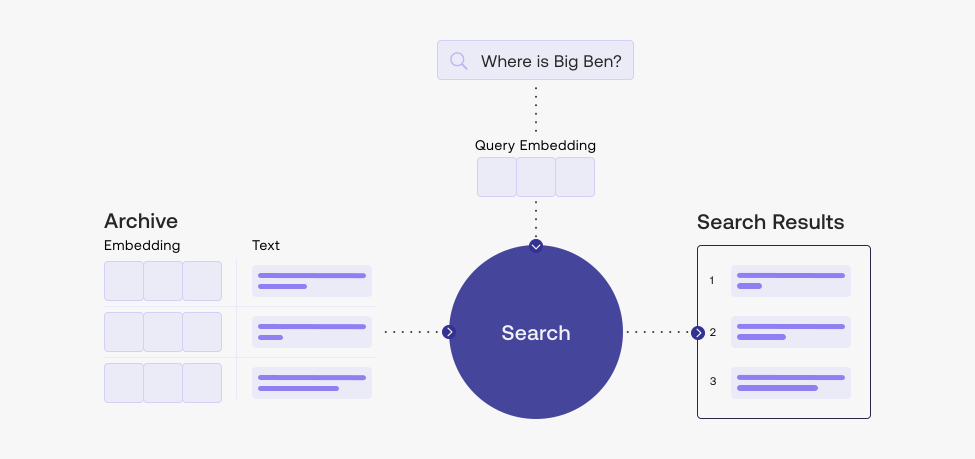
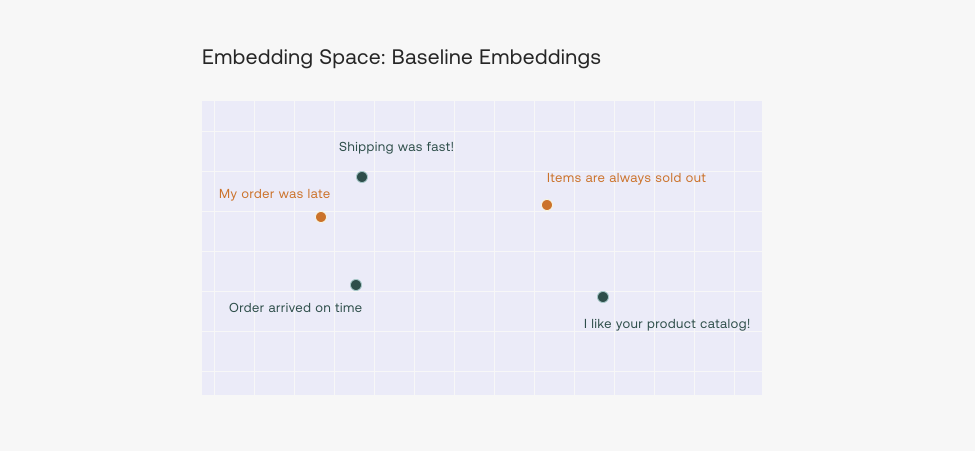
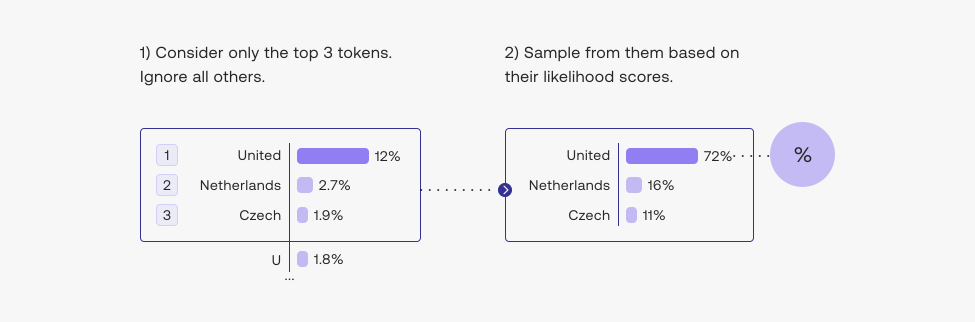
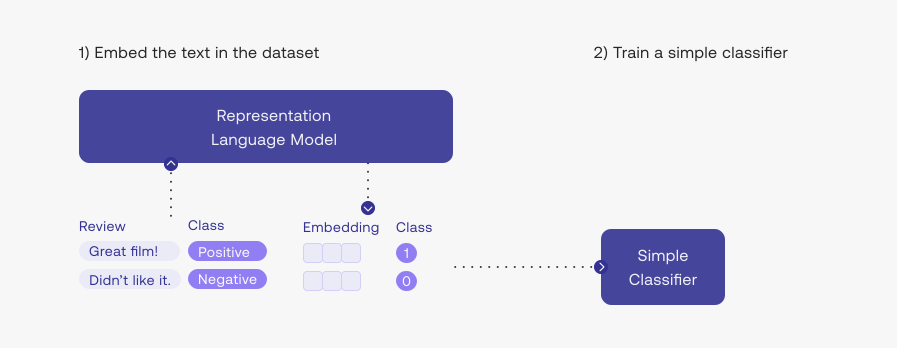
<br />
<span class="discussion">Translations:  <a href="https://chloamme.github.io/2022/01/08/illustrated-retrieval-transformer-korean.html">Korean</a>, <a href="https://habr.com/ru/post/648705/">Russian</a>
<br /></span></p>

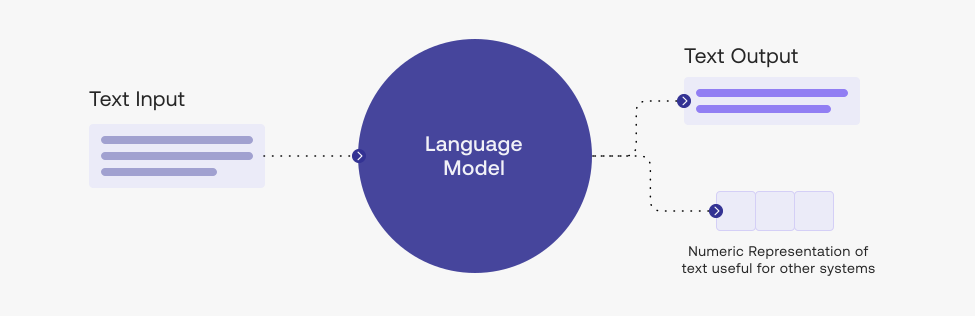
<p><strong>Summary</strong>: The latest batch of language models can be much smaller yet achieve GPT-3 like performance by being able to query a database or search the web for information. A key indication is that building larger and larger models is not the only way to improve performance.</p>

<h2 id="video">Video</h2>
<iframe width="560" height="315" src="https://www.youtube.com/embed/sMPq4cVS4kg" title="YouTube video player" frameborder="0" allow="accelerometer; autoplay; clipboard-write; encrypted-media; gyroscope; picture-in-picture" style="
width: 100%;
max-width: 560px;" allowfullscreen=""></iframe>

<hr />

<p>The last few years saw the rise of Large Language Models (LLMs) – machine learning models that rapidly improve how machines process and generate language. Some of the highlights since 2017 include:</p>

<ul>
  <li>The original <a href="/illustrated-transformer/">Transformer</a> breaks previous performance records for machine translation.</li>
  <li><a href="/illustrated-bert/">BERT</a> popularizes the pre-training then finetuning process, as well as Transformer-based contextualized word embeddings. It then rapidly starts to power <a href="https://blog.google/products/search/search-language-understanding-bert/">Google Search</a> and <a href="https://azure.microsoft.com/en-us/blog/bing-delivers-its-largest-improvement-in-search-experience-using-azure-gpus/">Bing Search</a>.</li>
  <li><a href="/illustrated-gpt2/">GPT-2</a> demonstrates the machine’s ability to write as well as humans do.</li>
  <li>First <a href="https://arxiv.org/abs/1910.10683">T5</a>, then <a href="https://huggingface.co/bigscience/T0pp">T0</a> push the boundaries of transfer learning (training a model on one task, and then having it do well on other adjacent tasks) and posing a lot of different tasks as text-to-text tasks.</li>
  <li><a href="/how-gpt3-works-visualizations-animations/">GPT-3</a> showed that massive scaling of generative models can lead to shocking emergent applications (the industry continues to train larger models like <a href="https://deepmind.com/research/publications/2021/scaling-language-models-methods-analysis-insights-from-training-gopher">Gopher</a>, <a href="https://www.microsoft.com/en-us/research/blog/using-deepspeed-and-megatron-to-train-megatron-turing-nlg-530b-the-worlds-largest-and-most-powerful-generative-language-model/">MT-NLG</a>…etc).</li>
</ul>

<p>For a while, it seemed like scaling larger and larger models is the main way to improve performance. Recent developments in the field, like DeepMind’s <a href="https://deepmind.com/research/publications/2021/improving-language-models-by-retrieving-from-trillions-of-tokens">RETRO Transformer</a> and OpenAI’s <a href="https://openai.com/blog/improving-factual-accuracy/">WebGPT</a>, reverse this trend by showing that smaller generative language models can perform on par with massive models if we augment them with a way to search/query for information.</p>

<p>This article breaks down DeepMind’s RETRO (<strong>R</strong>etrieval-<strong>E</strong>nhanced <strong>TR</strong>ansf<strong>O</strong>rmer) and how it works. The model performs on par with GPT-3 despite being 4% its size (7.5 billion parameters vs. 185 billion for GPT-3 Da Vinci).</p>

<div class="img-div">
  <img src="/images/retro/deepmind-retro-retrieval-transformer.png" />
  <br />
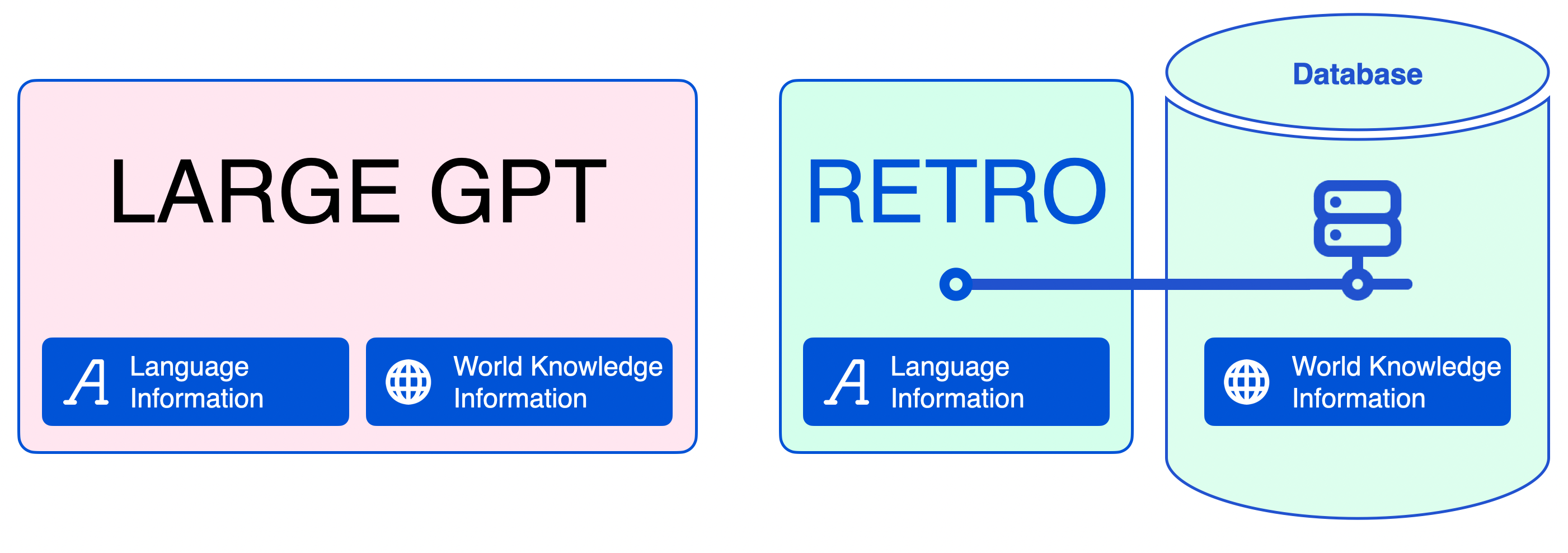
  RETRO incorporates information retrieved from a database to free its parameters from being an expensive store of facts and world knowledge.
</div>

<p>RETRO was presented in the paper <a href="https://arxiv.org/abs/2112.04426">Improving Language Models by Retrieving from Trillions of Tokens</a>. It continues and builds on a wide variety of retrieval <a href="http://www.crm.umontreal.ca/2018/Langue18/pdf/Cheung.pdf">work</a> <a href="https://ai.facebook.com/blog/retrieval-augmented-generation-streamlining-the-creation-of-intelligent-natural-language-processing-models/">in</a> <a href="https://openreview.net/forum?id=HklBjCEKvH">the</a> <a href="https://arxiv.org/abs/2102.02557">research</a> <a href="https://openreview.net/forum?id=B184E5qee">community</a>. This article explains the model and not what is especially novel about it.</p>

<!--more-->

<h2 id="why-this-is-important-separating-language-information-from-world-knowledge-information">Why This is Important: Separating Language Information from World Knowledge Information</h2>

<p>Language modeling trains models to predict the next word–to fill-in-the-blank at the end of the sentence, essentially.</p>

<p>Filling the blank sometimes requires knowledge of factual information (e.g. names or dates). For example:</p>

<div class="img-div">
  <img src="/images/retro/prompt-1.png" />
  <br />
  Input prompt: The Dune film was released in ....
</div>

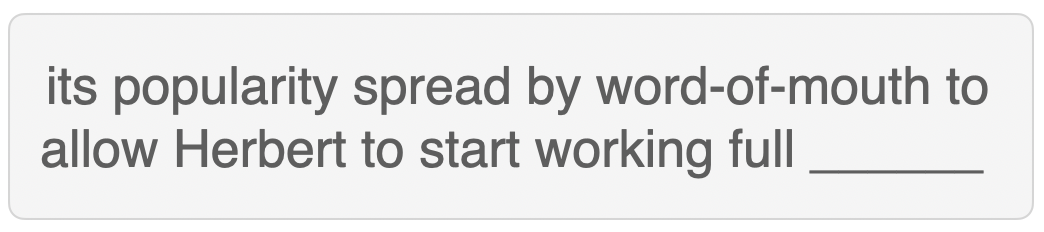
<p>Other times, familiarity with the language is enough to guess what goes in the blank. For example:</p>

<div class="img-div">
  <img src="/images/retro/prompt-2.png" />
  <br />
  Input prompt: its popularity spread by word-of-mouth to allow Herbert to start working full ....
</div>

<p>This distinction is important because LLMs encoded everything they know in their model parameters. While this makes sense for language information, it is inefficient for factual and world-knowledge information.</p>

<p>By including a retrieval method in the language model, the model can be much smaller. A neural database aids it with retrieving factual information it needs during text generation.</p>

<div class="img-div-any-width">
  <img src="/images/retro/Large-GPT-vs-Retro-transformer-world-knowledge-information.png" />
  <br />
  Aiding language models with retrieval methods allows us to reduce the amount of information a language model needs to encode in its parameters to perform well at text generation.
</div>

<p>Training becomes fast with small language models, as training data memorization is reduced. Anyone can deploy these models on smaller and more affordable GPUs and tweak them as per need.</p>

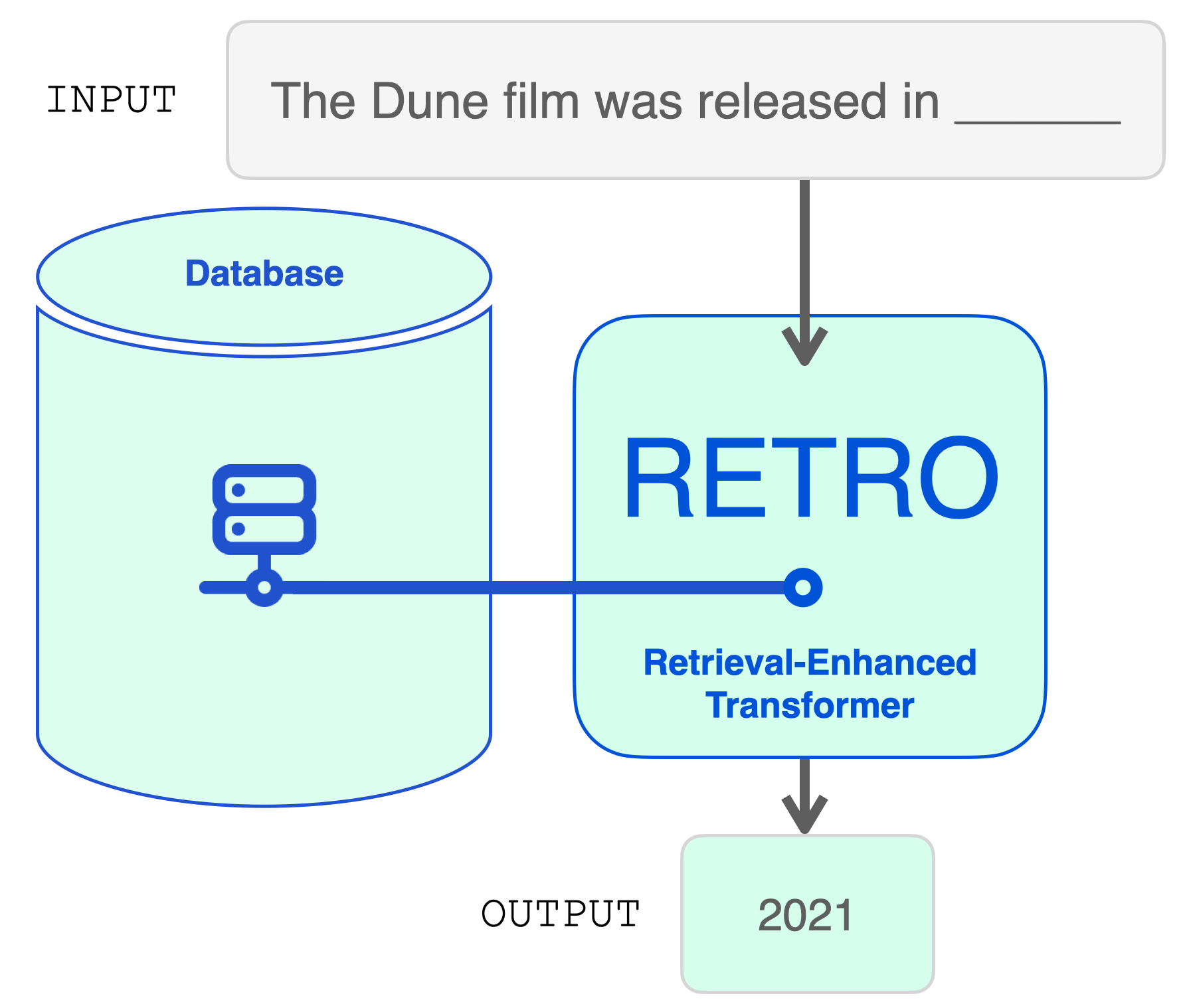
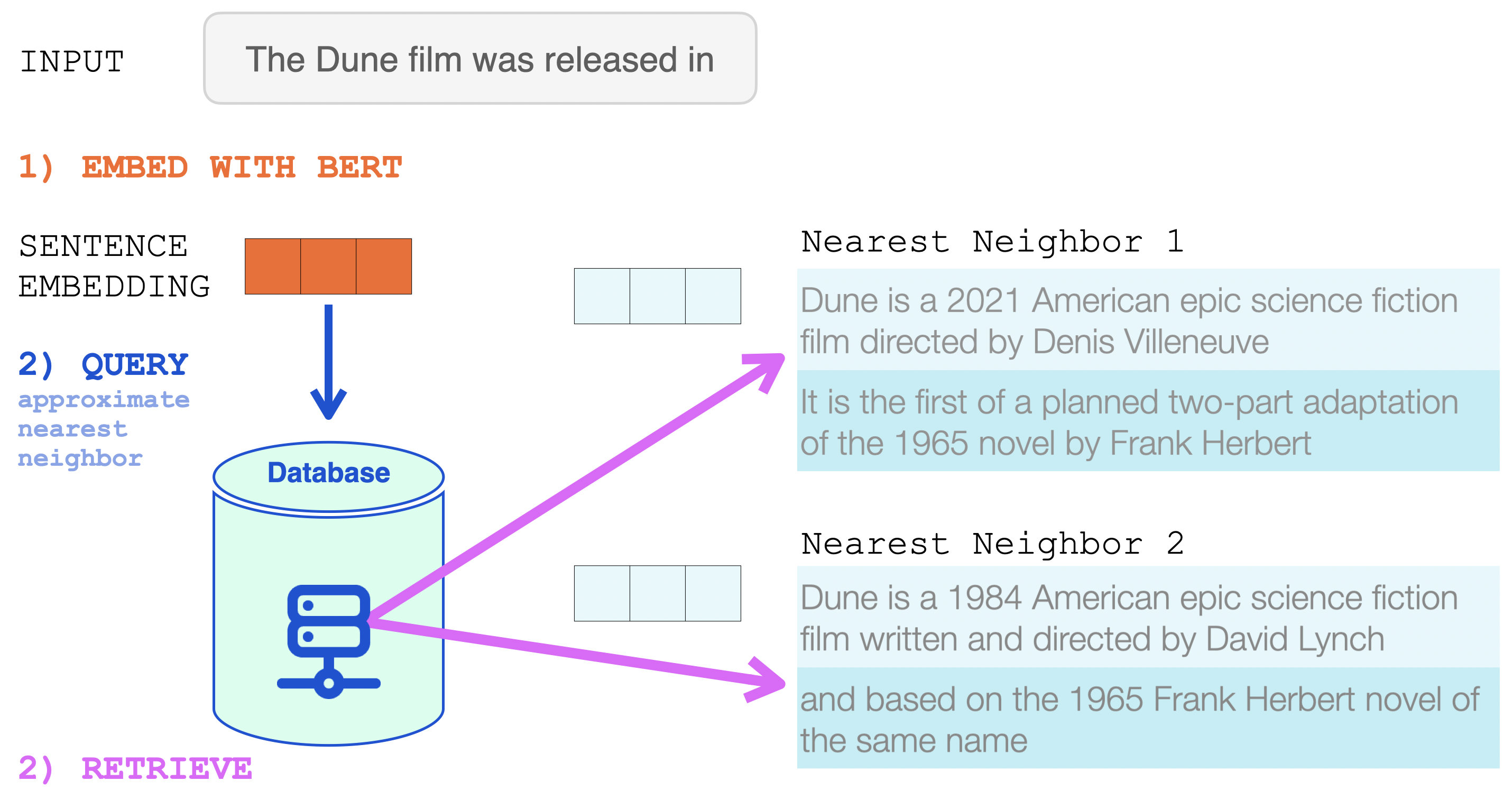
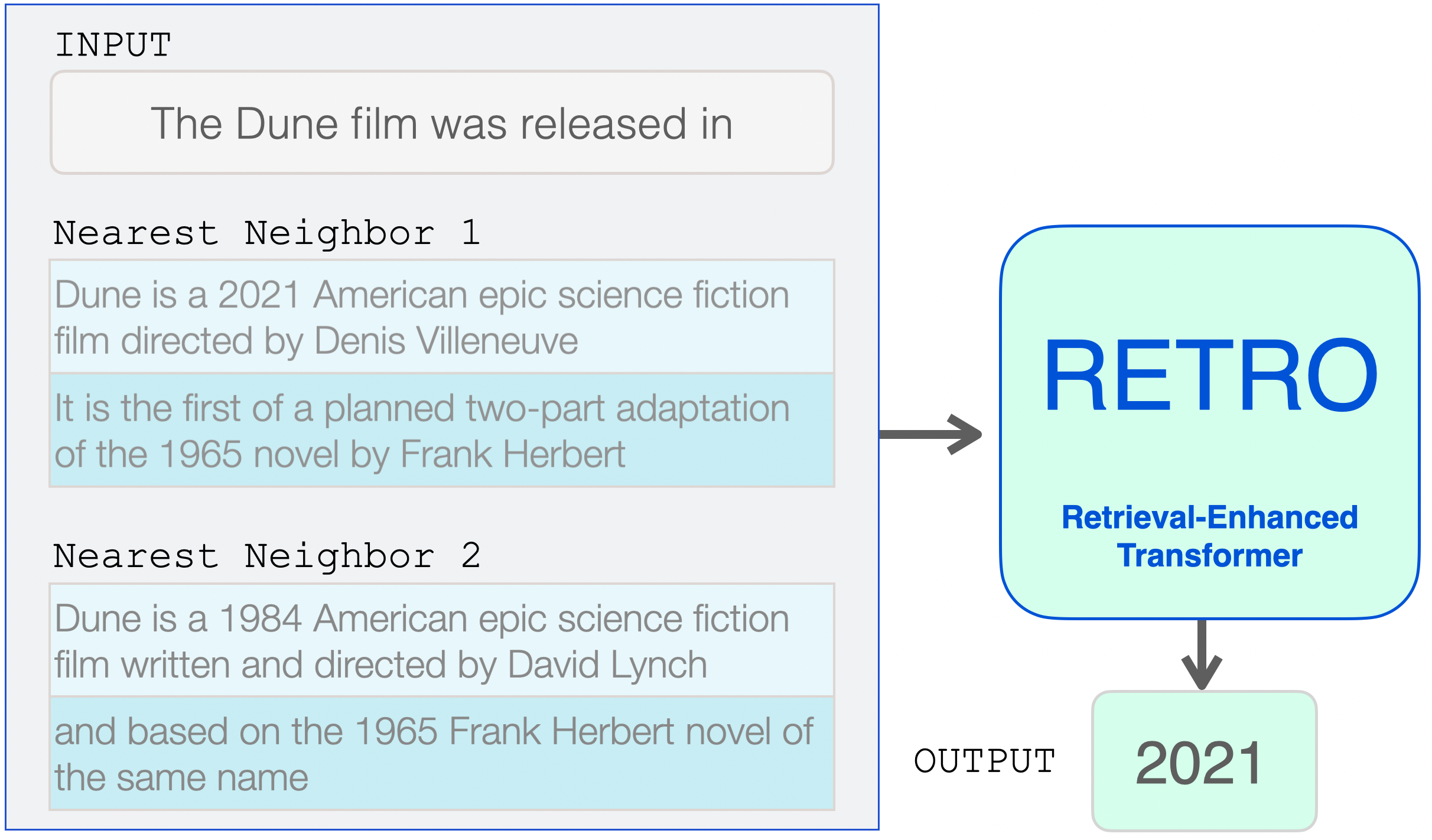
<p>Mechanically, RETRO is an encoder-decoder model just like the original transformer. However, it augments the input sequence with the help of a retrieval database. The model finds the most probable sequences in the database and adds them to the input. RETRO works its magic to generate the output prediction.</p>

<div class="img-div">
  <img src="/images/retro/dune-prompt-into-retro-transformer-4.png" />
  <br />
  RETRO utilizes a database to augment its input prompt. The prompt is used to retrieve relevant information from the database.
</div>

<p>Before we explore the model architecture, let’s dig deeper into the retrieval database.</p>

<h2 id="inspecting-retros-retrieval-database">Inspecting RETRO’s Retrieval Database</h2>

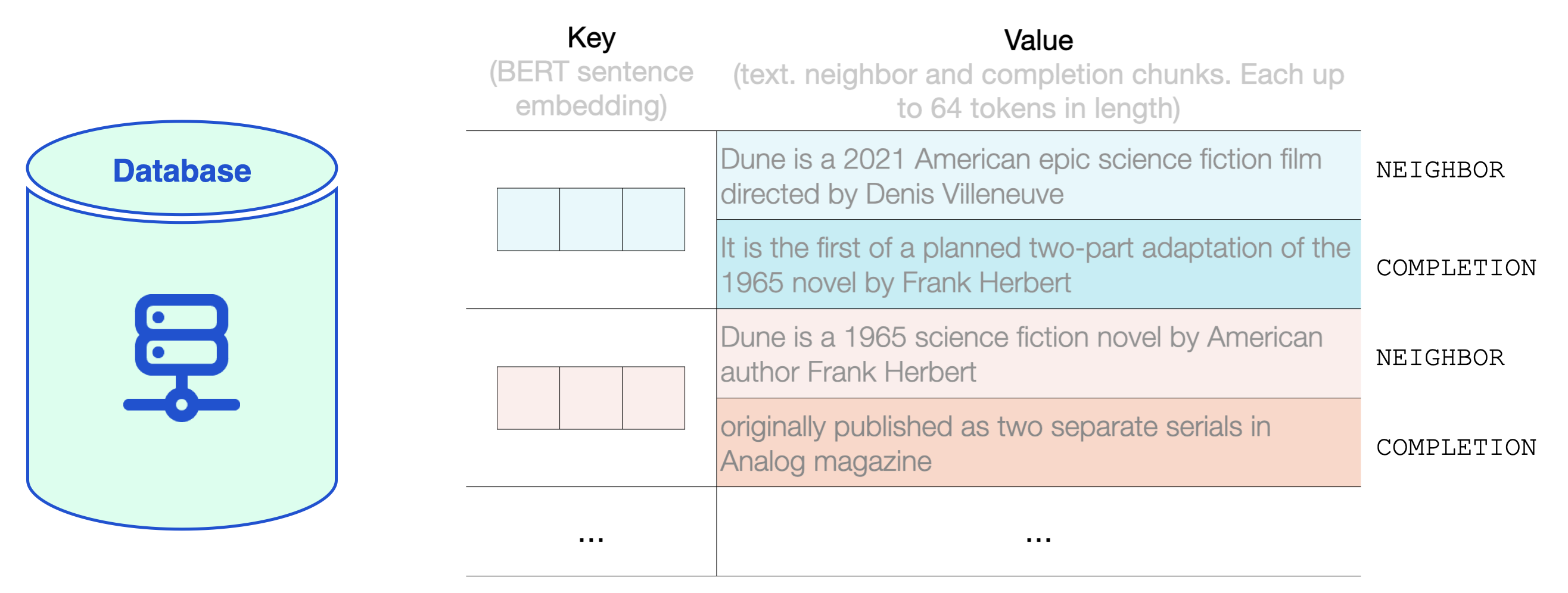
<p>The database is a key-value store.</p>

<p>The key is a standard BERT sentence embedding.</p>

<p>The value is text in two parts:</p>

<ol>
  <li>
    <p>Neighbor, which is used to compute the key</p>
  </li>
  <li>
    <p>Completion, the continuation of the text in the original document.</p>
  </li>
</ol>

<p>RETRO’s database contains 2 trillion multi-lingual tokens based on the <em>MassiveText</em> dataset. Both the neighbor and completion chunks are at most 64 tokens long.</p>

<div class="img-div-any-width">
  <img src="/images/retro/database-key-value-examples.png" />
  <br />
  A look inside RETRO's database shows examples of key-value pairs in the RETRO database. The value contains a neighbor chunk and a completion chunk.
</div>

<p>RETRO breaks the input prompt into multiple chunks. For simplicity, we’ll focus on how one chunk is augmented with retrieved text. The model, however, does this process for each chunk (except the first) in the input prompt.</p>

<h2 id="the-database-lookup">The Database Lookup</h2>

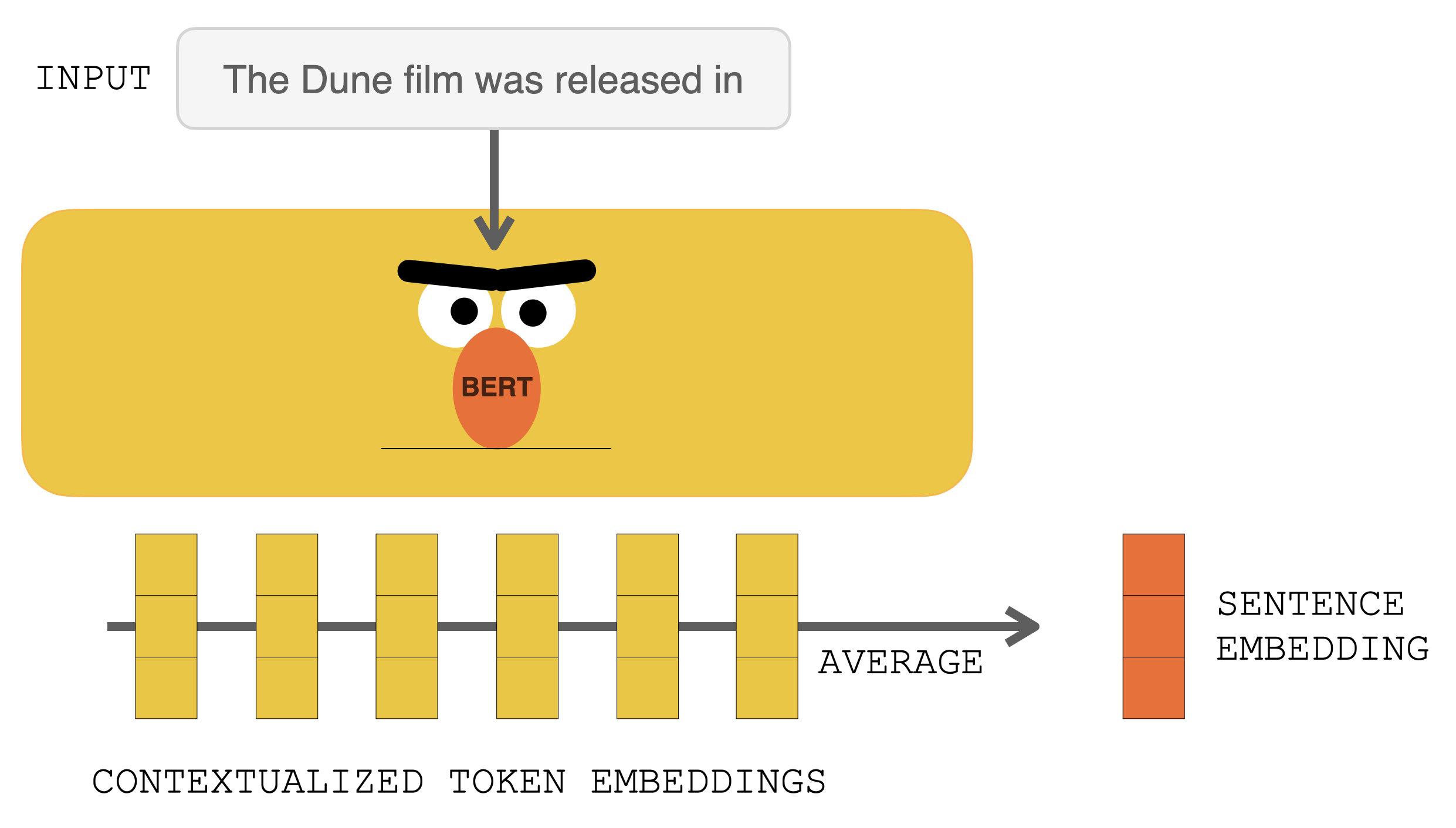
<p>Before hitting RETRO, the input prompt goes into BERT. The output contextualized vectors are then averaged to construct a sentence embedding vector. That vector is then used to query the database.</p>

<div class="img-div-any-width">
  <img src="/images/retro/bert-sentence-embedding.png" />
  <br />
  Processing the input prompt with BERT produces contextualized token embeddings. Averaging them produces a sentence embedding.
</div>

<p>That sentence embedding is then used in an approximate nearest neighbor search (<a href="https://github.com/google-research/google-research/tree/master/scann">https://github.com/google-research/google-research/tree/master/scann</a>).</p>

<p>The two nearest neighbors are retrieved, and their text becomes a part of the input into RETRO.</p>

<div class="img-div">
  <img src="/images/retro/neighbor-retrieval-from-retro-neural-database-with-bert-embeddings.png" />
  <br />
  The BERT sentence embedding is used to retrieve the nearest neighbors from RETRO's neural database. These are then added to the input of the language model.
</div>

<p>This is now the input to RETRO. The input prompt and its two nearest neighbors from the database (and their continuations).</p>

<p>From here, the Transformer and RETRO Blocks incorporate the information into their processing.</p>

<div class="img-div">
  <img src="/images/retro/input-prompt-and-retrieved-text-retro-transformer.png" />
  <br />
  The retrieved neighbors are added to the input of the language model. They're treated a little differently inside the model, however.
</div>

<h2 id="retro-architecture-at-a-high-level">RETRO Architecture at a High Level</h2>

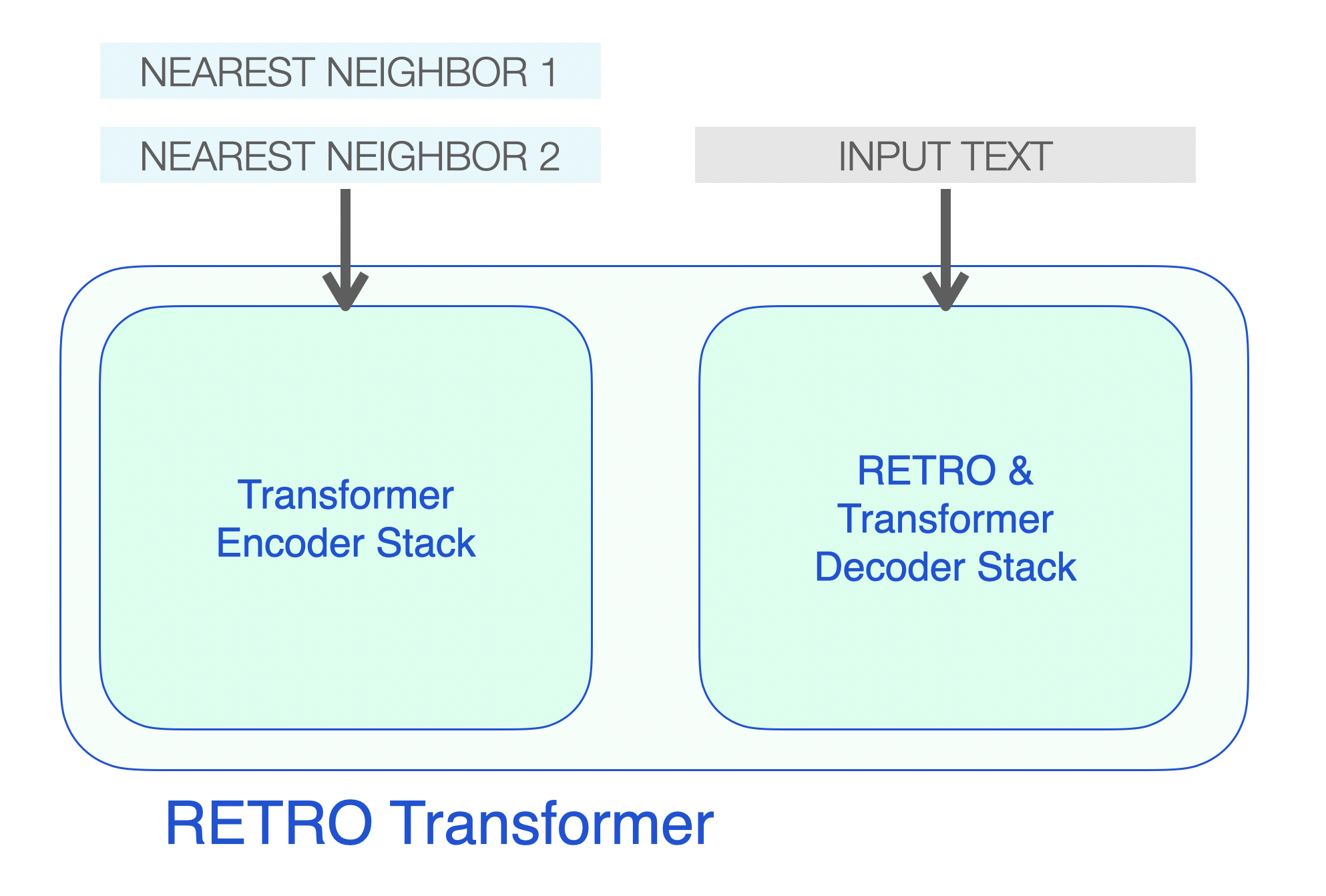
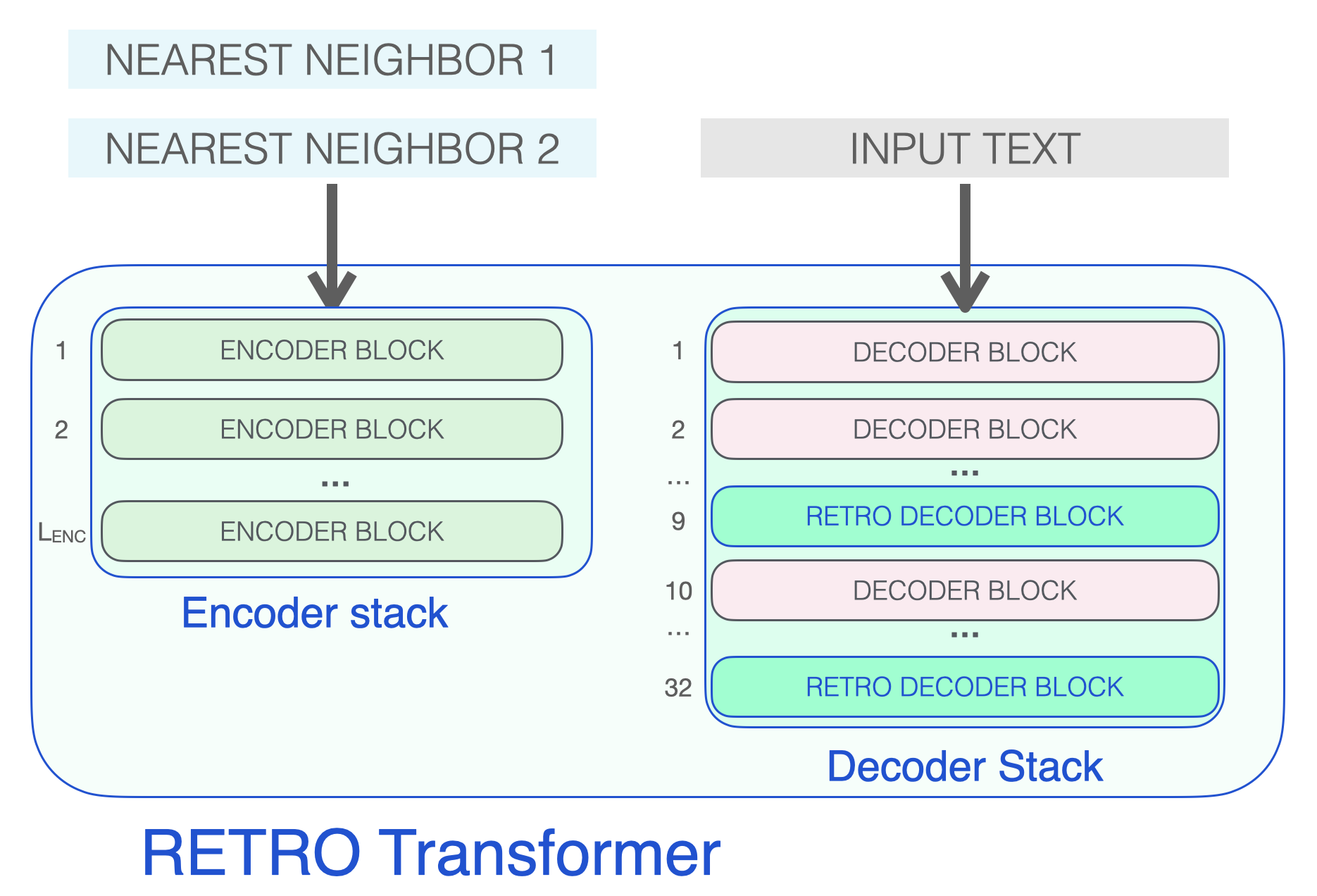
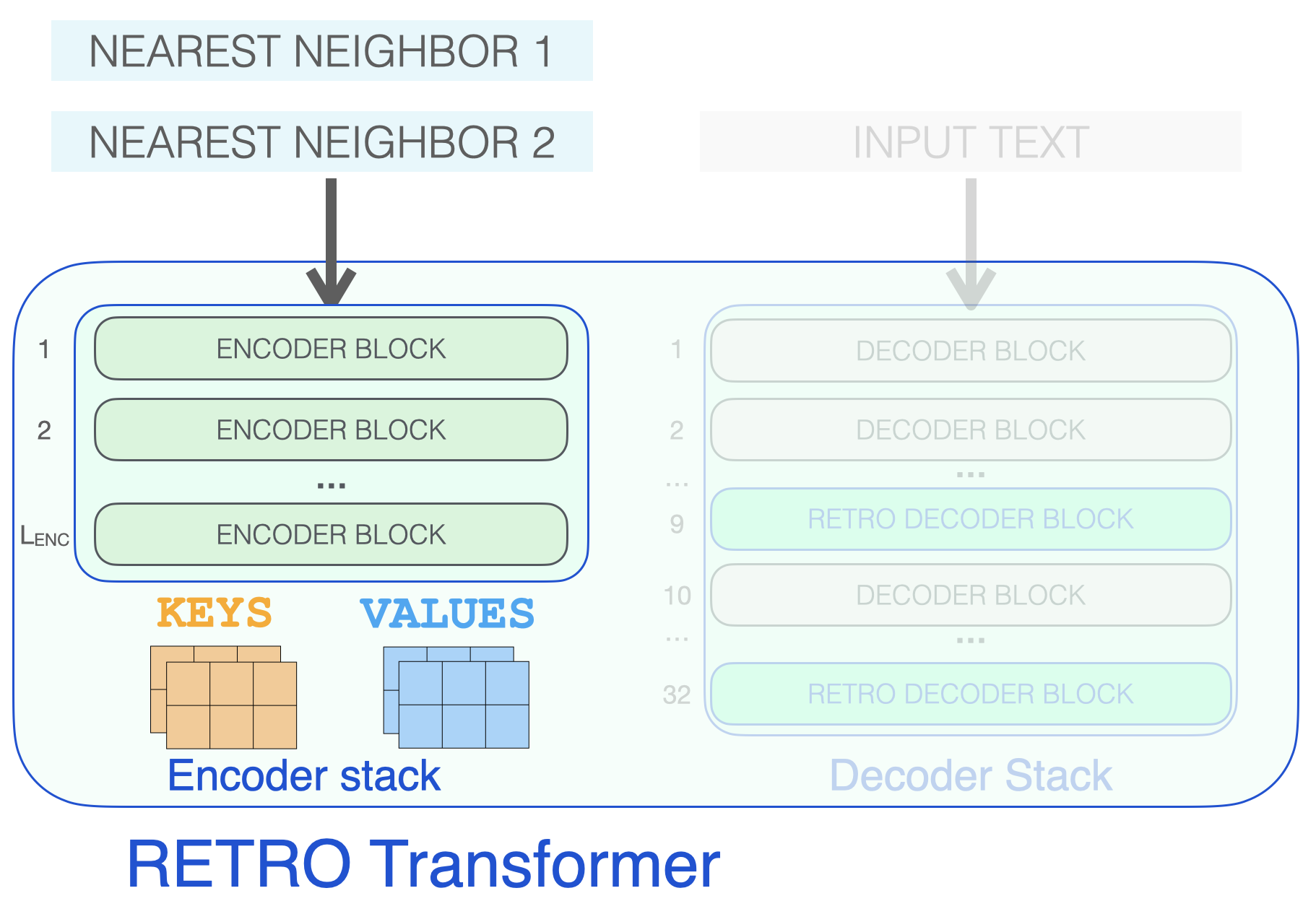
<p>RETRO’s architecture is an encoder stack and a decoder stack.</p>

<div class="img-div">
  <img src="/images/retro/Retro-transformer-encoder-decoder-stacks-2.png" />
  <br />
  A RETRO transformer consists of an encoder stack (to process the neighbors) and a decoder stack (to process the input)
</div>

<p>The encoder is made up of standard Transformer encoder blocks (self-attention + FFNN). To my best understanding, Retro uses an encoder made up of two Transformer Encoder Blocks.</p>

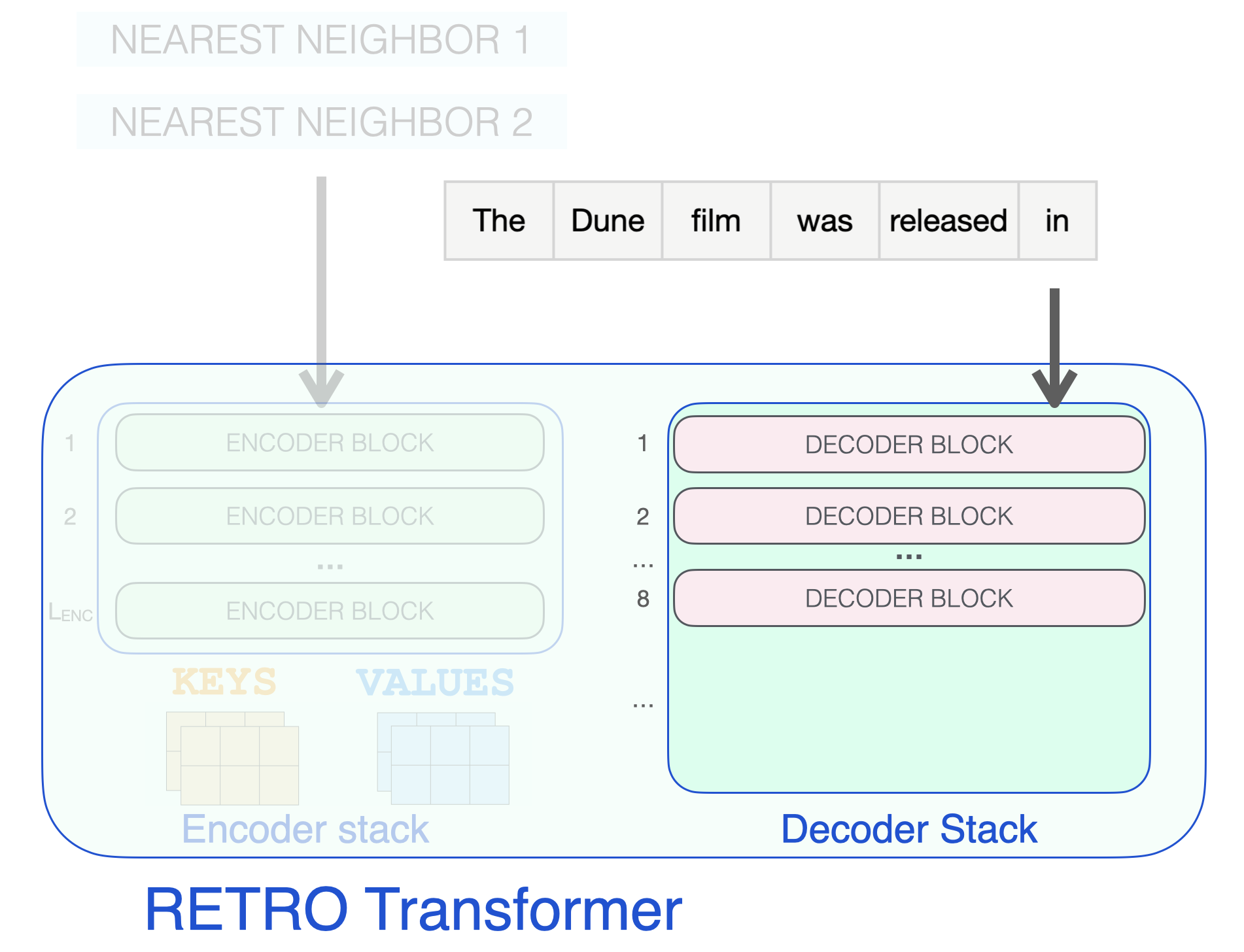
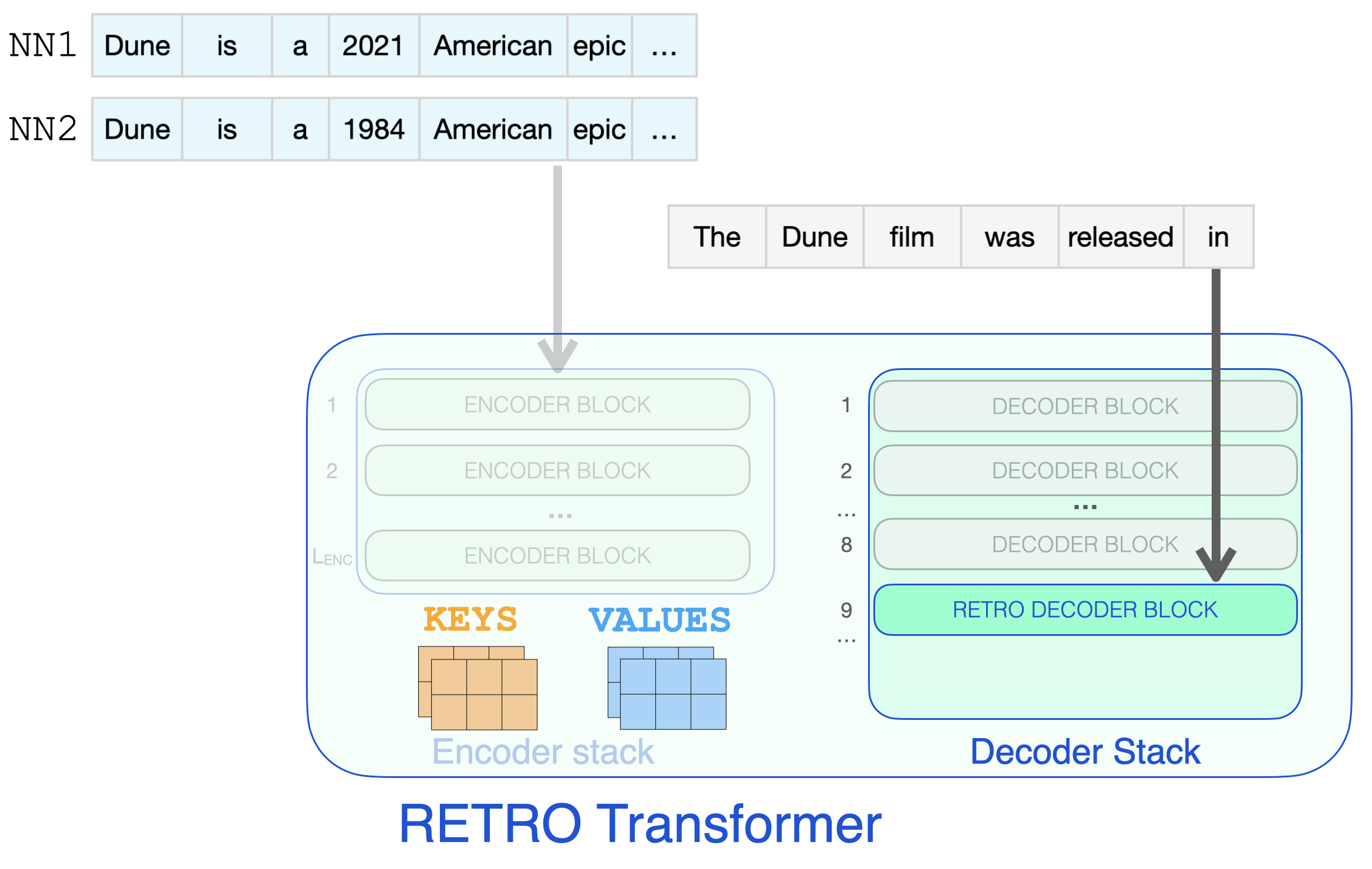
<p>The decoder stack interleaves two kinds of decoder blocks:</p>

<ul>
  <li>Standard transformer decoder block (ATTN + FFNN)</li>
  <li>RETRO decoder block (ATTN + Chunked cross attention (CCA) + FFNN)</li>
</ul>

<div class="img-div">
  <img src="/images/retro/retro-transformer-blocks-4.png" />
  <br />
  The three types of Transformer blocks that make up RETRO
</div>

<p>Let’s start by looking at the encoder stack, which processes the retrieved neighbors, resulting in KEYS and VALUES matrices that will later be used for attention (see <a href="https://jalammar.github.io/illustrated-transformer/">The Illustrated Transformer</a> for a refresher).</p>

<div class="img-div">
  <img src="/images/retro/retro-encoder-block-keys-values-2.png" />
  <br />
  The encoder stack processes the retrieved neighbors resulting in KEYS and VALUE matrices
</div>

<p>Decoder blocks process the input text just like a GPT would. It applies self-attention on the prompt token (causally, so only attending to previous tokens), then passes through a FFNN layer.</p>

<div class="img-div">
  <img src="/images/retro/retro-transformer-decoders-2.png" />
  <br />
  Input prompt passes through standard decoder block containing self-attention and FFNN layers
</div>

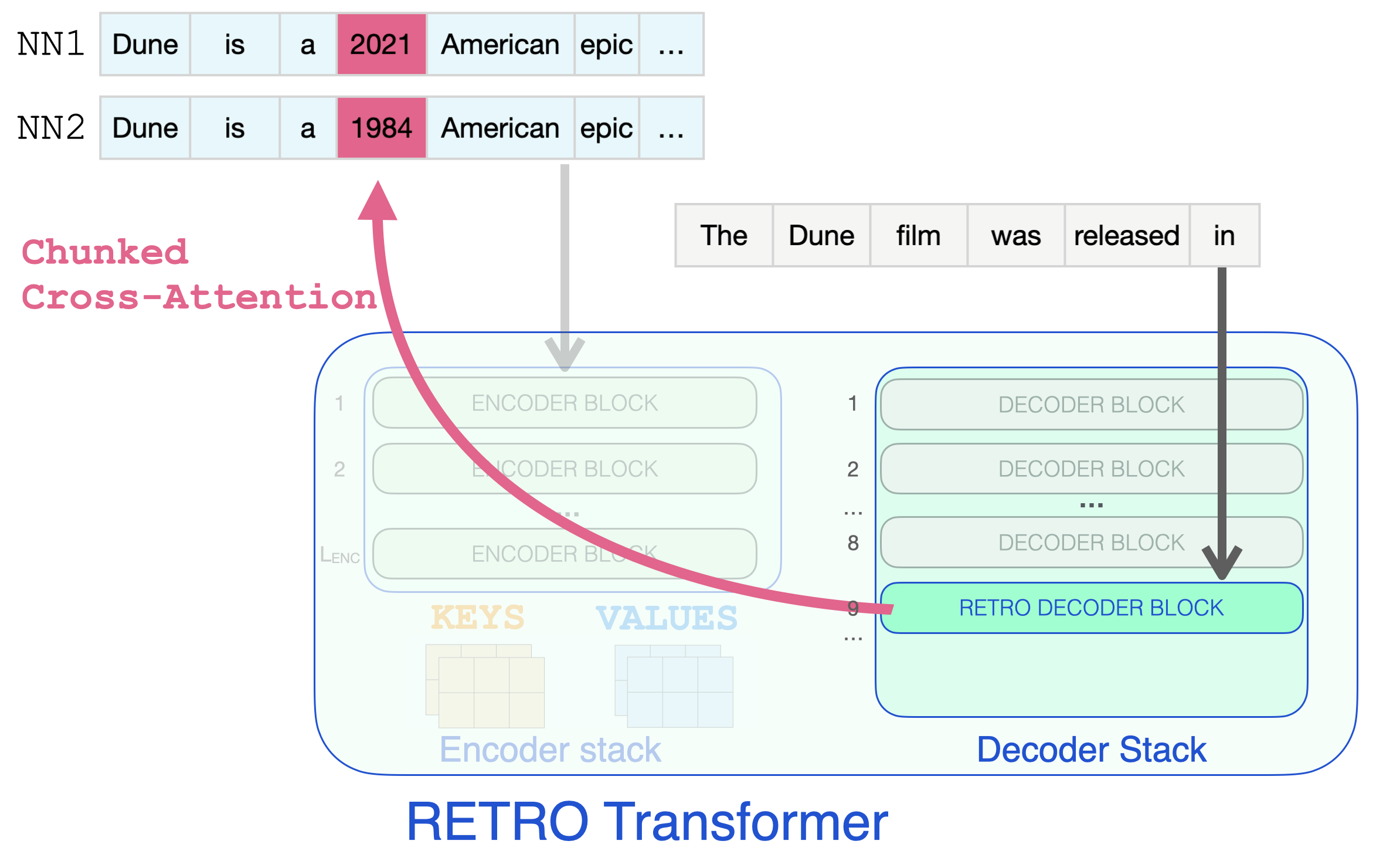
<p>It’s only when a RETRO decoder is reached do we start to incorporate the retrieved information. Every third block starting from 9 is a RETRO block (that allows its input to attend to the neighbors). So layers 9, 12, 15…32 are RETRO blocks. (The two smaller Retro models, and the Retrofit models have these layers starting from the 6th instead of the 9th layer).</p>

<div class="img-div">
  <img src="/images/retro/retro-decoder-attention-2.png" />
  <br />
  Input prompt reaches RETRO Decoder block to start information retrieval
</div>

<p>So effectively, this is the step where the retrieved information can glance at the dates it needs to complete the prompt.</p>

<div class="img-div">
  <img src="/images/retro/retro-decoder-chunked-cross-attention.png" />
  <br />
  RETRO Decoder block retrieving information from nearest neighbour chunks using Chunked Cross-Attention
</div>

<h2 id="previous-work">Previous Work</h2>

<p>Aiding language models with retrieval techniques has been an active area of research. Some of the previous work in the space includes:</p>

<ul>
  <li><a href="https://openreview.net/forum?id=B184E5qee">Improving Neural Language Models with a Continuous Cache</a></li>
  <li><a href="https://openreview.net/forum?id=HklBjCEKvH">Generalization through Memorization: Nearest Neighbor Language Models</a></li>
  <li>Read the <a href="https://ai.facebook.com/blog/retrieval-augmented-generation-streamlining-the-creation-of-intelligent-natural-language-processing-models/">Retrieval Augmented Generation</a> blog from Meta AI and go through Jackie Chi Kit Cheung’s lecture on <a href="http://www.crm.umontreal.ca/2018/Langue18/pdf/Cheung.pdf">Leveraging External Knowledge in Natural Language Understanding Systems</a></li>
  <li>SPALM: <a href="https://arxiv.org/abs/2102.02557">Adaptive Semiparametric Language Models</a></li>
  <li>DPR: <a href="https://aclanthology.org/2020.emnlp-main.550/">Dense Passage Retrieval for Open-Domain Question Answering</a></li>
  <li><a href="https://arxiv.org/abs/2002.08909">REALM: Retrieval-Augmented Language Model Pre-Training</a></li>
  <li>FiD: <a href="https://aclanthology.org/2021.eacl-main.74/">Leveraging Passage Retrieval with Generative Models for Open Domain Question Answering</a></li>
  <li>EMDR: <a href="https://arxiv.org/abs/2106.05346">End-to-End Training of Multi-Document Reader and Retriever for Open-Domain Question Answering</a></li>
  <li>BlenderBot 2.0: <a href="https://arxiv.org/abs/2107.07566">Internet-Augmented Dialogue Generation</a></li>
</ul>

<p>Please post in <a href="https://github.com/jalammar/jalammar.github.io/discussions/21">this thread</a> or reach out to me on <a href="https://twitter.com/JayAlammar">Twitter</a> for any corrections or feedback.</p>]]></content><author><name></name></author><summary type="html"><![CDATA[Discussion: Discussion Thread for comments, corrections, or any feedback. Translations: Korean, Russian Summary: The latest batch of language models can be much smaller yet achieve GPT-3 like performance by being able to query a database or search the web for information. A key indication is that building larger and larger models is not the only way to improve performance. Video The last few years saw the rise of Large Language Models (LLMs) – machine learning models that rapidly improve how machines process and generate language. Some of the highlights since 2017 include: The original Transformer breaks previous performance records for machine translation. BERT popularizes the pre-training then finetuning process, as well as Transformer-based contextualized word embeddings. It then rapidly starts to power Google Search and Bing Search. GPT-2 demonstrates the machine’s ability to write as well as humans do. First T5, then T0 push the boundaries of transfer learning (training a model on one task, and then having it do well on other adjacent tasks) and posing a lot of different tasks as text-to-text tasks. GPT-3 showed that massive scaling of generative models can lead to shocking emergent applications (the industry continues to train larger models like Gopher, MT-NLG…etc). For a while, it seemed like scaling larger and larger models is the main way to improve performance. Recent developments in the field, like DeepMind’s RETRO Transformer and OpenAI’s WebGPT, reverse this trend by showing that smaller generative language models can perform on par with massive models if we augment them with a way to search/query for information. This article breaks down DeepMind’s RETRO (Retrieval-Enhanced TRansfOrmer) and how it works. The model performs on par with GPT-3 despite being 4% its size (7.5 billion parameters vs. 185 billion for GPT-3 Da Vinci). RETRO incorporates information retrieved from a database to free its parameters from being an expensive store of facts and world knowledge. RETRO was presented in the paper Improving Language Models by Retrieving from Trillions of Tokens. It continues and builds on a wide variety of retrieval work in the research community. This article explains the model and not what is especially novel about it.]]></summary></entry><entry><title type="html">Explainable AI Cheat Sheet</title><link href="http://jalammar.github.io/explainable-ai/" rel="alternate" type="text/html" title="Explainable AI Cheat Sheet" /><published>2021-05-04T00:00:00+00:00</published><updated>2021-05-04T00:00:00+00:00</updated><id>http://jalammar.github.io/explainable-ai</id><content type="html" xml:base="http://jalammar.github.io/explainable-ai/"><![CDATA[<p>Introducing the <a href="https://ex.pegg.io">Explainable AI Cheat Sheet</a>, your high-level guide to the set of tools and methods that helps humans understand AI/ML models and their predictions.</p>
<p><a href="https://ex.pegg.io"> <img src="/images/Explainable-AI-cheat-sheet-v0.2.1080.png" /></a></p>

<p>I introduce the cheat sheet in this brief video:</p>

<div style="text-align:center">
 
 <iframe width="560" height="315" src="https://www.youtube.com/embed/Yg3q5x7yDeM" title="YouTube video player" frameborder="0" allow="accelerometer; autoplay; clipboard-write; encrypted-media; gyroscope; picture-in-picture" style="
 width: 100%;
 max-width: 560px;" allowfullscreen=""></iframe>
</div>]]></content><author><name></name></author><summary type="html"><![CDATA[Introducing the Explainable AI Cheat Sheet, your high-level guide to the set of tools and methods that helps humans understand AI/ML models and their predictions. I introduce the cheat sheet in this brief video:]]></summary></entry><entry><title type="html">Finding the Words to Say: Hidden State Visualizations for Language Models</title><link href="http://jalammar.github.io/hidden-states/" rel="alternate" type="text/html" title="Finding the Words to Say: Hidden State Visualizations for Language Models" /><published>2021-01-19T00:00:00+00:00</published><updated>2021-01-19T00:00:00+00:00</updated><id>http://jalammar.github.io/hidden-states</id><content type="html" xml:base="http://jalammar.github.io/hidden-states/"><![CDATA[<script>
window.ecco = {};

let dataPath = '/data/';
let ecco_url = '/assets/';
</script>

<script type="module">
let dataPath = '/data/';
let ecco_url = '/assets/';
import * as explainingApp from "/js/explaining-app.js";
 if (window.location.pathname =='/hidden-states/'){
    explainingApp.citations();
 }
</script>

<link id="css" rel="stylesheet" type="text/css" href="https://storage.googleapis.com/ml-intro/ecco/html/styles.css?6" />

<style>
    .toc li{
        margin-bottom:0px;
        list-style-type: none;
    }
    .toc{
        border-bottom: 1px solid rgba(0, 0, 0, 0.1);
        font-size:80%;

    }
    .toc ul{
        margin-top: 0;
    }

    .toc h3{
        /*font-size:90%;*/
        margin-bottom:5px;
    }

</style>

<p>By visualizing the hidden state between a model's layers, we can get some clues as to the model's "thought process".</p>
<div style="background: hsl(0, 0%, 97%);;
border-top: 1px solid rgba(0, 0, 0, 0.1);;" class="l-screen">

<div class="l-page">
<figure style="text-align: center; padding: 15px">
<img src="/images/explaining/rankings-gpt2xl.png" style="border:1px solid #bbb; width: 90%; margin: 0 auto; text-align: center" />
        <figcaption style="text-align:left">
            <strong>Figure: Finding the words to say</strong><br />
            After a language model generates a sentence, we can visualize a view of how the model came by each word (column).  Each row is a model layer. The value and color indicate the ranking of the output token at that layer. The darker the color, the higher the ranking. Layer 0 is at the top. Layer 47 is at the bottom.<br />
            <strong>Model:</strong>GPT2-XL<br />
        </figcaption>
    
</figure>
    </div>
</div>

<p>Part 2: Continuing the pursuit of making Transformer language models more transparent, this article showcases a collection of visualizations to uncover mechanics of language generation inside a pre-trained language model. These visualizations are all created using <a href="https://www.eccox.io">Ecco</a>, the open-source package we're releasing

<p>In the first part of this series, <a href="/explaining-transformers/">Interfaces for Explaining Transformer Language Models</a>, we showcased interactive interfaces for input saliency and neuron activations. In this article, we will focus on the hidden state as it evolves from model layer to the next. By looking at the hidden states produced by every transformer decoder block, we aim to gleam information about how a language model arrived at a specific output token. This method is explored by Voita et al.<cite key="voita2019bottom"></cite>. Nostalgebraist <cite key="nostalgebraist2020"></cite>
        presents compelling visual treatments showcasing the evolution of token rankings, logit scores, and softmax
        probabilities for the evolving hidden state through the various layers of the model.
    </p>

<!--more-->
<h2>Recap: Transformer Hidden States</h2>
<p>The following figure recaps how a transformer language model works. How the layers result in a final hidden state. And how that final state is then projected to the output vocabulary which results in a score assigned to each token in
        the model's vocabulary. We can see here the top scoring tokens when DistilGPT2 is fed the input sequence " 1, 1,
        ":</p>
<figure class="l-page-outset">
        <img src="/images/explaining/transformer-language-model-steps.png" />
        <figcaption>
            <strong>Figure: Recap of transformer language models.</strong><br />
            This figure shows how the model arrives at the top five output token candidates and their probability scores. This shows us that at the final layer, the
            model is 59% sure the next token is ' 1', and that would be chosen as the output token by greedy decoding.
            Other probable outputs include ' 2' with 18% probability (maybe we are counting) and ' 0' with 5%
            probability (maybe we are counting down).
        </figcaption>
    </figure>

Ecco provides a view of the model's top scoring tokens and their probability scores.


<figure class="highlight"><pre><code class="language-py" data-lang="py"><span class="c1"># Generate one token to complete this input string
</span><span class="n">output</span> <span class="o">=</span> <span class="n">lm</span><span class="p">.</span><span class="n">generate</span><span class="p">(</span><span class="s">" 1, 1, 1,"</span><span class="p">,</span> <span class="n">generate</span><span class="o">=</span><span class="mi">1</span><span class="p">)</span>

<span class="c1"># Visualize
</span><span class="n">output</span><span class="p">.</span><span class="n">layer_predictions</span><span class="p">(</span><span class="n">position</span><span class="o">=</span><span class="mi">6</span><span class="p">,</span> <span class="n">layer</span><span class="o">=</span><span class="mi">5</span><span class="p">)</span></code></pre></figure>


Which would show the following breakdown of candidate output tokens and their probability scores:

<figure class="l-page-outset">
        <img src="/images/explaining/prediction_scores.PNG" />
        <figcaption>
            <strong>Figure: Ten tokens with highest probabilities at the final layer of the model.</strong><br />
        </figcaption>
    </figure>

<h2>Scores after each layer</h2>
<p>Applying the same projection to internal hidden states of the model gives us a view of how the model's conviction
        for the output scoring developed over the processing of the inputs. This projection of internal hidden states
        gives us a sense of which layer contributed the most to elevating the scores (and hence ranking) of a certain
        potential output token.</p>

<figure class="l-page-outset">
        <img src="/images/explaining/predictions.PNG" />
        <figcaption>
            <strong>Figure: projecting inner hidden states to the model's vocabulary reveals cues of processing between layers.</strong><br />
        </figcaption>
    </figure>
<p>Viewing the evolution of the hidden states means that instead of looking only at the candidates output tokens from
        projecting the final model state, we can look at the top scoring tokens after projecting the hidden state
        resulting from each of the model's six layers.</p>


This visualization is created using the same method above with omitting the 'layer' argument (which we set to the final layer in the previous example, layer #5):

<figure class="highlight"><pre><code class="language-py" data-lang="py"><span class="c1"># Visualize the top scoring tokens after each layer
</span><span class="n">output</span><span class="p">.</span><span class="n">layer_predictions</span><span class="p">(</span><span class="n">position</span><span class="o">=</span><span class="mi">6</span><span class="p">)</span></code></pre></figure>


Resulting in: 

<figure class="l-page-outset">
        <img src="/images/explaining/predictions%20all%20layers.PNG" />
        <figcaption>
        <strong>Figure: Top scoring tokens after each of the model's six layers.</strong>
        <br />
            Each row shows the top ten predicted tokens obtained by projecting each hidden state to the output
            vocabulary. The probability scores are shown in pink (obtained by passing logit scores through softmax). We
            can see that <strong>Layer 0</strong> has no digits in its top ten predictions. <strong>Layer 1</strong>
            gives the token ' 1' a 0.03%, probability which, while low, still ranks the token as the seventh highest
            ranking token. Subsequent layers keep elevating the probability and ranking of ' 1', until <strong>the final
            layer</strong> injects a bit more caution by reducing the probability from 100% to ~60%, still retaining the
            token as the highest ranked in the model's output.<br />
            <strong>Note:</strong> This figure is incorrect in showing 0 probability assigned to some tokens due to rounding. The current version of Ecco fixes this by showing '&lt;0.01%'.
        </figcaption>
    </figure>


You can experiment with these visualizations and experiment with them on your own input sentences at the following colab link:

<p><a href="https://colab.research.google.com/github/jalammar/ecco/blob/main/notebooks/Ecco_Output_Token_Scores.ipynb"><img src="/images/explaining/colab-badge.svg" /></a>
    </p>

<h3>Evolution of the selected token</h3>
<figure class="aside">
        <img src="/images/explaining/logit_ranking_1.png" style="max-width:202px" />
        <figcaption>
            <strong>The ranking of the token ' 1' after each layer</strong><br />
            <strong>Layer 0</strong> elevated the token ' 1' to be the 31st highest scored token in the hidden state it
            produced. <strong>Layers 1 and 2</strong> kept increasing the ranking (to 7 then 5 respectively). All the
            <strong>following layers</strong> were sure this is the best token and gave it the top ranking spot.
        </figcaption>
    </figure>
<p>Another visual perspective on the evolving hidden states is to re-examine the hidden states after selecting an output
        token to see how the hidden state after each layer ranked that token. This is one of the many perspectives
        explored by Nostalgebraist <cite key="nostalgebraist2020"></cite>
        and the one we think is a great first approach. In the figure on the side, we can see the ranking (out of
        +50,0000 tokens in the model's vocabulary) of the token ' 1' where each row
        indicates a layer's output.
    </p>

<p>The same visualization can then be plotted for an entire generated sequence, where each column indicates a
        generation step (and its output token), and each row the ranking of
        the output token at each layer:
    </p>

<figure>
        <img src="/images/explaining/sequence_111_rankings.PNG" style="max-width: 400px" />
        <figcaption>
            <strong>Evolution of the rankings of the output sequence ' 1 , 1'</strong><br />
            We can see that <strong>Layer 3</strong> is the point at which the model started to be certain of
            the digit ' 1' as the output. <br /><strong>When the output is to be a comma</strong>, Layer 0 usually ranks
            the comma as 5. <br />
            <strong>When the output is to be a ' 1'</strong>, Layer 0 is less certain, but still ranks the ' 1' token at
            31 or 32.
            Notice that every output token is ranked #1 after Layer 5. That is the definition of <strong>greedy
            sampling</strong> -- the reason we selected this token is because it was ranked first.
        </figcaption>
    </figure>

<p>Let us demonstrate this visualization by presenting the following input to GPT2-Large:</p>


<figure class="l-page">
    <!--
        <script>
            require(['d3', 'ecco'], (d3, ecco) => {
                const euData ={'tokens': [{'token': 'The', 'token_id': 464, 'type': 'input'}, {'token': ' countries', 'token_id': 2678, 'type': 'input'}, {'token': ' of', 'token_id': 286, 'type': 'input'}, {'token': ' the', 'token_id': 262, 'type': 'input'}, {'token': ' European', 'token_id': 3427, 'type': 'input'}, {'token': ' Union', 'token_id': 4479, 'type': 'input'}, {'token': ' are', 'token_id': 389, 'type': 'input'}, {'token': ':', 'token_id': 25, 'type': 'input'}, {'token': '\n', 'token_id': 198, 'type': 'input'}, {'token': '1', 'token_id': 16, 'type': 'input'}, {'token': '.', 'token_id': 13, 'type': 'input'}, {'token': ' Austria', 'token_id': 17322, 'type': 'input'}, {'token': '\n', 'token_id': 198, 'type': 'input'}, {'token': '2', 'token_id': 17, 'type': 'input'}, {'token': '.', 'token_id': 13, 'type': 'input'}, {'token': ' Belgium', 'token_id': 15664, 'type': 'input'}, {'token': '\n', 'token_id': 198, 'type': 'input'}, {'token': '3', 'token_id': 18, 'type': 'input'}, {'token': '.', 'token_id': 13, 'type': 'input'}, {'token': ' Bulgaria', 'token_id': 27902, 'type': 'input'}, {'token': '\n', 'token_id': 198, 'type': 'input'}, {'token': '4', 'token_id': 19, 'type': 'input'}, {'token': '.', 'token_id': 13, 'type': 'input'}, {'token': ' Croatia', 'token_id': 28975, 'type': 'output'}]}
     ecco.renderOutputSequence('viz_eu_input', euData);
            })
        </script>
        <div id="viz_eu_input" class="ecco"></div>
        -->
        <div id="viz_eu_input" class="ecco"><div style="float: left; width: 70%;"><div class="sequence-indicator inputs-indicator">input:</div><div token="The" id="t0" position="0" value="0" class="token token-part input-token" style="opacity: 1; background-color: white;"><div class="position_in_seq">0</div><span style="color: rgb(0, 0, 0); padding-left: 4px;">The</span></div><div token=" countries" id="t1" position="1" value="0" class="token input-token" style="opacity: 1; background-color: white;"><div class="position_in_seq">1</div><span style="color: rgb(0, 0, 0); padding-left: 4px;"> countries</span></div><div token=" of" id="t2" position="2" value="0" class="token input-token" style="opacity: 1; background-color: white;"><div class="position_in_seq">2</div><span style="color: rgb(0, 0, 0); padding-left: 4px;"> of</span></div><div token=" the" id="t3" position="3" value="0" class="token input-token" style="opacity: 1; background-color: white;"><div class="position_in_seq">3</div><span style="color: rgb(0, 0, 0); padding-left: 4px;"> the</span></div><div token=" European" id="t4" position="4" value="0" class="token input-token" style="opacity: 1; background-color: white;"><div class="position_in_seq">4</div><span style="color: rgb(0, 0, 0); padding-left: 4px;"> European</span></div><div token=" Union" id="t5" position="5" value="0" class="token input-token" style="opacity: 1; background-color: white;"><div class="position_in_seq">5</div><span style="color: rgb(0, 0, 0); padding-left: 4px;"> Union</span></div><div token=" are" id="t6" position="6" value="0" class="token input-token" style="opacity: 1; background-color: white;"><div class="position_in_seq">6</div><span style="color: rgb(0, 0, 0); padding-left: 4px;"> are</span></div><div token=":" id="t7" position="7" value="0" class="token input-token" style="opacity: 1; background-color: white;"><div class="position_in_seq">7</div><span style="color: rgb(0, 0, 0); padding-left: 4px;">:</span></div><div token="
" id="t8" position="8" value="0" class="token new-line input-token" style="opacity: 1; background-color: white;"><div class="position_in_seq">8</div><span style="color: rgb(0, 0, 0); padding-left: 4px;">\n</span></div><div token="1" id="t9" position="9" value="0" class="token input-token" style="opacity: 1; background-color: white;"><div class="position_in_seq">9</div><span style="color: rgb(0, 0, 0); padding-left: 4px;">1</span></div><div token="." id="t10" position="10" value="0" class="token input-token" style="opacity: 1; background-color: white;"><div class="position_in_seq">10</div><span style="color: rgb(0, 0, 0); padding-left: 4px;">.</span></div><div token=" Austria" id="t11" position="11" value="0" class="token input-token" style="opacity: 1; background-color: white;"><div class="position_in_seq">11</div><span style="color: rgb(0, 0, 0); padding-left: 4px;"> Austria</span></div><div token="
" id="t12" position="12" value="0" class="token new-line input-token" style="opacity: 1; background-color: white;"><div class="position_in_seq">12</div><span style="color: rgb(0, 0, 0); padding-left: 4px;">\n</span></div><div token="2" id="t13" position="13" value="0" class="token input-token" style="opacity: 1; background-color: white;"><div class="position_in_seq">13</div><span style="color: rgb(0, 0, 0); padding-left: 4px;">2</span></div><div token="." id="t14" position="14" value="0" class="token input-token" style="opacity: 1; background-color: white;"><div class="position_in_seq">14</div><span style="color: rgb(0, 0, 0); padding-left: 4px;">.</span></div><div token=" Belgium" id="t15" position="15" value="0" class="token input-token" style="opacity: 1; background-color: white;"><div class="position_in_seq">15</div><span style="color: rgb(0, 0, 0); padding-left: 4px;"> Belgium</span></div><div token="
" id="t16" position="16" value="0" class="token new-line input-token" style="opacity: 1; background-color: white;"><div class="position_in_seq">16</div><span style="color: rgb(0, 0, 0); padding-left: 4px;">\n</span></div><div token="3" id="t17" position="17" value="0" class="token input-token" style="opacity: 1; background-color: white;"><div class="position_in_seq">17</div><span style="color: rgb(0, 0, 0); padding-left: 4px;">3</span></div><div token="." id="t18" position="18" value="0" class="token input-token" style="opacity: 1; background-color: white;"><div class="position_in_seq">18</div><span style="color: rgb(0, 0, 0); padding-left: 4px;">.</span></div><div token=" Bulgaria" id="t19" position="19" value="0" class="token input-token" style="opacity: 1; background-color: white;"><div class="position_in_seq">19</div><span style="color: rgb(0, 0, 0); padding-left: 4px;"> Bulgaria</span></div><div token="
" id="t20" position="20" value="0" class="token new-line input-token" style="opacity: 1; background-color: white;"><div class="position_in_seq">20</div><span style="color: rgb(0, 0, 0); padding-left: 4px;">\n</span></div><div token="4" id="t21" position="21" value="0" class="token input-token" style="opacity: 1; background-color: white;"><div class="position_in_seq">21</div><span style="color: rgb(0, 0, 0); padding-left: 4px;">4</span></div><div token="." id="t22" position="22" value="0" class="token input-token" style="opacity: 1; background-color: white;"><div class="position_in_seq">22</div><span style="color: rgb(0, 0, 0); padding-left: 4px;">.</span></div></div></div>
    </figure>
<div style="clear:both"></div>

<p>Visualizaing the evolution of the hidden states sheds light on how various layers contribute to generating this sequence as we can see in the following figure:</p>
 <figure>
 <a href="/images/explaining/ranking-eu-gpt2.png" target="_blank"><img src="/images/explaining/ranking-eu-gpt2-thumb.png" style="max-width: 648px" /></a><br /><br />
        <figcaption>
            <strong>Figure: Hidden state evolution of an output sequence</strong> <br />
            Click to open image in full resolution. The figure reveals:
            <ul>
                <li>Columns of solid pink corresponding to newlines and periods. Starting from Layer #0 and onwards, the model is certain early on of these tokens, indicating Layer #0's awareness of certain syntactic properties (and that later layers raise no objections).</li>
                <li>
                    Columns where country names are predicted are very bright at the top and it's up to the last five layers to really come up with the appropriate token.
                </li>
                <li>
                    Columns tracking the incrementing number tend to be resolved at layer #9.
                </li>
                <li>
                    The model erroneously lists Chile in the list, not a EU country. But notice that the ranking of that token is 43 -- indicating the error is better attributed to our token sampling method rather than to the model itself. In the case of all other countries they were correct and in the top 3.
                </li>
                <li>
                    Aside from Chile, the rest of the countries are correct, but also follow the alphabetical order followed in the input sequence.
                </li>
            </ul>
        </figcaption>
    </figure>


<p><a href="https://colab.research.google.com/github/jalammar/ecco/blob/main/notebooks/Ecco_Evolution_of_Selected_Token.ipynb"><img src="/images/explaining/colab-badge.svg" /></a></p>


<h3>Rankings of Other Tokens</h3>


<figure class="wide-aside">
        <img src="/images/explaining/watch_keys_cabinet.png" style="max-width:270px;" />
        <figcaption>
            <strong>Figure: Rankings of which token should go in the blank</strong> <br />
            While the final output succeeds in assigning the correct number, the first five layers surprisingly fail at
            identifying the correct number (by giving " is" a higher ranking than " are", which is the correct answer).
            Examining attention or inner-layer saliency could reveal clues as to the reason.
        </figcaption>
    </figure>

<p>We are not limited to watching the evolution of only one (the selected) token for a specific position. There are
        cases where we want to compare the rankings of multiple tokens <i>in the same position</i> regardless if the model selected them or not. </p>
 <p>One such case is the number prediction task described by Linzen et al.<cite key="linzen2016assessing"></cite>
        which arises from the English language phenomenon of subject-verb agreement. In that task, we want to analyze the
        model's capacity to encode <i>syntactic number</i> (whether the subject we're addressing is singular or plural)
        and <i>syntactic subjecthood</i> (which subject in the sentence we're addressing).
    </p>
<p>Put simply, fill-in the blank. The only acceptable answers are 1) <strong>is</strong> 2) <strong>are</strong>:
    </p>
<p>The key<strong>s</strong> to the cabinet ______ </p>
<p>To answer correctly, one has to first determine whether we're describing the keys (possible subject #1) or the
        cabinet (possible subject #2). Having decided it is the keys, the second determination would be whether it is
        singular or plural.</p>


<figure class="wide-aside">
        <img src="/images/explaining/watch_key_cabinets.png" style="max-width:270px;" />
        <figcaption>
            The model is able to assign a higher ranking to <strong>is</strong>, which is the correct token. Every layer
            in the model managed to rank " is" higher than " are". The ranking of " are" remains high, however, as far as
            rankings are concerned (the delta in probability scores might indicate otherwise, however).
        </figcaption>
    </figure>


<p>Contrast your answer for the first question with the following variation:</p>
<p>The key to the cabinet<strong>s</strong> ______ </p>
<p>The figures in this section visualize the hidden-state evolution of the tokens " is" and " are". The numbers
        in the cells are their ranking in the position of the blank (Both columns address the same position in the
        sequence, they're not subsequent positions as was the case in the previous visualization).</p>

<p>The first figure (showing the rankings for the sequence "The keys to the cabinet") raises the question of why do five layers fail the task and only the final layer sets the record
        straight. This is likely a similar effect to that observed in BERT of the final layer being the most
        task-specific<cite key="liu2019linguistic,rogers2020primer"></cite>. It is also worth investigating whether that capability of succeeding at the task is predominantly localized in
        Layer 5, or if the Layer is only the final expression in a circuit<cite key="cammarata2020thread"></cite>
        spanning multiple layers which is especially sensitive to subject-verb agreement.
    </p>

<h3>Probing for bias</h3>
<p>This method can shed light on questions of bias and where they might emerge in a model. The following figures, for example, probe for the model's gender expectation associated with different professions:</p>
<figure>
        <img src="/images/explaining/doctor.png" style="max-width:220px;" />
        <img src="/images/explaining/nurse.png" style="max-width:220px;" />
        <figcaption>
            <strong>Figure: Probing bias in the model's association of gender with professions - Doctor and nurse</strong><br />
            The first five layers all rank " man" higher than " woman" for both professions. For the nursing profession, the final layer decisively elevates " woman" to a higher ranking than " man".
        </figcaption>
    </figure>
<p>More systemaic and nuanced examination of bias in contextualized word embeddings (another term for the vectors we've been referring to as "hidden states") can be found in <cite key="zhao2019gender,kurita2019measuring,basta2019evaluating,webster2020measuring"></cite>.</p>


<p><a href="https://colab.research.google.com/github/jalammar/ecco/blob/main/notebooks/Ecco_Comparing_Token_Rankings.ipynb"><img src="/images/explaining/colab-badge.svg" /></a></p>

<h2>Your turn!</h2>
You can proceed to do your own experiments using Ecco and the three notebooks in this article:

<ul>
    <li>
    <a href="https://colab.research.google.com/github/jalammar/ecco/blob/main/notebooks/Ecco_Output_Token_Scores.ipynb">Output Token Scores</a>
  </li>
  <li>
    <a href="https://colab.research.google.com/github/jalammar/ecco/blob/main/notebooks/Ecco_Evolution_of_Selected_Token.ipynb">Evolution of Selected Token</a>
    </li>
    <li>
    <a href="https://colab.research.google.com/github/jalammar/ecco/blob/main/notebooks/Ecco_Comparing_Token_Rankings.ipynb">Comparing Token Rankings</a>
    </li>
</ul>

You can report issues you run into at the Ecco's Github page. Feel free to share any interesting findings at the Ecco <a href="https://github.com/jalammar/ecco/discussions">Discussion</a> board. I invite you again to read <a href="https://www.lesswrong.com/posts/AcKRB8wDpdaN6v6ru/interpreting-gpt-the-logit-lens">Interpreting GPT the Logit Lens</a> and see the various ways the author examines such a visualization. I leave you with a small gallery of examples showcasing the responses of different models to different input prompts.

<h2>Gallery</h2>
<figure>  <figcaption>
                    <strong>Input:</strong> "Heathrow airport is located in the city of"<br />
        <strong>Model:</strong> DistilGPT2
                </figcaption>
        <a href="london_rankings.png"><img src="/images/explaining/london_rankings.png" style="max-width:247px" /></a><br />

        
<hr style="border-top: 10px dotted #bbb" />
<figcaption><strong>Input:</strong> "Some of the most glorious historical attractions in Spain date from the period of Muslim rule, including The Mezquita, built as the Great Mosque of Cordoba and the Medina Azahara, also in Cordoba and now in ruins but still visitable as such and built as the Madinat al-Zahra, the Palace of al-Andalus; and the Alhambra in Granada, a splendid, intact palace. There are also two synagogues still standing that were built during the era of Muslim Spain: Santa Maria la Blanca in Toledo and the Synagogue of Cordoba, in the Old City. Reconquista and Imperial era"<br />
            <strong>Model:</strong> DistilGPT2
        </figcaption>        
<a href="/images/explaining/ranking-cordoba.png"> <img style="max-width: 648px" src="/images/explaining/ranking-cordoba.png" /></a><br />

<br />
<figcaption><strong>Model:</strong> GPT2-Large</figcaption>
<a href="/images/explaining/cordoba-gpt2.png"><img style="max-width: 648px" src="/images/explaining/cordoba-gpt2.png" /></a><br />


<br />
<figcaption><strong>Model:</strong> GPT2-XL</figcaption>
<a href="/images/explaining/cordoba-gpt2xl.png"><img style="max-width: 648px" src="/images/explaining/cordoba-gpt2xl.png" /></a><br />

<hr style="border-top: 10px dotted #bbb" />
<figcaption><strong>Input:</strong> "The countires of the European Union are:\n1. Austria\n2. Belgium\n3.
            Bulgaria\n4." <br />
            <strong>Model:</strong> DistilGPT2
        </figcaption>
        <a href="/images/explaining/ranking-eu.png"><img src="/images/explaining/ranking-eu.png" style="max-width: 648px" /></a><br />
        <figcaption><strong>Model:</strong> GPT2-Large</figcaption>
<a href="/images/explaining/ranking-eu-gpt2.png"><img src="/images/explaining/ranking-eu-gpt2.png" style="max-width: 648px" /></a><br /><br />
        <figcaption><strong>Model:</strong> GPT2-XL</figcaption>
        <a href="/images/explaining/ranking-eu-gpt2xl.png"><img style="max-width: 648px" src="/images/explaining/ranking-eu-gpt2xl.png" /></a>
    </figure>
    

<h2>Acknowledgements</h2>
<p>This article was vastly improved thanks to feedback on earlier drafts provided by
        Abdullah Almaatouq,
        Anfal Alatawi,
        Fahd Alhazmi,
        Hadeel Al-Negheimish,
        Isabelle Augenstein,
        Jasmijn Bastings,
        Najwa Alghamdi,
        Pepa Atanasova, and
        Sebastian Gehrmann.
    </p>


<h2>References</h2>
<references>
</references>


<h2>Citation</h2>
<div style="color: #777;">

If you found this work helpful for your research, please cite it as following:

<div class="cite">

      <pre><code class="language-code">Alammar, J. (2021). Finding the Words to Say: Hidden State Visualizations for Language Models [Blog post]. Retrieved from https://jalammar.github.io/hidden-states/
</code></pre>
    </div>

<br />
BibTex:

<div class="cite">

      <pre><code class="language-code">@misc{alammar2021hiddenstates, 
  title={Finding the Words to Say: Hidden State Visualizations for Language Models},
  author={Alammar, J},
  year={2021},
  url={https://jalammar.github.io/hidden-states/}
}
</code></pre>

    </div>
</div>


<script type="text/bibliography">

@article{poerner2018interpretable,
  title={Interpretable textual neuron representations for NLP},
  author={Poerner, Nina and Roth, Benjamin and Sch{\"u}tze, Hinrich},
  journal={arXiv preprint arXiv:1809.07291},
  year={2018},
  url={https://arxiv.org/pdf/1809.07291}
}

@misc{karpathy2015visualizing,
      title={Visualizing and Understanding Recurrent Networks},
      author={Andrej Karpathy and Justin Johnson and Li Fei-Fei},
      year={2015},
      eprint={1506.02078},
      archivePrefix={arXiv},
      primaryClass={cs.LG},
      url={https://arxiv.org/pdf/1506.02078.pdf}
}

@article{olah2017feature,
  title={Feature visualization},
  author={Olah, Chris and Mordvintsev, Alexander and Schubert, Ludwig},
  journal={Distill},
  volume={2},
  number={11},
  pages={e7},
  year={2017},
  url={https://distill.pub/2017/feature-visualization/}
}

@article{olah2018building,
  title={The building blocks of interpretability},
  author={Olah, Chris and Satyanarayan, Arvind and Johnson, Ian and Carter, Shan and Schubert, Ludwig and Ye, Katherine and Mordvintsev, Alexander},
  journal={Distill},
  volume={3},
  number={3},
  pages={e10},
  year={2018},
  url={https://distill.pub/2018/building-blocks/}
}

@article{abnar2020quantifying,
  title={Quantifying Attention Flow in Transformers},
  author={Abnar, Samira and Zuidema, Willem},
  journal={arXiv preprint arXiv:2005.00928},
  year={2020},
  url={https://arxiv.org/pdf/2005.00928}
}

@article{li2015visualizing,
  title={Visualizing and understanding neural models in nlp},
  author={Li, Jiwei and Chen, Xinlei and Hovy, Eduard and Jurafsky, Dan},
  journal={arXiv preprint arXiv:1506.01066},
  year={2015},
  url={https://arxiv.org/pdf/1506.01066}
}

@article{poerner2018interpretable,
  title={Interpretable textual neuron representations for NLP},
  author={Poerner, Nina and Roth, Benjamin and Sch{\"u}tze, Hinrich},
  journal={arXiv preprint arXiv:1809.07291},
  year={2018},
  url={https://arxiv.org/pdf/1809.07291}
}


@inproceedings{park2019sanvis,
  title={SANVis: Visual Analytics for Understanding Self-Attention Networks},
  author={Park, Cheonbok and Na, Inyoup and Jo, Yongjang and Shin, Sungbok and Yoo, Jaehyo and Kwon, Bum Chul and Zhao, Jian and Noh, Hyungjong and Lee, Yeonsoo and Choo, Jaegul},
  booktitle={2019 IEEE Visualization Conference (VIS)},
  pages={146--150},
  year={2019},
  organization={IEEE},
  url={https://arxiv.org/pdf/1909.09595}
}

@misc{nostalgebraist2020,
    title={interpreting GPT: the logit lens},
    url={https://www.lesswrong.com/posts/AcKRB8wDpdaN6v6ru/interpreting-gpt-the-logit-lens},
    year={2020},
    author={nostalgebraist}
 }

@article{vig2019analyzing,
  title={Analyzing the structure of attention in a transformer language model},
  author={Vig, Jesse and Belinkov, Yonatan},
  journal={arXiv preprint arXiv:1906.04284},
  year={2019},
  url={https://arxiv.org/pdf/1906.04284}
}

@inproceedings{hoover2020,
    title = "ex{BERT}: A Visual Analysis Tool to Explore Learned Representations in {T}ransformer Models",
    author = "Hoover, Benjamin  and Strobelt, Hendrik  and Gehrmann, Sebastian",
    booktitle = "Proceedings of the 58th Annual Meeting of the Association for Computational Linguistics: System Demonstrations",
    month = jul,
    year = "2020",
    address = "Online",
    publisher = "Association for Computational Linguistics",
    url = "https://www.aclweb.org/anthology/2020.acl-demos.22",
    pages = "187--196"
    }

@article{jones2017,
    title= "Tensor2tensor transformer visualization",
    author="Llion Jones",
    year="2017",
    url="https://github.com/tensorflow/tensor2tensor/tree/master/tensor2tensor/visualization"
    }

@article{voita2019bottom,
  title={The bottom-up evolution of representations in the transformer: A study with machine translation and language modeling objectives},
  author={Voita, Elena and Sennrich, Rico and Titov, Ivan},
  journal={arXiv preprint arXiv:1909.01380},
  year={2019},
  url={https://arxiv.org/pdf/1909.01380.pdf}
}

@misc{bastings2020elephant,
      title={The elephant in the interpretability room: Why use attention as explanation when we have saliency methods?},
      author={Jasmijn Bastings and Katja Filippova},
      year={2020},
      eprint={2010.05607},
      archivePrefix={arXiv},
      primaryClass={cs.CL},
      url={https://arxiv.org/pdf/2010.05607.pdf}
}

@article{linzen2016assessing,
  title={Assessing the ability of LSTMs to learn syntax-sensitive dependencies},
  author={Linzen, Tal and Dupoux, Emmanuel and Goldberg, Yoav},
  journal={Transactions of the Association for Computational Linguistics},
  volume={4},
  pages={521--535},
  year={2016},
  publisher={MIT Press},
  url={https://www.aclweb.org/anthology/Q16-1037.pdf}
}

@book{tufte2006beautiful,
  title={Beautiful evidence},
  author={Tufte, Edward R},
  year={2006},
  publisher={Graphis Pr}
}

@article{pedregosa2011scikit,
  title={Scikit-learn: Machine learning in Python},
  author={Pedregosa, Fabian and Varoquaux, Ga{\"e}l and Gramfort, Alexandre and Michel, Vincent and Thirion, Bertrand and Grisel, Olivier and Blondel, Mathieu and Prettenhofer, Peter and Weiss, Ron and Dubourg, Vincent and others},
  journal={the Journal of machine Learning research},
  volume={12},
  pages={2825--2830},
  year={2011},
  publisher={JMLR. org}
}

@article{walt2011numpy,
  title={The NumPy array: a structure for efficient numerical computation},
  author={Walt, St{\'e}fan van der and Colbert, S Chris and Varoquaux, Gael},
  journal={Computing in science \& engineering},
  volume={13},
  number={2},
  pages={22--30},
  year={2011},
  publisher={IEEE Computer Society}
}

@article{wolf2019huggingface,
  title={HuggingFace's Transformers: State-of-the-art Natural Language Processing},
  author={Wolf, Thomas and Debut, Lysandre and Sanh, Victor and Chaumond, Julien and Delangue, Clement and Moi, Anthony and Cistac, Pierric and Rault, Tim and Louf, R{\'e}mi and Funtowicz, Morgan and others},
  journal={ArXiv},
  pages={arXiv--1910},
  year={2019}
}

@article{bostock2012d3,
  title={D3. js-data-driven documents},
  author={Bostock, Mike and others},
  journal={l{\'\i}nea]. Disponible en: https://d3js. org/.[Accedido: 17-sep-2019]},
  year={2012}
}

@article{ragan2014jupyter,
  title={The Jupyter/IPython architecture: a unified view of computational research, from interactive exploration to communication and publication.},
  author={Ragan-Kelley, Min and Perez, F and Granger, B and Kluyver, T and Ivanov, P and Frederic, J and Bussonnier, M},
  journal={AGUFM},
  volume={2014},
  pages={H44D--07},
  year={2014}
}

@article{kokhlikyan2020captum,
  title={Captum: A unified and generic model interpretability library for PyTorch},
  author={Kokhlikyan, Narine and Miglani, Vivek and Martin, Miguel and Wang, Edward and Alsallakh, Bilal and Reynolds, Jonathan and Melnikov, Alexander and Kliushkina, Natalia and Araya, Carlos and Yan, Siqi and others},
  journal={arXiv preprint arXiv:2009.07896},
  year={2020}
}

@misc{li2016visualizing,
      title={Visualizing and Understanding Neural Models in NLP},
      author={Jiwei Li and Xinlei Chen and Eduard Hovy and Dan Jurafsky},
      year={2016},
      eprint={1506.01066},
      archivePrefix={arXiv},
      primaryClass={cs.CL}
}

@misc{radford2017learning,
      title={Learning to Generate Reviews and Discovering Sentiment},
      author={Alec Radford and Rafal Jozefowicz and Ilya Sutskever},
      year={2017},
      eprint={1704.01444},
      archivePrefix={arXiv},
      primaryClass={cs.LG},
      url={https://arxiv.org/pdf/1704.01444.pdf}
}

@misc{liu2019linguistic,
      title={Linguistic Knowledge and Transferability of Contextual Representations},
      author={Nelson F. Liu and Matt Gardner and Yonatan Belinkov and Matthew E. Peters and Noah A. Smith},
      year={2019},
      eprint={1903.08855},
      archivePrefix={arXiv},
      primaryClass={cs.CL},
      url={https://arxiv.org/pdf/1903.08855.pdf}
}

@misc{rogers2020primer,
      title={A Primer in BERTology: What we know about how BERT works},
      author={Anna Rogers and Olga Kovaleva and Anna Rumshisky},
      year={2020},
      eprint={2002.12327},
      archivePrefix={arXiv},
      primaryClass={cs.CL},
      url={https://arxiv.org/pdf/2002.12327.pdf}
}

@article{cammarata2020thread,
  author = {Cammarata, Nick and Carter, Shan and Goh, Gabriel and Olah, Chris and Petrov, Michael and Schubert, Ludwig},
  title = {Thread: Circuits},
  journal = {Distill},
  year = {2020},
  note = {https://distill.pub/2020/circuits},
  doi = {10.23915/distill.00024},
  url={https://distill.pub/2020/circuits/}
}

@article{victor2013media,
  title={Media for thinking the unthinkable},
  author={Victor, Bret},
  journal={Vimeo, May},
  year={2013}
}

@article{molnar2020interpretable,
  title={Interpretable Machine Learning--A Brief History, State-of-the-Art and Challenges},
  author={Molnar, Christoph and Casalicchio, Giuseppe and Bischl, Bernd},
  journal={arXiv preprint arXiv:2010.09337},
  year={2020},
  url={https://arxiv.org/pdf/2010.09337.pdf}
}

@inproceedings{vaswani2017attention,
  title={Attention is all you need},
  author={Vaswani, Ashish and Shazeer, Noam and Parmar, Niki and Uszkoreit, Jakob and Jones, Llion and Gomez, Aidan N and Kaiser, {\L}ukasz and Polosukhin, Illia},
  booktitle={Advances in neural information processing systems},
  pages={5998--6008},
  year={2017},
  url={https://papers.nips.cc/paper/7181-attention-is-all-you-need.pdf}
}

@article{liu2018generating,
  title={Generating wikipedia by summarizing long sequences},
  author={Liu, Peter J and Saleh, Mohammad and Pot, Etienne and Goodrich, Ben and Sepassi, Ryan and Kaiser, Lukasz and Shazeer, Noam},
  journal={arXiv preprint arXiv:1801.10198},
  year={2018},
  url={https://arxiv.org/pdf/1801.10198}
}

@misc{radford2018improving,
  title={Improving language understanding by generative pre-training},
  author={Radford, Alec and Narasimhan, Karthik and Salimans, Tim and Sutskever, Ilya},
  year={2018},
  url={https://www.cs.ubc.ca/~amuham01/LING530/papers/radford2018improving.pdf}
}
@article{radford2019language,
  title={Language models are unsupervised multitask learners},
  author={Radford, Alec and Wu, Jeffrey and Child, Rewon and Luan, David and Amodei, Dario and Sutskever, Ilya},
  journal={OpenAI blog},
  volume={1},
  number={8},
  pages={9},
  year={2019},
  url={https://d4mucfpksywv.cloudfront.net/better-language-models/language_models_are_unsupervised_multitask_learners.pdf}
}

@article{brown2020language,
  title={Language models are few-shot learners},
  author={Brown, Tom B and Mann, Benjamin and Ryder, Nick and Subbiah, Melanie and Kaplan, Jared and Dhariwal, Prafulla and Neelakantan, Arvind and Shyam, Pranav and Sastry, Girish and Askell, Amanda and others},
  journal={arXiv preprint arXiv:2005.14165},
  year={2020},
  url={https://arxiv.org/pdf/2005.14165.pdf}
}

@article{devlin2018bert,
  title={Bert: Pre-training of deep bidirectional transformers for language understanding},
  author={Devlin, Jacob and Chang, Ming-Wei and Lee, Kenton and Toutanova, Kristina},
  journal={arXiv preprint arXiv:1810.04805},
  year={2018},
  url={https://arxiv.org/pdf/1810.04805.pdf}
}

@article{liu2019roberta,
  title={Roberta: A robustly optimized bert pretraining approach},
  author={Liu, Yinhan and Ott, Myle and Goyal, Naman and Du, Jingfei and Joshi, Mandar and Chen, Danqi and Levy, Omer and Lewis, Mike and Zettlemoyer, Luke and Stoyanov, Veselin},
  journal={arXiv preprint arXiv:1907.11692},
  year={2019}
}

@article{lan2019albert,
  title={Albert: A lite bert for self-supervised learning of language representations},
  author={Lan, Zhenzhong and Chen, Mingda and Goodman, Sebastian and Gimpel, Kevin and Sharma, Piyush and Soricut, Radu},
  journal={arXiv preprint arXiv:1909.11942},
  year={2019},
  url={https://arxiv.org/pdf/1909.11942.pdf}
}

@article{lewis2019bart,
  title={Bart: Denoising sequence-to-sequence pre-training for natural language generation, translation, and comprehension},
  author={Lewis, Mike and Liu, Yinhan and Goyal, Naman and Ghazvininejad, Marjan and Mohamed, Abdelrahman and Levy, Omer and Stoyanov, Ves and Zettlemoyer, Luke},
  journal={arXiv preprint arXiv:1910.13461},
  year={2019},
  url={https://arxiv.org/pdf/1910.13461}
}

@article{raffel2019exploring,
  title={Exploring the limits of transfer learning with a unified text-to-text transformer},
  author={Raffel, Colin and Shazeer, Noam and Roberts, Adam and Lee, Katherine and Narang, Sharan and Matena, Michael and Zhou, Yanqi and Li, Wei and Liu, Peter J},
  journal={arXiv preprint arXiv:1910.10683},
  year={2019},
  url={https://arxiv.org/pdf/1910.10683}
}

@article{dosovitskiy2020image,
  title={An Image is Worth 16x16 Words: Transformers for Image Recognition at Scale},
  author={Dosovitskiy, Alexey and Beyer, Lucas and Kolesnikov, Alexander and Weissenborn, Dirk and Zhai, Xiaohua and Unterthiner, Thomas and Dehghani, Mostafa and Minderer, Matthias and Heigold, Georg and Gelly, Sylvain and others},
  journal={arXiv preprint arXiv:2010.11929},
  year={2020},
  url={https://arxiv.org/pdf/2010.11929.pdf}
}

@article{zhao2019gender,
  title={Gender bias in contextualized word embeddings},
  author={Zhao, Jieyu and Wang, Tianlu and Yatskar, Mark and Cotterell, Ryan and Ordonez, Vicente and Chang, Kai-Wei},
  journal={arXiv preprint arXiv:1904.03310},
  year={2019},
  url={https://arxiv.org/pdf/1904.03310.pdf}
}

@article{kurita2019measuring,
  title={Measuring bias in contextualized word representations},
  author={Kurita, Keita and Vyas, Nidhi and Pareek, Ayush and Black, Alan W and Tsvetkov, Yulia},
  journal={arXiv preprint arXiv:1906.07337},
  year={2019},
  url={https://arxiv.org/pdf/1906.07337.pdf}
}

@article{basta2019evaluating,
  title={Evaluating the underlying gender bias in contextualized word embeddings},
  author={Basta, Christine and Costa-Juss{\`a}, Marta R and Casas, Noe},
  journal={arXiv preprint arXiv:1904.08783},
  year={2019},
  url={https://arxiv.org/pdf/1904.08783.pdf}
}

@misc{atanasova2020diagnostic,
      title={A Diagnostic Study of Explainability Techniques for Text Classification},
      author={Pepa Atanasova and Jakob Grue Simonsen and Christina Lioma and Isabelle Augenstein},
      year={2020},
      eprint={2009.13295},
      archivePrefix={arXiv},
      primaryClass={cs.CL},
      url={https://arxiv.org/pdf/2009.13295.pdf}
}

@article{madsen2019visualizing,
  author = {Madsen, Andreas},
  title = {Visualizing memorization in RNNs},
  journal = {Distill},
  year = {2019},
  note = {https://distill.pub/2019/memorization-in-rnns},
  doi = {10.23915/distill.00016},
  url={https://distill.pub/2019/memorization-in-rnns/}
}

@misc{vig2019visualizing,
      title={Visualizing Attention in Transformer-Based Language Representation Models},
      author={Jesse Vig},
      year={2019},
      eprint={1904.02679},
      archivePrefix={arXiv},
      primaryClass={cs.HC},
      url={https://arxiv.org/pdf/1904.02679}
}


@misc{tenney2020language,
      title={The Language Interpretability Tool: Extensible, Interactive Visualizations and Analysis for NLP Models},
      author={Ian Tenney and James Wexler and Jasmijn Bastings and Tolga Bolukbasi and Andy Coenen and Sebastian Gehrmann and Ellen Jiang and Mahima Pushkarna and Carey Radebaugh and Emily Reif and Ann Yuan},
      year={2020},
      eprint={2008.05122},
      archivePrefix={arXiv},
      primaryClass={cs.CL},
      url={https://arxiv.org/pdf/2008.05122}
}

@article{wallace2019allennlp,
  title={Allennlp interpret: A framework for explaining predictions of nlp models},
  author={Wallace, Eric and Tuyls, Jens and Wang, Junlin and Subramanian, Sanjay and Gardner, Matt and Singh, Sameer},
  journal={arXiv preprint arXiv:1909.09251},
  year={2019},
  url={https://arxiv.org/pdf/1909.09251.pdf}
}

@misc{zhang2020dialogpt,
      title={DialoGPT: Large-Scale Generative Pre-training for Conversational Response Generation},
      author={Yizhe Zhang and Siqi Sun and Michel Galley and Yen-Chun Chen and Chris Brockett and Xiang Gao and Jianfeng Gao and Jingjing Liu and Bill Dolan},
      year={2020},
      eprint={1911.00536},
      archivePrefix={arXiv},
      primaryClass={cs.CL},
      url={https://arxiv.org/pdf/1911.00536}
}
@misc{sanh2020distilbert,
      title={DistilBERT, a distilled version of BERT: smaller, faster, cheaper and lighter},
      author={Victor Sanh and Lysandre Debut and Julien Chaumond and Thomas Wolf},
      year={2020},
      eprint={1910.01108},
      archivePrefix={arXiv},
      primaryClass={cs.CL},
      url={https://arxiv.org/pdf/1910.01108}
}

@misc{shrikumar2017just,
      title={Not Just a Black Box: Learning Important Features Through Propagating Activation Differences},
      author={Avanti Shrikumar and Peyton Greenside and Anna Shcherbina and Anshul Kundaje},
      year={2017},
      eprint={1605.01713},
      archivePrefix={arXiv},
      primaryClass={cs.LG},
      url={https://arxiv.org/pdf/1605.01713}
}

@misc{denil2015extraction,
      title={Extraction of Salient Sentences from Labelled Documents},
      author={Misha Denil and Alban Demiraj and Nando de Freitas},
      year={2015},
      eprint={1412.6815},
      archivePrefix={arXiv},
      primaryClass={cs.CL},
      url={https://arxiv.org/pdf/1412.6815.pdf}
}

@misc{webster2020measuring,
      title={Measuring and Reducing Gendered Correlations in Pre-trained Models},
      author={Kellie Webster and Xuezhi Wang and Ian Tenney and Alex Beutel and Emily Pitler and Ellie Pavlick and Jilin Chen and Slav Petrov},
      year={2020},
      eprint={2010.06032},
      archivePrefix={arXiv},
      primaryClass={cs.CL},
      url={https://arxiv.org/pdf/2010.06032}
}

@article{arrieta2020explainable,
  title={Explainable Artificial Intelligence (XAI): Concepts, taxonomies, opportunities and challenges toward responsible AI},
  author={Arrieta, Alejandro Barredo and D{\'\i}az-Rodr{\'\i}guez, Natalia and Del Ser, Javier and Bennetot, Adrien and Tabik, Siham and Barbado, Alberto and Garc{\'\i}a, Salvador and Gil-L{\'o}pez, Sergio and Molina, Daniel and Benjamins, Richard and others},
  journal={Information Fusion},
  volume={58},
  pages={82--115},
  year={2020},
  publisher={Elsevier},
  url={https://arxiv.org/pdf/1910.10045.pdf}
}

@article{tsang2020does,
  title={How does this interaction affect me? Interpretable attribution for feature interactions},
  author={Tsang, Michael and Rambhatla, Sirisha and Liu, Yan},
  journal={arXiv preprint arXiv:2006.10965},
  year={2020},
  url={https://arxiv.org/pdf/2006.10965.pdf}
}

@misc{swayamdipta2020dataset,
      title={Dataset Cartography: Mapping and Diagnosing Datasets with Training Dynamics},
      author={Swabha Swayamdipta and Roy Schwartz and Nicholas Lourie and Yizhong Wang and Hannaneh Hajishirzi and Noah A. Smith and Yejin Choi},
      year={2020},
      eprint={2009.10795},
      archivePrefix={arXiv},
      primaryClass={cs.CL},
      url={https://arxiv.org/pdf/2009.10795}
}

@article{han2020explaining,
  title={Explaining Black Box Predictions and Unveiling Data Artifacts through Influence Functions},
  author={Han, Xiaochuang and Wallace, Byron C and Tsvetkov, Yulia},
  journal={arXiv preprint arXiv:2005.06676},
  year={2020},
  url={https://arxiv.org/pdf/2005.06676.pdf}
}

@article{alammar2018illustrated,
  title={The illustrated transformer},
  author={Alammar, Jay},
  journal={The Illustrated Transformer--Jay Alammar--Visualizing Machine Learning One Concept at a Time},
  volume={27},
  year={2018},
  url={https://jalammar.github.io/illustrated-transformer/}
}

@misc{sundararajan2017axiomatic,
      title={Axiomatic Attribution for Deep Networks},
      author={Mukund Sundararajan and Ankur Taly and Qiqi Yan},
      year={2017},
      eprint={1703.01365},
      archivePrefix={arXiv},
      primaryClass={cs.LG},
      url={https://arxiv.org/pdf/1703.01365}
}

@misc{strobelt2017lstmvis,
      title={LSTMVis: A Tool for Visual Analysis of Hidden State Dynamics in Recurrent Neural Networks},
      author={Hendrik Strobelt and Sebastian Gehrmann and Hanspeter Pfister and Alexander M. Rush},
      year={2017},
      eprint={1606.07461},
      archivePrefix={arXiv},
      primaryClass={cs.CL},
      url={https://arxiv.org/pdf/1606.07461.pdf}
}

@inproceedings{dalvi2019neurox,
  title={NeuroX: A toolkit for analyzing individual neurons in neural networks},
  author={Dalvi, Fahim and Nortonsmith, Avery and Bau, Anthony and Belinkov, Yonatan and Sajjad, Hassan and Durrani, Nadir and Glass, James},
  booktitle={Proceedings of the AAAI Conference on Artificial Intelligence},
  volume={33},
  pages={9851--9852},
  year={2019},
  url={https://arxiv.org/pdf/1812.09359.pdf}
}

@article{de2020decisions,
  title={How do decisions emerge across layers in neural models? interpretation with differentiable masking},
  author={De Cao, Nicola and Schlichtkrull, Michael and Aziz, Wilker and Titov, Ivan},
  journal={arXiv preprint arXiv:2004.14992},
  year={2020},
  url={https://arxiv.org/pdf/2004.14992.pdf}
}

@inproceedings{morcos2018insights,
  title={Insights on representational similarity in neural networks with canonical correlation},
  author={Morcos, Ari and Raghu, Maithra and Bengio, Samy},
  booktitle={Advances in Neural Information Processing Systems},
  pages={5727--5736},
  year={2018},
  url={https://papers.nips.cc/paper/2018/file/a7a3d70c6d17a73140918996d03c014f-Paper.pdf}
}
@inproceedings{raghu2017svcca,
  title={Svcca: Singular vector canonical correlation analysis for deep learning dynamics and interpretability},
  author={Raghu, Maithra and Gilmer, Justin and Yosinski, Jason and Sohl-Dickstein, Jascha},
  booktitle={Advances in Neural Information Processing Systems},
  pages={6076--6085},
  year={2017},
  url={https://papers.nips.cc/paper/2017/file/dc6a7e655d7e5840e66733e9ee67cc69-Paper.pdf}
}

@incollection{hotelling1992relations,
  title={Relations between two sets of variates},
  author={Hotelling, Harold},
  booktitle={Breakthroughs in statistics},
  pages={162--190},
  year={1992},
  publisher={Springer}
}

@article{massarelli2019decoding,
  title={How decoding strategies affect the verifiability of generated text},
  author={Massarelli, Luca and Petroni, Fabio and Piktus, Aleksandra and Ott, Myle and Rockt{\"a}schel, Tim and Plachouras, Vassilis and Silvestri, Fabrizio and Riedel, Sebastian},
  journal={arXiv preprint arXiv:1911.03587},
  year={2019},
  url={https://arxiv.org/pdf/1911.03587.pdf}
}

@misc{holtzman2020curious,
      title={The Curious Case of Neural Text Degeneration},
      author={Ari Holtzman and Jan Buys and Li Du and Maxwell Forbes and Yejin Choi},
      year={2020},
      eprint={1904.09751},
      archivePrefix={arXiv},
      primaryClass={cs.CL},
      url={https://arxiv.org/pdf/1904.09751.pdf}
}

@article{petroni2020context,
  title={How Context Affects Language Models' Factual Predictions},
  author={Petroni, Fabio and Lewis, Patrick and Piktus, Aleksandra and Rockt{\"a}schel, Tim and Wu, Yuxiang and Miller, Alexander H and Riedel, Sebastian},
  journal={arXiv preprint arXiv:2005.04611},
  year={2020},
  url={https://arxiv.org/pdf/2005.04611.pdf}
}

@misc{ribeiro2016whyribeiro2016why,
      title={"Why Should I Trust You?": Explaining the Predictions of Any Classifier},
      author={Marco Tulio Ribeiro and Sameer Singh and Carlos Guestrin},
      year={2016},
      eprint={1602.04938},
      archivePrefix={arXiv},
      primaryClass={cs.LG},
      url={https://arxiv.org/pdf/1602.04938.pdf}
}

@misc{du2019techniques,
      title={Techniques for Interpretable Machine Learning},
      author={Mengnan Du and Ninghao Liu and Xia Hu},
      year={2019},
      eprint={1808.00033},
      archivePrefix={arXiv},
      primaryClass={cs.LG},
      url={https://arxiv.org/pdf/1808.00033.pdf}
}

@article{carvalho2019machine,
  title={Machine learning interpretability: A survey on methods and metrics},
  author={Carvalho, Diogo V and Pereira, Eduardo M and Cardoso, Jaime S},
  journal={Electronics},
  volume={8},
  number={8},
  pages={832},
  year={2019},
  publisher={Multidisciplinary Digital Publishing Institute},
  url={https://www.mdpi.com/2079-9292/8/8/832/pdf}
}

@misc{durrani2020analyzing,
      title={Analyzing Individual Neurons in Pre-trained Language Models},
      author={Nadir Durrani and Hassan Sajjad and Fahim Dalvi and Yonatan Belinkov},
      year={2020},
      eprint={2010.02695},
      archivePrefix={arXiv},
      primaryClass={cs.CL},
      url={https://arxiv.org/pdf/2010.02695}
}


</script>
</p>]]></content><author><name></name></author><summary type="html"><![CDATA[By visualizing the hidden state between a model's layers, we can get some clues as to the model's "thought process". Figure: Finding the words to say After a language model generates a sentence, we can visualize a view of how the model came by each word (column). Each row is a model layer. The value and color indicate the ranking of the output token at that layer. The darker the color, the higher the ranking. Layer 0 is at the top. Layer 47 is at the bottom. Model:GPT2-XL Part 2: Continuing the pursuit of making Transformer language models more transparent, this article showcases a collection of visualizations to uncover mechanics of language generation inside a pre-trained language model. These visualizations are all created using Ecco, the open-source package we're releasing In the first part of this series, Interfaces for Explaining Transformer Language Models, we showcased interactive interfaces for input saliency and neuron activations. In this article, we will focus on the hidden state as it evolves from model layer to the next. By looking at the hidden states produced by every transformer decoder block, we aim to gleam information about how a language model arrived at a specific output token. This method is explored by Voita et al.. Nostalgebraist presents compelling visual treatments showcasing the evolution of token rankings, logit scores, and softmax probabilities for the evolving hidden state through the various layers of the model.]]></summary></entry><entry><title type="html">Interfaces for Explaining Transformer Language Models</title><link href="http://jalammar.github.io/explaining-transformers/" rel="alternate" type="text/html" title="Interfaces for Explaining Transformer Language Models" /><published>2020-12-17T00:00:00+00:00</published><updated>2020-12-17T00:00:00+00:00</updated><id>http://jalammar.github.io/explaining%20transformers</id><content type="html" xml:base="http://jalammar.github.io/explaining-transformers/"><![CDATA[<script>
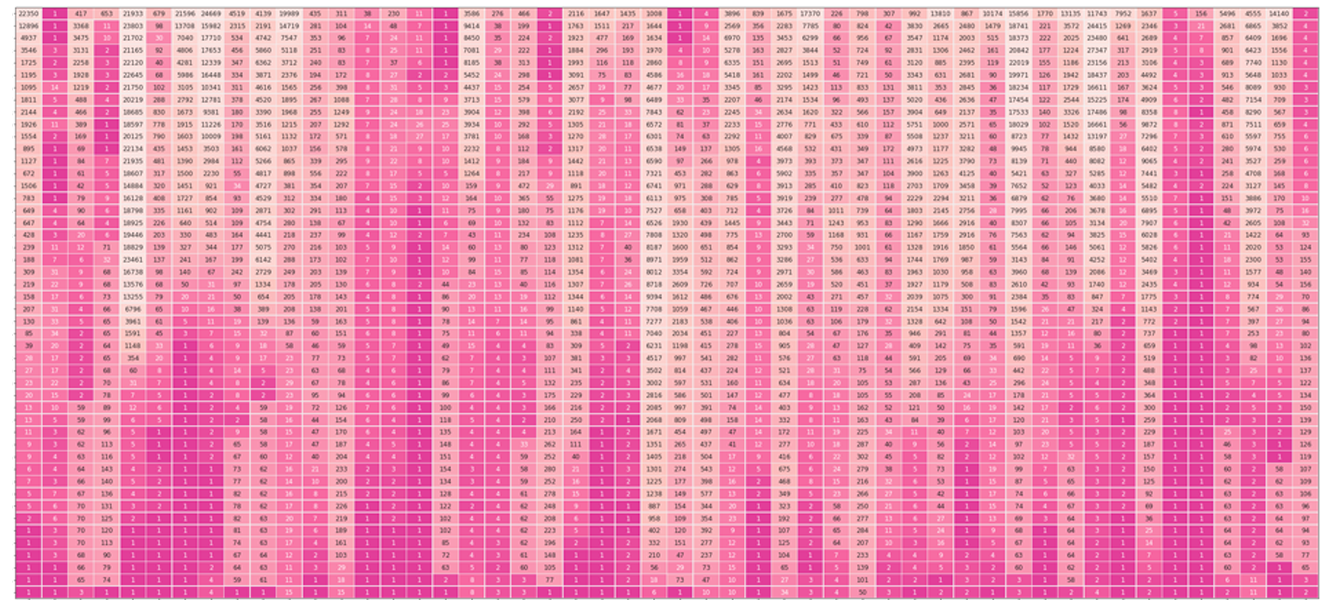
window.ecco = {};

let dataPath = '/data/';
let ecco_url = '/assets/';
 
</script>

<script type="module">

let dataPath = '/data/';
let ecco_url = '/assets/';
import * as explainingApp from "/js/explaining-app.js";

function showRefreshWarning(){
    var warning = document.getElementById("warning");
    warning.style.display = "block";
    warning.innerHTML = 'Please refresh the page. There was an error loading the scripts on the page. If the error presists, please let me know on <a href="https://github.com/jalammar/ecco/discussions/11">Github</a>.'
}

// Show the hero explorables, even in homepage preview
explainingApp.vizHeroSaliency();
explainingApp.vizHeroFactors();
        
// 
// Only process citations on the page, not in homepage preview
 if (window.location.pathname =='/explaining-transformers/'){
    try{
        explainingApp.vizShakespeare();
        explainingApp.EUSaliency();
        explainingApp.vizOnes();
        explainingApp.vizAnswer();
        explainingApp.saliencyFormulas();
        explainingApp.vizCounting();
        explainingApp.vizCountingTwoFactors();
        explainingApp.vizCountingFiveFactors();
        explainingApp.vizEUFactors();
        explainingApp.vizXMLFactors();
        explainingApp.vizPianoFactors();
    }
    catch(err){
        showRefreshWarning()
    }
    
    explainingApp.citations();
 }

</script>

<link id="css" rel="stylesheet" type="text/css" href="https://storage.googleapis.com/ml-intro/ecco/html/styles.css?6" />

<link rel="stylesheet" href="https://cdn.jsdelivr.net/npm/katex@0.12.0/dist/katex.min.css" integrity="sha384-AfEj0r4/OFrOo5t7NnNe46zW/tFgW6x/bCJG8FqQCEo3+Aro6EYUG4+cU+KJWu/X" crossorigin="anonymous" />

<style>
    .toc li{
        margin-bottom:0px;
        list-style-type: none;
    }
    .toc{
        border-bottom: 1px solid rgba(0, 0, 0, 0.1);
        font-size:80%;

    }
    .toc ul{
        margin-top: 0;
    }

    .toc h3{
        /*font-size:90%;*/
        margin-bottom:5px;
    }

</style>

<div id="warning" style="background-color: #ffffc9; border: 1px solid #666; font-size:80%; padding:10px;display:none"></div>

<p>Interfaces for exploring transformer language models by looking at input saliency and neuron activation.</p>

<div style="background: hsl(0, 0%, 97%);;
border-top: 1px solid rgba(0, 0, 0, 0.1);;" class="l-screen">

<div class="l-page">
<figure>
    <figcaption style="margin-top:20px">
        <strong>Explorable #1:</strong>  Input saliency of a list of countries generated by a language model<br />
         <strong style="color:purple">Tap or hover over</strong> the <strong>output tokens</strong>:<br /><br />
    </figcaption>
    <div id="viz_hero_saliency" class="ecco fig" style="max-width: 700px"></div>
    <br style="clear:both" />
    <figcaption style="margin-top:20px">
    <br />
        <strong>Explorable #2:</strong>  Neuron activation analysis reveals four groups of neurons, each is associated with generating a certain type of token<br />
        <strong style="color:purple">Tap or hover over</strong> the sparklines on the left to isolate a certain factor:<br /><br />
    </figcaption>
    <div id="viz_hero_factors" class="ecco fig" style="width:100%; max-width: 700px; margin:5px auto"></div>
    <br style="clear:both" />
</figure>
    </div>
</div>

<!--
<div class="toc">
    <h3>Contents</h3>
    <ul>
        <li>
            <a href="#introduction">Introduction</a>
        </li>
        <li>
            <a href="#saliency">Input Saliency</a>
        </li>
        <li>
            <a href="#evolution">Evolution of Hidden States</a>
        </li>
        <li>
            <a href="#activations">Neuron Activations</a>
        </li>
        <li>
            <a href="#conclusion">Conclusion & Future Work</a>
        </li>
    </ul>
</div>
-->

<p id="introduction">The Transformer architecture<cite key="vaswani2017attention"></cite>
    has been powering a number of the recent advances in NLP. A breakdown of this architecture is provided <a href="https://jalammar.github.io/illustrated-transformer/">here</a> <cite key="alammar2018illustrated"></cite>. Pre-trained language models based on the architecture,
    in both its auto-regressive<cite key="liu2018generating,radford2018improving,radford2019language,brown2020language"></cite> (models that use their own output as input to next time-steps and that process tokens from left-to-right, like GPT2)
    and denoising<cite key="devlin2018bert,liu2019roberta,lan2019albert,lewis2019bart,raffel2019exploring"></cite> (models trained by corrupting/masking the input and that process tokens bidirectionally, like BERT)
    variants continue to push the envelope in various tasks in NLP and, more recently, in computer vision<cite key="dosovitskiy2020image"></cite>. Our understanding of why these models work so well, however, still lags behind these developments.
</p>

<p>This exposition series continues the pursuit to interpret<cite key="rogers2020primer,atanasova2020diagnostic"></cite>
    and visualize<cite key="vig2019visualizing,madsen2019visualizing,hoover2020,tenney2020language,wallace2019allennlp"></cite>
    the inner-workings of transformer-based language models.

We illustrate how some key interpretability methods apply to transformer-based language models. This article focuses on auto-regressive models, but these methods are applicable to other architectures and tasks as well.
     
</p>

<p>This is the first article in the series. In it, we present explorables and visualizations aiding the intuition of:</p>
<ul>
    <li>
        <strong>Input Saliency</strong> methods that score input tokens importance to generating a token.
    </li>
    <li>
        <strong>Neuron Activations</strong> and how individual and groups of model neurons spike in response to
        inputs and to produce outputs.
    </li>
</ul>

<p>The next article addresses <strong>Hidden State Evolution</strong> across the layers of the model and what it may tell us about each layer's role.</p>

<!--more-->

<!--
    <li>
        <strong>Attention</strong>, a central concept in transformers, and how recent work<cite key="abnar2020quantifying"></cite>
        leads to visualizations that are more faithful to its role.
    </li>
-->

<p>In the language of Interpretable Machine Learning (IML) literature like Molnar et al.<cite key="molnar2020interpretable"></cite>, input saliency is a method that explains individual predictions. The latter two methods fall under the
    umbrella of "analyzing components of more complex models", and are better described as increasing the transparency<cite key="du2019techniques,carvalho2019machine"> </cite> of transformer models.
</p>

<p>Moreover, this article is accompanied by <a href="https://github.com/jalammar/ecco/tree/main/notebooks">reproducible notebooks</a> and <a href="https://github.com/jalammar/ecco/">Ecco - an open source library</a> to create similar
    interactive interfaces directly in Jupyter notebooks<cite key="ragan2014jupyter"></cite>
    for GPT-based<cite key="radford2018improving"></cite> models from the HuggingFace transformers library<cite key="wolf2019huggingface"></cite>.
</p>

<p>If we're to impose the three components we're examining to explore the architecture of the transformer, it would look like the following figure.</p>
<figure>
    <img src="/images/explaining/transformer-input-saliency-hidden-states-neuron-activations.png" />
    <figcaption>
        <strong>
            Figure: Three methods to gain a little more insight into the inner-workings of Transformer language models.
        </strong> <br />
        By introducing tools that visualize input saliency, the evolution of hidden states, and neuron activations, we aim to enable researchers to build more intuition about Transformer language models.
    </figcaption>
</figure>

<hr />

<h2 id="saliency">Input Saliency</h2>

<p>When a computer vision model classifies a picture as containing a husky, saliency maps can tell us whether the classification was made due to the visual properties of the animal itself, or because of the snow in the background<cite key="ribeiro2016whyribeiro2016why"></cite>. This is a method of <i>attribution</i> explaining the relationship between a model's output and inputs -- helping us detect errors and biases, and better understand the behavior of the system.</p>

<figure>
    <img src="/images/explaining/dog-saliency-map.jpg" />
    <figcaption>
        <strong>
            Figure: Input saliency map attributing a model's prediction to input pixels.
        </strong> <br />
    </figcaption>
</figure>

<p>Multiple methods exist for assigning importance scores to the inputs of an NLP model<cite key="li2015visualizing,arrieta2020explainable"></cite>. The literature is most often concerned with this application for classification tasks, rather than natural
    language generation. This article focuses on language generation. Our first interface calculates feature importance after each token is generated, and by
    hovering or tapping on an output token, imposes a saliency map on the tokens responsible for generating it.
</p>

<p>
    The first example for this interface asks GPT2-XL<cite key="radford2019language"></cite> for William Shakespeare's date of birth. The model is correctly able to produce the date (1564, but broken into two tokens: " 15" and "64", because the model's vocabulary does not include " 1564" as a single token). The interface shows the importance of each input token when generating each output token:
</p>
<figure>

    <div id="viz_shakespear" class="ecco"></div>
    <div style="clear:both"></div>
    <figcaption>
        <strong style="display:block">Explorable: Input saliency of Shakespeare's birth
            year using Gradient × Input.</strong>
        <strong style="color:purple">Tap or hover over</strong> the output tokens.<br />
        GPT2-XL is able to tell the birth date of William Shakespeare expressed in two tokens. In generating the
        first token, 53% of the importance is assigned to the name (20% to the first name, 33% to the last name).
        The next most important two tokens are " year" (22%) and " born" (14%). In generating the second token to
        complete the date, the name still is the most important with 60% importance, followed by the first portion
        of the date -- a model output, but an input to the second time step. <br />
        This prompt aims to probe world knowledge. It was generated using greedy decoding. Smaller variants of GPT2
        were not able to output the correct date.
    </figcaption>
</figure>

<p>Our second example attempts to both probe a model's world knowledge, as well as to see if the model
    repeats the patterns in the text (simple patterns like the periods after numbers and like new lines, and
    slightly more involved patterns like completing a numbered list). The model used here is DistilGPT2<cite key="sanh2020distilbert"></cite>.
</p>

<p>This explorable shows a more detailed view that displays the attribution percentage for each token -- in case you need that precision.</p>

<figure>
   
    <div id="viz_444" class="ecco fig"></div>
    <br style="clear:both" />
    <figcaption style="margin-top:20px">
        <strong>Explorable: Input saliency of a list of EU countries</strong> <br />
        <strong style="color:purple">Tap or hover over</strong> the output tokens.<br />
        This was generated by DistilGPT2 and attribution via Gradients X Inputs. Output sequence is cherry-picked to
        only include European countries and uses sampled (non-greedy) decoding. Some model runs would include China,
        Mexico, and other countries in the list. With the exception of the repeated " Finland", the model continues
        the list alphabetically.

    </figcaption>
</figure>

<p>Another example that we use illustratively in the rest of this article is one where we ask the model to complete
    a simple pattern:</p>

<figure>
   
    <div id="viz_ones" class="ecco"></div>
    <div style="clear: both;"></div>
    <figcaption style="margin-top:20px">
        <strong style="margin-top:40px; clear:both; display:block">Explorable: Input saliency of a simple
            alternating pattern of commas and the number one.</strong>
        <strong style="color:purple">Tap or hover over</strong> the output tokens.<br />
        Every generated token ascribes the first token in the input the highest feature importance score. Then
        throughout the sequence, the preceding token, and the first three tokens in the sequence are often the most
        important. This uses Gradient × Inputs on GPT2-XL. <br />
        This prompt aims to probe the model's response to syntax and token patterns. Later in the article, we build
        on it by switching to counting instead of repeating the digit ' 1'. Completion gained using greedy decoding.
        DistilGPT2 is able to complete it correctly as well.
    </figcaption>
</figure>

<p>It is also possible to use the interface to analyze the responses of a transformer-based conversational agent.
    In the following example, we pose an existential question to DiabloGPT<cite key="zhang2020dialogpt"></cite>:
</p>

<figure>

    <div id="viz_answer" class="ecco"></div>
    <div style="clear: both;"></div>
    <figcaption style="margin-top:20px">
        <strong>Explorable: Input saliency of DiabloGPT's answer to the ultimate question</strong> <br />
        <strong style="color:purple">Tap or hover over</strong> the output tokens.<br />
        This was the model's first response to the prompt. The question mark is attributed the highest score in the
        beginning of the output sequence. Generating the tokens " will" and " ever" assigns noticeably more importance to
        the word " ultimate".
        This uses Gradient × Inputs on DiabloGPT-large.

    </figcaption>
</figure>

<p><a href="https://colab.research.google.com/github/jalammar/ecco/blob/main/notebooks/Ecco_Input_Saliency.ipynb"><img src="/images/explaining/colab-badge.svg" /></a>
</p>

<h3>About Gradient-Based Saliency</h3>
<p>Demonstrated above is scoring feature importance based on Gradients X Inputs<cite key="denil2015extraction,shrikumar2017just"></cite>-- a gradient-based saliency method shown by Atanasova et al.<cite key="atanasova2020diagnostic"></cite>
    to perform well across various datasets for text classification in transformer models.
</p>

<p>To illustrate how that works, let's
    first recall how the model generates the output token in each time step. In the following figure, we see how
    <span style="color:blue; font-weight: bold">①</span>
    the
    language model's final hidden state is projected into the model's vocabulary resulting in a numeric score for
    each
    token in the model's vocabulary. Passing that scores vector through a softmax operation results in a probability
    score for each token. <span style="color:deeppink; font-weight: bold">②</span> We proceed to select a token
    (e.g. select the highest-probability scoring token, or sample from the top scoring tokens) based
    on
    that vector.</p>

<figure class="l-middle">
    <img src="/images/explaining/111.PNG" />
    <figcaption>
        <strong>
            Figure: Gradient-based input saliency
        </strong>
    </figcaption>
</figure>

<p><span style="color:rebeccapurple; font-weight: bold">③</span> By calculating the gradient of the
    selected logit (before the softmax) with respect to the inputs by back-propagating it all the way back to the
    input tokens, we get a signal of how important each token was in the calculation resulting in this generated
    token.
    That assumption is based on the idea that the smallest change in the input token with the highest
    feature-importance
    value makes a large change in what the resulting output of the model would be.</p>

<figure class="l-middle">
    <img src="/images/explaining/gradXinput.PNG" />
    <figcaption>
        <strong>
            Figure: Gradient X input calculation and aggregation
        </strong>
    </figcaption>
</figure>

<p>The resulting gradient vector per token is then multiplied by the input embedding of the respective token. Taking
    the L2 norm of the resulting vector results in the token's feature importance score. We then normalize the
    scores by dividing by the sum of these scores.</p>

<p>More formally, <span style="color:purple">gradient</span> × <span style="color:green">input</span> is described as follows:</p>

<p style="text-align:center">
    <span class="katex"><span class="katex-mathml"><math xmlns="http://www.w3.org/1998/Math/MathML"><semantics><mrow><mo stretchy="false">∥</mo><msub><mi mathvariant="normal" style="color:purple">∇</mi><msub><mi>X</mi><mi>i</mi></msub></msub><msub><mi>f</mi><mi>c</mi></msub><mo stretchy="false">(</mo><msub><mi>X</mi><mrow><mn>1</mn><mo>:</mo><mi>n</mi></mrow></msub><mo stretchy="false">)</mo><msub><mi>X</mi><mi>i</mi></msub><msub><mo stretchy="false">∥</mo><mn>2</mn></msub></mrow><annotation encoding="application/x-tex"> \lVert \nabla _{X_i} f_c (X_{1:n})  X_i\lVert_2</annotation></semantics></math></span><span class="katex-html" aria-hidden="true"><span class="base"><span class="strut" style="height: 1.0001em; vertical-align: -0.2501em;"></span><span class="mopen" style="color:deeppink">∥</span><span class="mord"><span class="mord" style="color:purple">∇</span><span class="msupsub"><span class="vlist-t vlist-t2"><span class="vlist-r"><span class="vlist" style="height: 0.328331em;"><span class="" style="top: -2.55em; margin-left: 0em; margin-right: 0.05em;"><span class="pstrut" style="height: 2.7em;"></span><span class="sizing reset-size6 size3 mtight"><span class="mord mtight"><span class="mord mtight"><span class="mord mathnormal mtight" style="margin-right: 0.07847em; color:purple">X</span><span class="msupsub"><span class="vlist-t vlist-t2"><span class="vlist-r"><span class="vlist" style="height: 0.328086em;"><span class="" style="top: -2.357em; margin-left: -0.07847em; margin-right: 0.0714286em;"><span class="pstrut" style="height: 2.5em;"></span><span class="sizing reset-size3 size1 mtight"><span class="mord mathnormal mtight" style="color:purple">i</span></span></span></span><span class="vlist-s">​</span></span><span class="vlist-r"><span class="vlist" style="height: 0.143em;"><span class=""></span></span></span></span></span></span></span></span></span></span><span class="vlist-s">​</span></span><span class="vlist-r"><span class="vlist" style="height: 0.2501em;"><span class=""></span></span></span></span></span></span><span class="mord"><span class="mord mathnormal" style="margin-right: 0.10764em; color:purple">f</span><span class="msupsub"><span class="vlist-t vlist-t2"><span class="vlist-r"><span class="vlist" style="height: 0.151392em;"><span class="" style="top: -2.55em; margin-left: -0.10764em; margin-right: 0.05em;"><span class="pstrut" style="height: 2.7em;"></span><span class="sizing reset-size6 size3 mtight"><span class="mord mathnormal mtight" style="color:purple">c</span></span></span></span><span class="vlist-s">​</span></span><span class="vlist-r"><span class="vlist" style="height: 0.15em;"><span class=""></span></span></span></span></span></span><span class="mopen" style="color:purple">(</span><span class="mord"><span class="mord mathnormal" style="margin-right: 0.07847em; color:purple">X</span><span class="msupsub"><span class="vlist-t vlist-t2"><span class="vlist-r"><span class="vlist" style="height: 0.301108em;"><span class="" style="top: -2.55em; margin-left: -0.07847em; margin-right: 0.05em;"><span class="pstrut" style="height: 2.7em;"></span><span class="sizing reset-size6 size3 mtight"><span class="mord mtight"><span class="mord mtight" style="color:purple">1</span><span class="mrel mtight" style="color:purple">:</span><span class="mord mathnormal mtight" style="color:purple">n</span></span></span></span></span><span class="vlist-s">​</span></span><span class="vlist-r"><span class="vlist" style="height: 0.15em;"><span class=""></span></span></span></span></span></span><span class="mclose" style="color:purple">)</span><span class="mord"><span class="mord mathnormal" style="margin-right: 0.07847em; color:green">X</span><span class="msupsub"><span class="vlist-t vlist-t2"><span class="vlist-r"><span class="vlist" style="height: 0.311664em;"><span class="" style="top: -2.55em; margin-left: -0.07847em; margin-right: 0.05em;"><span class="pstrut" style="height: 2.7em;"></span><span class="sizing reset-size6 size3 mtight"><span class="mord mathnormal mtight" style="color:green">i</span></span></span></span><span class="vlist-s">​</span></span><span class="vlist-r"><span class="vlist" style="height: 0.15em;"><span class=""></span></span></span></span></span></span><span class="mopen"><span class="mopen" style="color:deeppink">∥</span><span class="msupsub"><span class="vlist-t vlist-t2"><span class="vlist-r"><span class="vlist" style="height: 0.301108em;"><span class="" style="top: -2.55em; margin-left: 0em; margin-right: 0.05em;"><span class="pstrut" style="height: 2.7em;"></span><span class="sizing reset-size6 size3 mtight"><span class="mord mtight" style="color:deeppink">2</span></span></span></span><span class="vlist-s">​</span></span><span class="vlist-r"><span class="vlist" style="height: 0.15em;"><span class=""></span></span></span></span></span></span></span></span></span>
</p>

<p>
    Where <span id="input_term" style="color:green"></span> is the embedding vector of the input token at timestep <i>i</i>, and <span id="grad" style="color:purple"></span> is the back-propagated gradient of the score of the selected token unpacked as follows:
</p>
<ul>
    <li>
        <span id="input_embeddings" style="color:purple"></span> is the list of input token embedding vectors in the input sequence (of length
        <span id="n_length"></span>)
    </li>
    <li>
        <span id="function_score" style="color:purple"></span> is the score of the selected token after a forward pass through the model (selected through any one of a number of methods including greedy/argmax decoding, sampling, or beam search).
        With the <i>c</i> standing for "class" given this is often described in the classification context. We're keeping the notation even though in our case, "token" is more fitting.
    </li>
</ul>

<div id="math"></div>
<p>This formalization is the one stated by Bastings et al.<cite key="bastings2020elephant"></cite> except the gradient and input vectors are multiplied element-wise. The resulting vector is then aggregated into a score via calculating the <span style="color:deeppink">L2 norm</span> as this was empirically shown in Atanasova et al.<cite key="atanasova2020diagnostic"></cite> to perform better than other methods (like averaging).</p>

<hr />

<h2 id="activations">Neuron Activations</h2>

<p>The Feed Forward Neural Network (FFNN) sublayer is one of the two major components inside a transformer block (in
    addition to self-attention). It accounts for 66% of the parameters of a transformer block and thus provides a
    significant portion of the model's representational capacity. Previous work<cite key="karpathy2015visualizing,poerner2018interpretable,radford2017learning,olah2017feature,olah2018building,dalvi2019neurox"></cite>
    has examined neuron firings inside deep neural networks in both the NLP and computer vision domains. In this
    section we apply that examination to transformer-based language models.
</p>

<h3>Continue Counting: 1, 2, 3, ___ </h3>
<p>To guide our neuron examination, let's present our model with the input "1, 2, 3" in hopes it would echo the
    comma/number alteration, yet also keep incrementing the numbers.</p>

<p>It succeeds.</p>

<figure class="l-page">


    <div id="viz_123" class="ecco"></div>
</figure>

<p style="padding-top:45px;clear:both">By using the methods we'll discuss in Article #2 (following the lead of <a href="https://www.lesswrong.com/posts/AcKRB8wDpdaN6v6ru/interpreting-gpt-the-logit-lens">nostalgebraist</a><cite key="nostalgebraist2020"></cite>), we can produce a graphic that exposes the probabilities of output tokens after each layer in the model. This looks at the hidden state after each layer, and displays the ranking of the ultimately produced output token in that layer.</p>

<p>For example, in the first step, the model produced the token " 4". The first column tells us about that process. The bottom most cell in that column shows that the token " 4" was ranked #1 in probability after the last layer. Meaning that the last layer (and thus the model) gave it the highest probability score. The cells above indicate the ranking of the token " 4" after each layer.</p>

<p>By looking at the hidden states, we observe that the model gathers confidence
    about the two patterns of the
    output sequence (the commas, and the ascending numbers) at different layers.</p>

<figure>
    <img src="/images/explaining/ranking_123.png" style="max-width: 350px" />
    <figcaption>
        The model is able to successfully complete the list. Examining the hidden states shows that the earlier
        layers of
        the model are more comfortable predicting the commas as that's a simpler pattern. It is still able to
        increment
        the digits, but it needs at least one more layer to start to be sure about those outputs.
    </figcaption>
</figure>

<p>What happens at Layer 4 which makes the model elevate the digits (4, 5, 6) to the top of the probability
    distribution?</p>

<p>We can plot the activations of the neurons in layer 4 to get a sense of neuron activity. That is what the first of the following three figures shows.</p>

<p>It is difficult, however, to gain any interpretation from looking at activations during one forward pass through the model.</p>

<p>
    The figures below show neuron activations while five tokens are generated (' 4 , 5 , 6'). To get around the
    sparsity of the firings, we may wish to cluster the firings, which is what the subsequent figure shows.</p>

<figure>
    <table style="width:100%" class="graphs-table">
        <tr>
            <td style="text-align: center;">
                <img src="/images/explaining/activations-4.PNG" style="max-width: 100px" />
            </td>
            <td>
            <figcaption>
                <strong>Activations of 200 neurons (out of 3072) in Layer 4's FFNN resulting in the model outputting the
                    token '&nbsp;4'</strong><br />
                Each row is a neuron. Only neurons with positive activation are colored. The darker they are, the more
                intense the firing.
            </figcaption>
            </td>
        </tr>
        <tr>
            <td>

                <img src="/images/explaining/activations_1.PNG" style="max-width: 300px" />
            </td>
            <td>
                <figcaption>            
                    <strong>Neuron firings in the FFNN sublayer of Layer 4</strong> <br />
                    Each row corresponds to a neuron in the feedforward neural network of layer #4. Each column is
                    that neuron's status when a token was generated (namely, the token at the top of the
                    figure).<br />
                    A view of the first 400 neurons shows how sparse the activations usually are (out of the 3072
                    neurons in the FFNN layer in DistilGPT2).<br />
                </figcaption>

            </td>
        </tr>
        <tr>
            <td>

                <img src="/images/explaining/activations_2.PNG" />
            </td>
            <td>
                <figcaption><br />
                    <strong>Clustering Neurons by Activation Values</strong><br />
                    To locate the signal, the neurons are clustered (using kmeans on the activation values) to reveal the firing pattern. We notice:
                    <ul>
                        <li>The largest cluster or two tend to be sparse like the <span style="background-color: #ffA50033">orange cluster</span>.
                        </li>
                        <li>Neurons in the <span style="background-color: #00800033">green cluster</span> fire the
                            most when generating a number.
                        </li>
                        <li>Neurons in the <span style="background-color: #ff000033">red cluster</span>, however,
                            fire the most when generating the commas.
                        </li>
                        <li>The <span style="background-color: #08008033">purple cluster</span> tracks the digits,
                            but with less intensity and larger number of
                            neurons.
                        </li>
                        <li>Neurons in the <span style="background-color: #ffc0cb44">pink cluster</span> are focused
                            on the numbers and rarely fire when generating
                            the
                            commas. Their activations
                            get higher and higher the more the token value is incremented.
                        </li>
                    </ul>
                </figcaption>
            </td>
        </tr>
    </table>
</figure>

<p>
    If visualized and examined properly, neuron firings can reveal the complementary and compositional roles that can be played by individual neurons, and groups of neurons<cite key="karpathy2015visualizing,strobelt2017lstmvis,dalvi2019neurox,radford2017learning,olah2018building"></cite>.
</p>

<p>Even after clustering, looking directly at activations is a crude and noisy affair. As presented in
    Olah et al.<cite key="olah2018building"></cite>,
    we are better off reducing the dimensionality using a matrix decomposition method. We follow the authors'
    suggestion to use Non-negative Matrix Factorization (NMF) as a natural candidate for reducing the dimensionality
    into groups that are potentially individually more interpretable. Our first experiments were with Principal Component Analysis (PCA), but NMF
    is a better approach because it's difficult to interpret the negative values in a PCA component of neuron
    firings.
</p>

<h3>Factor Analysis</h3>
<p>By first capturing the activations of the neurons in FFNN layers of the model, and then decomposing them into a
    more manageable number of factors (using<cite key="pedregosa2011scikit,walt2011numpy"></cite>) using NMF, we are able to shed light on how various neurons contributed towards each generated token.
</p>

<p>The simplest approach is to break down the activations into two factors. In our next interface, we have the model
    generate thirty tokens, decompose the activations into two factors, and highlight each token with the factor
    with the highest activation when that token was generated:</p>

<figure>

    <div id="viz_two_factors" class="l-screen-inset ecco fig factor"></div>

    <figcaption>
        <strong>Explorable: Two Activation Factors of a Counting Sequence</strong> <br />
        <strong style="color:purple">Tap or hover over</strong> the sparklines on the left to isolate a certain
        factor <br />
        <span style="background-color: rgba(186, 164, 215, 0.5)">Factor #1</span> contains the collection of neurons
        that
        light up to produce a number. It is a linear transformation of 5,449 neurons (30% of the 18,432 neurons in
        the FFNN layers: 3072 per layer, 6 layers in DistilGPT2). <br />
        <span style="background-color: rgb(195, 244, 132)">Factor #2</span> contains the collection of neurons
        that light up to produce a comma. It is a linear transformation of 8,542 neurons (46% of the FFNN neurons).
        <br />
        The two factors have 4,365 neurons in common. <br />

        <span style="color:red"> Note</span>: The association between the color and the token is different in the case of the input tokens and
        output tokens. For the input tokens, this is how the neurons fired <i>in response</i> to the token as an
        input. For the output tokens, this is the activation value <i>which produced</i> the token. This is why the
        last input token and the first output token share the same activation value.
    </figcaption>
</figure>

<p>This interface is capable of compressing a lot of data that showcase the excitement levels of factors composed of
    groups of neurons. The sparklines<cite key="tufte2006beautiful"></cite>
    on the left give a snapshot of the excitement level of each factor across the entire sequence. Interacting with
    the sparklines (by hovering with a mouse or tapping on touchscreens) displays the activation of the factor on
    the tokens in the sequence on the right.
</p>

<p>We can see that decomposing activations into two factors resulted in factors that correspond with the alternating
    patterns we're analyzing (commas, and incremented numbers). We can increase the resolution of the factor
    analysis by increasing the number of factors. The following figure decomposes the same activations into five
    factors.</p>

<figure>

    <div id="viz_five_factors" class="l-screen-inset ecco fig factor" style="width:100%"></div>

    <figcaption>
        <strong>Explorable: Five Activation Factors of a Counting Sequence</strong> <br />
        <strong style="color:purple">Tap or hover over</strong> the sparklines on the left to isolate a certain
        factor <br />
        <ul>
            <li>Decomposition into five factors shows the counting factor being broken down into three factors, each
                addressing a distinct portion of the sequence (<span style="background-color: rgba(186, 164, 215, 0.5)">start</span>, <span style="background-color: rgb(195, 244, 132)">middle</span>, <span style="background-color: rgb(254, 149, 182)">end</span>).
            </li>
            <li>The <span style="background-color: rgb(238, 214, 137)">yellow factor</span> reliably tracks
                generating the commas in the sequence.
            </li>
            <li>The <span style="background-color: rgba(35, 171, 216, 0.5)">blue factor</span> is common across
                various GPT2 factors -- it is of neurons that intently focus on the first token in the sequence, and
                only on that token.
            </li>
        </ul>

    </figcaption>
</figure>

<p>We can start extending this to input sequences with more content, like the list of EU countries:</p>

<figure>

    <div id="viz_eu_factors" class="l-screen-inset ecco fig factor" style="width:100% !important"></div>

    <figcaption>
        <strong>Explorable: Six Activation Factors of a list of EU countries</strong> <br />
        <strong style="color:purple">Tap or hover over</strong> the sparklines on the left to isolate a certain
        factor <br />
    </figcaption>
</figure>

<p>Another example, of how DistilGPT2 reacts to XML, shows a clear distinction of factors attending to different
    components of the syntax. This time we are breaking down the activations into ten components: </p>

<figure>

    <div id="viz_xml" class="l-screen-inset ecco fig factor"></div>

    <div style="clear: both;"></div>
    <figcaption>
        <strong>Explorable: Ten Activation Factors of XML</strong> <br />
        <strong style="color:purple">Tap or hover over</strong> the sparklines on the left to isolate a certain
        factor <br />
        Factorizing neuron activations in response to XML (that was generated by an RNN from<cite key="karpathy2015visualizing"></cite>
        ) into ten
        factors
        results in factors corresponding to:
        <ol>
            <li><span style="background-color: rgba(152, 120, 195, 0.5)"> New-lines</span></li>
            <li><span style="background-color: rgb(234, 191, 229)">Labels of tags</span>, with higher activation on
                closing tags
            </li>
            <li><span style="background-color: rgba(254, 83, 136, 0.5)">Indentation spaces</span></li>
            <li>The <span style="background-color: rgba(255, 121, 73, 0.4)">'&lt;' (less-than) character</span>
                starting XML tags
            </li>
            <li>The large factor focusing on the <span style="background-color: rgb(226, 183, 47)">first token</span>. Common to GPT2 models.
            </li>
            <li>Two factors tracking the <span style="background-color: rgb(82, 246, 103)">'&gt;'</span> <span style="background-color: rgb(124, 236, 202)">(greater than)</span> character at the end of XML
                tags
            </li>
            <li>The <span style="background-color: rgba(50, 177, 219, 0.4)">text inside XML tags</span></li>
            <li>The <span style="background-color:rgba(85, 117, 221, 0.4)">'&lt;&#47;'</span> symbols indicating
                closing XML tag
            </li>
        </ol>
    </figcaption>
</figure>

<h3>Factorizing Activations of a Single Layer</h3>
<p>This interface is a good companion for hidden state examinations which can highlight a specific layer of
    interest, and using this interface we can focus our analysis on that layer of interest. It is straight-forward
    to apply this method to specific layers of interest. Hidden-state evolution diagrams, for example,
    indicate that layer #0 does a lot of heavy lifting as it often tends to shortlist the tokens that make it to the
    top of the probability distribution. The following figure showcases ten factors applied to the activations
    of layer 0 in response to a passage by Fyodor Dostoyevsky:</p>

<figure>

    <div id="viz_piano_l1" class="l-screen-inset ecco fig factor"></div>

    <figcaption>
        <strong>Explorable: Ten Factors From The Underground</strong> <br />
        <strong style="color:purple">Tap or hover over</strong> the sparklines on the left to isolate a certain
        factor <br />
        Ten Factors from the activations the neurons in Layer 0 in response to a passage from Notes from Underground
        by Dostoevsky.
        <ul>
            <li>Factors that focus on specific portions of the text (<span style="background-color: rgb(255, 182, 155)">beginning</span>, <span style="background-color: rgb(187, 165, 215)">middle</span>, and <span style="background-color: rgb(231, 181, 224)">end</span>. This is interesting as the only signal
                the model gets about how these tokens are connected are the positional encodings. This indicates the
                neurons that are keeping track of the order of words. Further examination is required to assess
                whether these FFNN neurons directly respond to the time signal, or if they are responding to a
                specific trigger in the self-attention layer's transformation of the hidden state.
            </li>
            <li>
                Factors corresponding to linguistic features, for example, we can see factors for <span style="background-color: rgb(233, 200, 95)">pronouns</span> (he, him), <span style="background-color: rgb(99, 247, 118)">auxiliary verbs</span> (would, will), <span style="background-color: rgb(83, 231, 185)">other verbs</span> (introduce, prove -- notice the
                understandable misfiring at the 'suffer' token which is a partial token of 'sufferings', a noun),
                <span style="background-color: rgb(65, 183, 221)">linking verbs</span> (is, are, were), and a factor
                that favors <span style="background-color: rgb(187, 200, 241)">nouns and their adjectives</span>
                ("fatal rubbish", "vulgar folly").
            </li>
            <li>A factor corresponding to <span style="background-color: rgb(186, 242, 113)">commas</span>, a
                syntactic feature.
            </li>
            <li>The <span style="background-color: rgba(254, 75, 131, 0.4)">first-token</span> factor</li>
        </ul>
    </figcaption>
</figure>

<p>We can crank up the resolution by increasing the number of factors. Increasing this to eighteen factors
    starts to
    reveal factors that light up in response to adverbs, and other factors that light up in response to partial
    tokens. Increase the number of factors more and you'll start to identify factors that light up in response
    to
    specific words ("nothing" and "man" seem especially provocative to the layer).</p>

<h3>About Activation Factor Analysis</h3>
<p>The explorables above show the factors resulting from decomposing the matrix holding the activations values of FFNN neurons using Non-negative Matrix Factorization. The following figure sheds light on how that is done:</p>

<figure class="l-page">
    <img src="/images/explaining/neuron-factors-decomposition.PNG" />
    <figcaption>
        <strong>
            Figure: Decomposition of activations matrix using NMF.
        </strong> <br />
        NMF reveals patterns of neuron activations inside one or a collection of layers.
    </figcaption>
</figure>

<p>Beyond dimensionality reduction, Non-negative Matrix Factorization can reveal underlying common behaviour of groups of neurons. It can be used to analyze the entire network, a single layer, or groups of layers.</p>

<p><a href="https://colab.research.google.com/github/jalammar/ecco/blob/main/notebooks/Ecco_Neuron_Factors.ipynb"><img src="/images/explaining/colab-badge.svg" /></a>
</p>

<!--
<hr/>
<h2>Attention [Work in progress]</h2>
        <p>Attention is most commonly visualize in Sankey diagrams<cite key="jones2017,vig2019analyzing,hoover2020"></cite>
            . These diagrams have the benefit of
            being able to give a snapshot of how multiple tokens are attending to different locations all in one figure.
            Downsides to that perspective is the limited length of input or output sequences that can be shown on the
            screen
            at once. It could also be exposing an overwhelming amount of data if the focus of the reader is one token,
            and
            not the entire sequence. For these reasons, we believe Token Sparkbars provide a reasonable compliment to
            attention visualization.
        </p>

        <p>One caveat to traditional attention visualizations is that they communicate that a specific tokken attended
            to a
            set of previous tokens. This is most commonly mistaken<cite key="abnar2020quantifying"></cite>
            as raw attention weights show how a position
            attended to position -- the contents of these positions contain a mixture of the various tokens from the
            previous layer. This misconception would be further reinforced if we impose the bars against the text using
            token sparkbars. So instead of visualizaing raw attention, we visualize attention flow [Abnar] - which
            calculates attention all the way down to the tokens:
        </p>
<p>[Work in progress]</p>

<hr/>
<h2 id="conclusion">Conclusion & Future Work</h2>

<p>We demonstrated multiple visualizations and explorable interfaces to aid the analysis of Transformer language models spanning input saliency, hidden state evolution, and neuron activation factorization.</p>

<p>
    We see plenty of room to explore further methods and interfaces that improve the transparency of deep learning models including Transformer-based models. These include:
</p>
    <ul>
        <li>
            Visualizing and examining other key components of transformer language-models. While attention is widely analyzed, and while this article shed more light on the work on hidden states and feed-forward neuron activations, components like <strong>decoding strategies</strong><cite key="holtzman2020curious,petroni2020context"></cite> are essential pieces of the puzzle which can benefit from interfaces to aid intuition building. This is especially the case when probing for world knowledge in models.
        </li>
<li>
    Visualizations that <strong>combine multiple interpretability techniques</strong> as suggested in Olah et al.<cite key="olah2018building"></cite>. Combining saliency with factors, for example, could shed more light on the roles of various factors and neurons.
</li>
<li>
    NLP visualization tools that communicate large amounts of data and impose them in <strong>word-sized</strong><cite key="tufte2006beautiful"></cite><strong> graphics</strong> that are present in the flow of the text and right next to their respective tokens. We, for example, can now envision more compact displays for hidden state evolution (by imposing the ranking as a sparkline right next to the tokens in a paragraph).
</li>
<li>
    Visual tools which aid understanding complex black-models by visualizing the various <strong>components</strong> of these models, and of the <strong>data</strong> flowing through them, and of <strong>how they behave as systems</strong><cite key="victor2013media"></cite>. We can envision applying to attention an explorable similar to the input saliency visualization demonstrated in this work. We would like to see it done with attention flow<cite key="abnar2020quantifying"></cite>, however, rather than raw attention.
</li>
<li>
    <strong>Other saliency methods</strong> that deal with some of the shortcomings of gradient x input, like Integrated Gradients<cite key="sundararajan2017axiomatic"></cite>. We are also keen to see more work investigating saliency methods of natural language generation beyond scoring single predictions. Interesting directions include <cite key="tsang2020does,swayamdipta2020dataset,han2020explaining"></cite>.
</li>
        <li>
            Interesting <strong>directions that examine hidden state evolution</strong> include the Canonical Correlation Analysis (CCA) line of investigation<cite key="hotelling1992relations,raghu2017svcca,morcos2018insights,voita2019bottom"></cite> and, more recently, the work of De Cao et al.<cite key="de2020decisions"></cite>
        </li>
</ul>

<p>We hope such tools will enable researchers and engineers to build intuitions to aid their work in understanding and improving these architecture.
</p>

-->

<h2>Conclusion</h2>
<p>This concludes the first article in the series. Be sure to click on <a href="https://colab.research.google.com/github/jalammar/ecco/blob/main/notebooks/Ecco_Input_Saliency.ipynb">the</a> <a href="https://colab.research.google.com/github/jalammar/ecco/blob/main/notebooks/Ecco_Neuron_Factors.ipynb">notebooks</a> and play with <a href="https://github.com/jalammar/ecco">Ecco</a>! I would love your feedback on this article, series, and on Ecco in <a href="https://github.com/jalammar/ecco/discussions/9">this thread</a>. If you find interesting factors or neurons, feel free to post them there as well. I welcome all feedback!</p>

<h2>Acknowledgements</h2>
<p>This article was vastly improved thanks to feedback on earlier drafts provided by
    Abdullah Almaatouq,
    Ahmad Alwosheel,
    Anfal Alatawi,
    Christopher Olah,
    Fahd Alhazmi,
    Hadeel Al-Negheimish,
    Isabelle Augenstein,
    Jasmijn Bastings,
    Najla Alariefy,
    Najwa Alghamdi,
    Pepa Atanasova, and
    Sebastian Gehrmann.
</p>

<h2>References</h2>
<references>
</references>

<h2>Citation</h2>
<div style="color: #777;">

If you found this work helpful for your research, please cite it as following:

<div class="cite">

    <pre><code class="language-code">Alammar, J. (2020). Interfaces for Explaining Transformer Language Models  
[Blog post]. Retrieved from https://jalammar.github.io/explaining-transformers/
</code></pre>
  </div>

<br />
BibTex:

<div class="cite">

    <pre><code class="language-code">@misc{alammar2020explaining, 
  title={Interfaces for Explaining Transformer Language Models},
  author={Alammar, J},
  year={2020},
  url={https://jalammar.github.io/explaining-transformers/}
}
</code></pre>

  </div>
</div>

<script type="text/bibliography">

@article{poerner2018interpretable,
  title={Interpretable textual neuron representations for NLP},
  author={Poerner, Nina and Roth, Benjamin and Sch{\"u}tze, Hinrich},
  journal={arXiv preprint arXiv:1809.07291},
  year={2018},
  url={https://arxiv.org/pdf/1809.07291}
}

@misc{karpathy2015visualizing,
      title={Visualizing and Understanding Recurrent Networks},
      author={Andrej Karpathy and Justin Johnson and Li Fei-Fei},
      year={2015},
      eprint={1506.02078},
      archivePrefix={arXiv},
      primaryClass={cs.LG},
      url={https://arxiv.org/pdf/1506.02078.pdf}
}

@article{olah2017feature,
  title={Feature visualization},
  author={Olah, Chris and Mordvintsev, Alexander and Schubert, Ludwig},
  journal={Distill},
  volume={2},
  number={11},
  pages={e7},
  year={2017},
  url={https://distill.pub/2017/feature-visualization/}
}

@article{olah2018building,
  title={The building blocks of interpretability},
  author={Olah, Chris and Satyanarayan, Arvind and Johnson, Ian and Carter, Shan and Schubert, Ludwig and Ye, Katherine and Mordvintsev, Alexander},
  journal={Distill},
  volume={3},
  number={3},
  pages={e10},
  year={2018},
  url={https://distill.pub/2018/building-blocks/}
}

@article{abnar2020quantifying,
  title={Quantifying Attention Flow in Transformers},
  author={Abnar, Samira and Zuidema, Willem},
  journal={arXiv preprint arXiv:2005.00928},
  year={2020},
  url={https://arxiv.org/pdf/2005.00928}
}

@article{li2015visualizing,
  title={Visualizing and understanding neural models in nlp},
  author={Li, Jiwei and Chen, Xinlei and Hovy, Eduard and Jurafsky, Dan},
  journal={arXiv preprint arXiv:1506.01066},
  year={2015},
  url={https://arxiv.org/pdf/1506.01066}
}

@article{poerner2018interpretable,
  title={Interpretable textual neuron representations for NLP},
  author={Poerner, Nina and Roth, Benjamin and Sch{\"u}tze, Hinrich},
  journal={arXiv preprint arXiv:1809.07291},
  year={2018},
  url={https://arxiv.org/pdf/1809.07291}
}


@inproceedings{park2019sanvis,
  title={SANVis: Visual Analytics for Understanding Self-Attention Networks},
  author={Park, Cheonbok and Na, Inyoup and Jo, Yongjang and Shin, Sungbok and Yoo, Jaehyo and Kwon, Bum Chul and Zhao, Jian and Noh, Hyungjong and Lee, Yeonsoo and Choo, Jaegul},
  booktitle={2019 IEEE Visualization Conference (VIS)},
  pages={146--150},
  year={2019},
  organization={IEEE},
  url={https://arxiv.org/pdf/1909.09595}
}

@misc{nostalgebraist2020,
    title={interpreting GPT: the logit lens},
    url={https://www.lesswrong.com/posts/AcKRB8wDpdaN6v6ru/interpreting-gpt-the-logit-lens},
    year={2020},
    author={nostalgebraist}
 }

@article{vig2019analyzing,
  title={Analyzing the structure of attention in a transformer language model},
  author={Vig, Jesse and Belinkov, Yonatan},
  journal={arXiv preprint arXiv:1906.04284},
  year={2019},
  url={https://arxiv.org/pdf/1906.04284}
}

@inproceedings{hoover2020,
    title = "ex{BERT}: A Visual Analysis Tool to Explore Learned Representations in {T}ransformer Models",
    author = "Hoover, Benjamin  and Strobelt, Hendrik  and Gehrmann, Sebastian",
    booktitle = "Proceedings of the 58th Annual Meeting of the Association for Computational Linguistics: System Demonstrations",
    month = jul,
    year = "2020",
    address = "Online",
    publisher = "Association for Computational Linguistics",
    url = "https://www.aclweb.org/anthology/2020.acl-demos.22",
    pages = "187--196"
    }

@article{jones2017,
    title= "Tensor2tensor transformer visualization",
    author="Llion Jones",
    year="2017",
    url="https://github.com/tensorflow/tensor2tensor/tree/master/tensor2tensor/visualization"
    }

@article{voita2019bottom,
  title={The bottom-up evolution of representations in the transformer: A study with machine translation and language modeling objectives},
  author={Voita, Elena and Sennrich, Rico and Titov, Ivan},
  journal={arXiv preprint arXiv:1909.01380},
  year={2019},
  url={https://arxiv.org/pdf/1909.01380.pdf}
}

@misc{bastings2020elephant,
      title={The elephant in the interpretability room: Why use attention as explanation when we have saliency methods?},
      author={Jasmijn Bastings and Katja Filippova},
      year={2020},
      eprint={2010.05607},
      archivePrefix={arXiv},
      primaryClass={cs.CL},
      url={https://arxiv.org/pdf/2010.05607.pdf}
}

@article{linzen2016assessing,
  title={Assessing the ability of LSTMs to learn syntax-sensitive dependencies},
  author={Linzen, Tal and Dupoux, Emmanuel and Goldberg, Yoav},
  journal={Transactions of the Association for Computational Linguistics},
  volume={4},
  pages={521--535},
  year={2016},
  publisher={MIT Press}
}

@book{tufte2006beautiful,
  title={Beautiful evidence},
  author={Tufte, Edward R},
  year={2006},
  publisher={Graphis Pr}
}

@article{pedregosa2011scikit,
  title={Scikit-learn: Machine learning in Python},
  author={Pedregosa, Fabian and Varoquaux, Ga{\"e}l and Gramfort, Alexandre and Michel, Vincent and Thirion, Bertrand and Grisel, Olivier and Blondel, Mathieu and Prettenhofer, Peter and Weiss, Ron and Dubourg, Vincent and others},
  journal={the Journal of machine Learning research},
  volume={12},
  pages={2825--2830},
  year={2011},
  publisher={JMLR. org},
  url={https://www.jmlr.org/papers/volume12/pedregosa11a/pedregosa11a.pdf}
}

@article{walt2011numpy,
  title={The NumPy array: a structure for efficient numerical computation},
  author={Walt, St{\'e}fan van der and Colbert, S Chris and Varoquaux, Gael},
  journal={Computing in science \& engineering},
  volume={13},
  number={2},
  pages={22--30},
  year={2011},
  publisher={IEEE Computer Society},
  url={https://hal.inria.fr/inria-00564007/document}
}

@article{wolf2019huggingface,
  title={HuggingFace's Transformers: State-of-the-art Natural Language Processing},
  author={Wolf, Thomas and Debut, Lysandre and Sanh, Victor and Chaumond, Julien and Delangue, Clement and Moi, Anthony and Cistac, Pierric and Rault, Tim and Louf, R{\'e}mi and Funtowicz, Morgan and others},
  journal={ArXiv},
  pages={arXiv--1910},
  year={2019},
  url={https://www.aclweb.org/anthology/2020.emnlp-demos.6.pdf}
}

@article{bostock2012d3,
  title={D3. js-data-driven documents},
  author={Bostock, Mike and others},
  journal={l{\'\i}nea]. Disponible en: https://d3js. org/.[Accedido: 17-sep-2019]},
  year={2012}
}

@article{ragan2014jupyter,
  title={The Jupyter/IPython architecture: a unified view of computational research, from interactive exploration to communication and publication.},
  author={Ragan-Kelley, Min and Perez, F and Granger, B and Kluyver, T and Ivanov, P and Frederic, J and Bussonnier, M},
  journal={AGUFM},
  volume={2014},
  pages={H44D--07},
  year={2014},
  url={https://ui.adsabs.harvard.edu/abs/2014AGUFM.H44D..07R/abstract}
}

@article{kokhlikyan2020captum,
  title={Captum: A unified and generic model interpretability library for PyTorch},
  author={Kokhlikyan, Narine and Miglani, Vivek and Martin, Miguel and Wang, Edward and Alsallakh, Bilal and Reynolds, Jonathan and Melnikov, Alexander and Kliushkina, Natalia and Araya, Carlos and Yan, Siqi and others},
  journal={arXiv preprint arXiv:2009.07896},
  year={2020}
}

@misc{li2016visualizing,
      title={Visualizing and Understanding Neural Models in NLP},
      author={Jiwei Li and Xinlei Chen and Eduard Hovy and Dan Jurafsky},
      year={2016},
      eprint={1506.01066},
      archivePrefix={arXiv},
      primaryClass={cs.CL}
}

@misc{radford2017learning,
      title={Learning to Generate Reviews and Discovering Sentiment},
      author={Alec Radford and Rafal Jozefowicz and Ilya Sutskever},
      year={2017},
      eprint={1704.01444},
      archivePrefix={arXiv},
      primaryClass={cs.LG},
      url={https://arxiv.org/pdf/1704.01444.pdf}
}

@misc{liu2019linguistic,
      title={Linguistic Knowledge and Transferability of Contextual Representations},
      author={Nelson F. Liu and Matt Gardner and Yonatan Belinkov and Matthew E. Peters and Noah A. Smith},
      year={2019},
      eprint={1903.08855},
      archivePrefix={arXiv},
      primaryClass={cs.CL},
      url={https://arxiv.org/pdf/1903.08855.pdf}
}

@misc{rogers2020primer,
      title={A Primer in BERTology: What we know about how BERT works},
      author={Anna Rogers and Olga Kovaleva and Anna Rumshisky},
      year={2020},
      eprint={2002.12327},
      archivePrefix={arXiv},
      primaryClass={cs.CL},
      url={https://arxiv.org/pdf/2002.12327.pdf}
}

@article{cammarata2020thread,
  author = {Cammarata, Nick and Carter, Shan and Goh, Gabriel and Olah, Chris and Petrov, Michael and Schubert, Ludwig},
  title = {Thread: Circuits},
  journal = {Distill},
  year = {2020},
  note = {https://distill.pub/2020/circuits},
  doi = {10.23915/distill.00024},
  url={https://distill.pub/2020/circuits/}
}

@article{victor2013media,
  title={Media for thinking the unthinkable},
  author={Victor, Bret},
  journal={Vimeo, May},
  year={2013}
}

@article{molnar2020interpretable,
  title={Interpretable Machine Learning--A Brief History, State-of-the-Art and Challenges},
  author={Molnar, Christoph and Casalicchio, Giuseppe and Bischl, Bernd},
  journal={arXiv preprint arXiv:2010.09337},
  year={2020},
  url={https://arxiv.org/pdf/2010.09337.pdf}
}

@inproceedings{vaswani2017attention,
  title={Attention is all you need},
  author={Vaswani, Ashish and Shazeer, Noam and Parmar, Niki and Uszkoreit, Jakob and Jones, Llion and Gomez, Aidan N and Kaiser, {\L}ukasz and Polosukhin, Illia},
  booktitle={Advances in neural information processing systems},
  pages={5998--6008},
  year={2017},
  url={https://papers.nips.cc/paper/7181-attention-is-all-you-need.pdf}
}

@article{liu2018generating,
  title={Generating wikipedia by summarizing long sequences},
  author={Liu, Peter J and Saleh, Mohammad and Pot, Etienne and Goodrich, Ben and Sepassi, Ryan and Kaiser, Lukasz and Shazeer, Noam},
  journal={arXiv preprint arXiv:1801.10198},
  year={2018},
  url={https://arxiv.org/pdf/1801.10198}
}

@misc{radford2018improving,
  title={Improving language understanding by generative pre-training},
  author={Radford, Alec and Narasimhan, Karthik and Salimans, Tim and Sutskever, Ilya},
  year={2018},
  url={https://www.cs.ubc.ca/~amuham01/LING530/papers/radford2018improving.pdf}
}
@article{radford2019language,
  title={Language models are unsupervised multitask learners},
  author={Radford, Alec and Wu, Jeffrey and Child, Rewon and Luan, David and Amodei, Dario and Sutskever, Ilya},
  journal={OpenAI blog},
  volume={1},
  number={8},
  pages={9},
  year={2019},
  url={https://d4mucfpksywv.cloudfront.net/better-language-models/language_models_are_unsupervised_multitask_learners.pdf}
}

@article{brown2020language,
  title={Language models are few-shot learners},
  author={Brown, Tom B and Mann, Benjamin and Ryder, Nick and Subbiah, Melanie and Kaplan, Jared and Dhariwal, Prafulla and Neelakantan, Arvind and Shyam, Pranav and Sastry, Girish and Askell, Amanda and others},
  journal={arXiv preprint arXiv:2005.14165},
  year={2020},
  url={https://arxiv.org/pdf/2005.14165.pdf}
}

@article{devlin2018bert,
  title={Bert: Pre-training of deep bidirectional transformers for language understanding},
  author={Devlin, Jacob and Chang, Ming-Wei and Lee, Kenton and Toutanova, Kristina},
  journal={arXiv preprint arXiv:1810.04805},
  year={2018},
  url={https://arxiv.org/pdf/1810.04805.pdf}
}

@article{liu2019roberta,
  title={Roberta: A robustly optimized bert pretraining approach},
  author={Liu, Yinhan and Ott, Myle and Goyal, Naman and Du, Jingfei and Joshi, Mandar and Chen, Danqi and Levy, Omer and Lewis, Mike and Zettlemoyer, Luke and Stoyanov, Veselin},
  journal={arXiv preprint arXiv:1907.11692},
  year={2019},
  url={https://arxiv.org/pdf/1907.11692}
}

@article{lan2019albert,
  title={Albert: A lite bert for self-supervised learning of language representations},
  author={Lan, Zhenzhong and Chen, Mingda and Goodman, Sebastian and Gimpel, Kevin and Sharma, Piyush and Soricut, Radu},
  journal={arXiv preprint arXiv:1909.11942},
  year={2019},
  url={https://arxiv.org/pdf/1909.11942.pdf}
}

@article{lewis2019bart,
  title={Bart: Denoising sequence-to-sequence pre-training for natural language generation, translation, and comprehension},
  author={Lewis, Mike and Liu, Yinhan and Goyal, Naman and Ghazvininejad, Marjan and Mohamed, Abdelrahman and Levy, Omer and Stoyanov, Ves and Zettlemoyer, Luke},
  journal={arXiv preprint arXiv:1910.13461},
  year={2019},
  url={https://arxiv.org/pdf/1910.13461}
}

@article{raffel2019exploring,
  title={Exploring the limits of transfer learning with a unified text-to-text transformer},
  author={Raffel, Colin and Shazeer, Noam and Roberts, Adam and Lee, Katherine and Narang, Sharan and Matena, Michael and Zhou, Yanqi and Li, Wei and Liu, Peter J},
  journal={arXiv preprint arXiv:1910.10683},
  year={2019},
  url={https://arxiv.org/pdf/1910.10683}
}

@article{dosovitskiy2020image,
  title={An Image is Worth 16x16 Words: Transformers for Image Recognition at Scale},
  author={Dosovitskiy, Alexey and Beyer, Lucas and Kolesnikov, Alexander and Weissenborn, Dirk and Zhai, Xiaohua and Unterthiner, Thomas and Dehghani, Mostafa and Minderer, Matthias and Heigold, Georg and Gelly, Sylvain and others},
  journal={arXiv preprint arXiv:2010.11929},
  year={2020},
  url={https://arxiv.org/pdf/2010.11929.pdf}
}

@article{zhao2019gender,
  title={Gender bias in contextualized word embeddings},
  author={Zhao, Jieyu and Wang, Tianlu and Yatskar, Mark and Cotterell, Ryan and Ordonez, Vicente and Chang, Kai-Wei},
  journal={arXiv preprint arXiv:1904.03310},
  year={2019},
  url={https://arxiv.org/pdf/1904.03310.pdf}
}

@article{kurita2019measuring,
  title={Measuring bias in contextualized word representations},
  author={Kurita, Keita and Vyas, Nidhi and Pareek, Ayush and Black, Alan W and Tsvetkov, Yulia},
  journal={arXiv preprint arXiv:1906.07337},
  year={2019},
  url={https://arxiv.org/pdf/1906.07337.pdf}
}

@article{basta2019evaluating,
  title={Evaluating the underlying gender bias in contextualized word embeddings},
  author={Basta, Christine and Costa-Juss{\`a}, Marta R and Casas, Noe},
  journal={arXiv preprint arXiv:1904.08783},
  year={2019},
  url={https://arxiv.org/pdf/1904.08783.pdf}
}

@misc{atanasova2020diagnostic,
      title={A Diagnostic Study of Explainability Techniques for Text Classification},
      author={Pepa Atanasova and Jakob Grue Simonsen and Christina Lioma and Isabelle Augenstein},
      year={2020},
      eprint={2009.13295},
      archivePrefix={arXiv},
      primaryClass={cs.CL},
      url={https://arxiv.org/pdf/2009.13295.pdf}
}

@article{madsen2019visualizing,
  author = {Madsen, Andreas},
  title = {Visualizing memorization in RNNs},
  journal = {Distill},
  year = {2019},
  note = {https://distill.pub/2019/memorization-in-rnns},
  doi = {10.23915/distill.00016},
  url={https://distill.pub/2019/memorization-in-rnns/}
}

@misc{vig2019visualizing,
      title={Visualizing Attention in Transformer-Based Language Representation Models},
      author={Jesse Vig},
      year={2019},
      eprint={1904.02679},
      archivePrefix={arXiv},
      primaryClass={cs.HC},
      url={https://arxiv.org/pdf/1904.02679}
}


@misc{tenney2020language,
      title={The Language Interpretability Tool: Extensible, Interactive Visualizations and Analysis for NLP Models},
      author={Ian Tenney and James Wexler and Jasmijn Bastings and Tolga Bolukbasi and Andy Coenen and Sebastian Gehrmann and Ellen Jiang and Mahima Pushkarna and Carey Radebaugh and Emily Reif and Ann Yuan},
      year={2020},
      eprint={2008.05122},
      archivePrefix={arXiv},
      primaryClass={cs.CL},
      url={https://arxiv.org/pdf/2008.05122}
}

@article{wallace2019allennlp,
  title={Allennlp interpret: A framework for explaining predictions of nlp models},
  author={Wallace, Eric and Tuyls, Jens and Wang, Junlin and Subramanian, Sanjay and Gardner, Matt and Singh, Sameer},
  journal={arXiv preprint arXiv:1909.09251},
  year={2019},
  url={https://arxiv.org/pdf/1909.09251.pdf}
}

@misc{zhang2020dialogpt,
      title={DialoGPT: Large-Scale Generative Pre-training for Conversational Response Generation},
      author={Yizhe Zhang and Siqi Sun and Michel Galley and Yen-Chun Chen and Chris Brockett and Xiang Gao and Jianfeng Gao and Jingjing Liu and Bill Dolan},
      year={2020},
      eprint={1911.00536},
      archivePrefix={arXiv},
      primaryClass={cs.CL},
      url={https://arxiv.org/pdf/1911.00536}
}
@misc{sanh2020distilbert,
      title={DistilBERT, a distilled version of BERT: smaller, faster, cheaper and lighter},
      author={Victor Sanh and Lysandre Debut and Julien Chaumond and Thomas Wolf},
      year={2020},
      eprint={1910.01108},
      archivePrefix={arXiv},
      primaryClass={cs.CL},
      url={https://arxiv.org/pdf/1910.01108}
}

@misc{shrikumar2017just,
      title={Not Just a Black Box: Learning Important Features Through Propagating Activation Differences},
      author={Avanti Shrikumar and Peyton Greenside and Anna Shcherbina and Anshul Kundaje},
      year={2017},
      eprint={1605.01713},
      archivePrefix={arXiv},
      primaryClass={cs.LG},
      url={https://arxiv.org/pdf/1605.01713}
}

@misc{denil2015extraction,
      title={Extraction of Salient Sentences from Labelled Documents},
      author={Misha Denil and Alban Demiraj and Nando de Freitas},
      year={2015},
      eprint={1412.6815},
      archivePrefix={arXiv},
      primaryClass={cs.CL},
      url={https://arxiv.org/pdf/1412.6815.pdf}
}

@misc{webster2020measuring,
      title={Measuring and Reducing Gendered Correlations in Pre-trained Models},
      author={Kellie Webster and Xuezhi Wang and Ian Tenney and Alex Beutel and Emily Pitler and Ellie Pavlick and Jilin Chen and Slav Petrov},
      year={2020},
      eprint={2010.06032},
      archivePrefix={arXiv},
      primaryClass={cs.CL},
      url={https://arxiv.org/pdf/2010.06032}
}

@article{arrieta2020explainable,
  title={Explainable Artificial Intelligence (XAI): Concepts, taxonomies, opportunities and challenges toward responsible AI},
  author={Arrieta, Alejandro Barredo and D{\'\i}az-Rodr{\'\i}guez, Natalia and Del Ser, Javier and Bennetot, Adrien and Tabik, Siham and Barbado, Alberto and Garc{\'\i}a, Salvador and Gil-L{\'o}pez, Sergio and Molina, Daniel and Benjamins, Richard and others},
  journal={Information Fusion},
  volume={58},
  pages={82--115},
  year={2020},
  publisher={Elsevier},
  url={https://arxiv.org/pdf/1910.10045.pdf}
}

@article{tsang2020does,
  title={How does this interaction affect me? Interpretable attribution for feature interactions},
  author={Tsang, Michael and Rambhatla, Sirisha and Liu, Yan},
  journal={arXiv preprint arXiv:2006.10965},
  year={2020},
  url={https://arxiv.org/pdf/2006.10965.pdf}
}

@misc{swayamdipta2020dataset,
      title={Dataset Cartography: Mapping and Diagnosing Datasets with Training Dynamics},
      author={Swabha Swayamdipta and Roy Schwartz and Nicholas Lourie and Yizhong Wang and Hannaneh Hajishirzi and Noah A. Smith and Yejin Choi},
      year={2020},
      eprint={2009.10795},
      archivePrefix={arXiv},
      primaryClass={cs.CL},
      url={https://arxiv.org/pdf/2009.10795}
}

@article{han2020explaining,
  title={Explaining Black Box Predictions and Unveiling Data Artifacts through Influence Functions},
  author={Han, Xiaochuang and Wallace, Byron C and Tsvetkov, Yulia},
  journal={arXiv preprint arXiv:2005.06676},
  year={2020},
  url={https://arxiv.org/pdf/2005.06676.pdf}
}

@article{alammar2018illustrated,
  title={The illustrated transformer},
  author={Alammar, Jay},
  journal={The Illustrated Transformer--Jay Alammar--Visualizing Machine Learning One Concept at a Time},
  volume={27},
  year={2018},
  url={https://jalammar.github.io/illustrated-transformer/}
}

@misc{sundararajan2017axiomatic,
      title={Axiomatic Attribution for Deep Networks},
      author={Mukund Sundararajan and Ankur Taly and Qiqi Yan},
      year={2017},
      eprint={1703.01365},
      archivePrefix={arXiv},
      primaryClass={cs.LG},
      url={https://arxiv.org/pdf/1703.01365}
}

@misc{strobelt2017lstmvis,
      title={LSTMVis: A Tool for Visual Analysis of Hidden State Dynamics in Recurrent Neural Networks},
      author={Hendrik Strobelt and Sebastian Gehrmann and Hanspeter Pfister and Alexander M. Rush},
      year={2017},
      eprint={1606.07461},
      archivePrefix={arXiv},
      primaryClass={cs.CL},
      url={https://arxiv.org/pdf/1606.07461.pdf}
}

@inproceedings{dalvi2019neurox,
  title={NeuroX: A toolkit for analyzing individual neurons in neural networks},
  author={Dalvi, Fahim and Nortonsmith, Avery and Bau, Anthony and Belinkov, Yonatan and Sajjad, Hassan and Durrani, Nadir and Glass, James},
  booktitle={Proceedings of the AAAI Conference on Artificial Intelligence},
  volume={33},
  pages={9851--9852},
  year={2019},
  url={https://arxiv.org/pdf/1812.09359.pdf}
}

@article{de2020decisions,
  title={How do decisions emerge across layers in neural models? interpretation with differentiable masking},
  author={De Cao, Nicola and Schlichtkrull, Michael and Aziz, Wilker and Titov, Ivan},
  journal={arXiv preprint arXiv:2004.14992},
  year={2020},
  url={https://arxiv.org/pdf/2004.14992.pdf}
}

@inproceedings{morcos2018insights,
  title={Insights on representational similarity in neural networks with canonical correlation},
  author={Morcos, Ari and Raghu, Maithra and Bengio, Samy},
  booktitle={Advances in Neural Information Processing Systems},
  pages={5727--5736},
  year={2018},
  url={https://papers.nips.cc/paper/2018/file/a7a3d70c6d17a73140918996d03c014f-Paper.pdf}
}
@inproceedings{raghu2017svcca,
  title={Svcca: Singular vector canonical correlation analysis for deep learning dynamics and interpretability},
  author={Raghu, Maithra and Gilmer, Justin and Yosinski, Jason and Sohl-Dickstein, Jascha},
  booktitle={Advances in Neural Information Processing Systems},
  pages={6076--6085},
  year={2017},
  url={https://papers.nips.cc/paper/2017/file/dc6a7e655d7e5840e66733e9ee67cc69-Paper.pdf}
}

@incollection{hotelling1992relations,
  title={Relations between two sets of variates},
  author={Hotelling, Harold},
  booktitle={Breakthroughs in statistics},
  pages={162--190},
  year={1992},
  publisher={Springer}
}

@article{massarelli2019decoding,
  title={How decoding strategies affect the verifiability of generated text},
  author={Massarelli, Luca and Petroni, Fabio and Piktus, Aleksandra and Ott, Myle and Rockt{\"a}schel, Tim and Plachouras, Vassilis and Silvestri, Fabrizio and Riedel, Sebastian},
  journal={arXiv preprint arXiv:1911.03587},
  year={2019},
  url={https://arxiv.org/pdf/1911.03587.pdf}
}

@misc{holtzman2020curious,
      title={The Curious Case of Neural Text Degeneration},
      author={Ari Holtzman and Jan Buys and Li Du and Maxwell Forbes and Yejin Choi},
      year={2020},
      eprint={1904.09751},
      archivePrefix={arXiv},
      primaryClass={cs.CL},
      url={https://arxiv.org/pdf/1904.09751.pdf}
}

@article{petroni2020context,
  title={How Context Affects Language Models' Factual Predictions},
  author={Petroni, Fabio and Lewis, Patrick and Piktus, Aleksandra and Rockt{\"a}schel, Tim and Wu, Yuxiang and Miller, Alexander H and Riedel, Sebastian},
  journal={arXiv preprint arXiv:2005.04611},
  year={2020},
  url={https://arxiv.org/pdf/2005.04611.pdf}
}

@misc{ribeiro2016whyribeiro2016why,
      title={"Why Should I Trust You?": Explaining the Predictions of Any Classifier},
      author={Marco Tulio Ribeiro and Sameer Singh and Carlos Guestrin},
      year={2016},
      eprint={1602.04938},
      archivePrefix={arXiv},
      primaryClass={cs.LG},
      url={https://arxiv.org/pdf/1602.04938.pdf}
}

@misc{du2019techniques,
      title={Techniques for Interpretable Machine Learning},
      author={Mengnan Du and Ninghao Liu and Xia Hu},
      year={2019},
      eprint={1808.00033},
      archivePrefix={arXiv},
      primaryClass={cs.LG},
      url={https://arxiv.org/pdf/1808.00033.pdf}
}

@article{carvalho2019machine,
  title={Machine learning interpretability: A survey on methods and metrics},
  author={Carvalho, Diogo V and Pereira, Eduardo M and Cardoso, Jaime S},
  journal={Electronics},
  volume={8},
  number={8},
  pages={832},
  year={2019},
  publisher={Multidisciplinary Digital Publishing Institute},
  url={https://www.mdpi.com/2079-9292/8/8/832/pdf}
}

@misc{durrani2020analyzing,
      title={Analyzing Individual Neurons in Pre-trained Language Models},
      author={Nadir Durrani and Hassan Sajjad and Fahim Dalvi and Yonatan Belinkov},
      year={2020},
      eprint={2010.02695},
      archivePrefix={arXiv},
      primaryClass={cs.CL},
      url={https://arxiv.org/pdf/2010.02695}
}


</script>]]></content><author><name></name></author><summary type="html"><![CDATA[Interfaces for exploring transformer language models by looking at input saliency and neuron activation. Explorable #1: Input saliency of a list of countries generated by a language model Tap or hover over the output tokens: Explorable #2: Neuron activation analysis reveals four groups of neurons, each is associated with generating a certain type of token Tap or hover over the sparklines on the left to isolate a certain factor: The Transformer architecture has been powering a number of the recent advances in NLP. A breakdown of this architecture is provided here . Pre-trained language models based on the architecture, in both its auto-regressive (models that use their own output as input to next time-steps and that process tokens from left-to-right, like GPT2) and denoising (models trained by corrupting/masking the input and that process tokens bidirectionally, like BERT) variants continue to push the envelope in various tasks in NLP and, more recently, in computer vision. Our understanding of why these models work so well, however, still lags behind these developments. This exposition series continues the pursuit to interpret and visualize the inner-workings of transformer-based language models. We illustrate how some key interpretability methods apply to transformer-based language models. This article focuses on auto-regressive models, but these methods are applicable to other architectures and tasks as well. This is the first article in the series. In it, we present explorables and visualizations aiding the intuition of: Input Saliency methods that score input tokens importance to generating a token. Neuron Activations and how individual and groups of model neurons spike in response to inputs and to produce outputs. The next article addresses Hidden State Evolution across the layers of the model and what it may tell us about each layer's role.]]></summary></entry><entry><title type="html">How GPT3 Works - Visualizations and Animations</title><link href="http://jalammar.github.io/how-gpt3-works-visualizations-animations/" rel="alternate" type="text/html" title="How GPT3 Works - Visualizations and Animations" /><published>2020-07-27T00:00:00+00:00</published><updated>2020-07-27T00:00:00+00:00</updated><id>http://jalammar.github.io/how-gpt3-works-visualizations-animations</id><content type="html" xml:base="http://jalammar.github.io/how-gpt3-works-visualizations-animations/"><![CDATA[<p><span class="discussion">Discussions:
<a href="https://news.ycombinator.com/item?id=23967887" class="hn-link">Hacker News (397 points, 97 comments)</a>, <a href="https://www.reddit.com/r/MachineLearning/comments/hwxn26/p_how_gpt3_works_visuals_and_animations/" class="">Reddit r/MachineLearning (247 points, 27 comments)</a>
</span>
<br />
<span class="discussion">Translations: <a href="https://www.arnevogel.com/wie-gpt3-funktioniert/">German</a>, <a href="https://chloamme.github.io/2021/12/18/how-gpt3-works-visualizations-animations-korean.html">Korean</a>, <a href="https://blogcn.acacess.com/how-gpt3-works-visualizations-and-animations-zhong-yi">Chinese (Simplified)</a>, <a href="https://habr.com/ru/post/514698/">Russian</a>, <a href="https://devrimdanyal.medium.com/g%C3%B6rselle%C5%9Ftirmeler-ve-animasyonlar-ile-gpt3-nas%C4%B1l-%C3%A7al%C4%B1%C5%9F%C4%B1r-e7891ed3fa88">Turkish</a></span>
<br /></p>

<p>The tech world is <a href="https://www.theverge.com/21346343/gpt-3-explainer-openai-examples-errors-agi-potential">abuzz</a> with GPT3 hype. Massive language models (like GPT3) are starting to surprise us with their abilities. While not yet completely reliable for most businesses to put in front of their customers, these models are showing sparks of cleverness that are sure to accelerate the march of automation and the possibilities of intelligent computer systems. Let’s remove the aura of mystery around GPT3 and learn how it’s trained and how it works.</p>

<div style="text-align:center">
<iframe width="560" height="315" src="https://www.youtube.com/embed/MQnJZuBGmSQ" title="YouTube video player" frameborder="0" style="
 width: 100%;
 max-width: 560px;" allow="accelerometer; autoplay; clipboard-write; encrypted-media; gyroscope; picture-in-picture" allowfullscreen=""></iframe>
</div>

<p>A trained language model generates text.</p>

<p>We can optionally pass it some text as input, which influences its output.</p>

<p>The output is generated from what the model “learned” during its training period where it scanned vast amounts of text.</p>

<div class="img-div-any-width">
  <img src="/images/gpt3/01-gpt3-language-model-overview.gif" />
  <br />

</div>

<!--more-->

<p>Training is the process of exposing the model to lots of text. That process has been completed. All the experiments you see now are from that one trained model. It was estimated to cost 355 GPU years and cost $4.6m.</p>

<div class="img-div-any-width">
  <img src="/images/gpt3/02-gpt3-training-language-model.gif" />
  <br />

</div>

<p>The dataset of 300 billion tokens of text is used to generate training examples for the model. For example, these are three training examples generated from the one sentence at the top.</p>

<p>You can see how you can slide a window across all the text and make lots of examples.</p>

<div class="img-div-any-width">
  <img src="/images/gpt3/gpt3-training-examples-sliding-window.png" />
  <br />

</div>

<p>The model is presented with an example. We only show it the features and ask it to predict the next word.</p>

<p>The model’s prediction will be wrong. We calculate the error in its prediction and update the model so next time it makes a better prediction.</p>

<p>Repeat millions of times</p>

<div class="img-div-any-width">
  <img src="/images/gpt3/03-gpt3-training-step-back-prop.gif" />
  <br />

</div>

<p>Now let’s look at these same steps with a bit more detail.</p>

<p>GPT3 actually generates output one token at a time (let’s assume a token is a word for now).</p>

<div class="img-div-any-width">
  <img src="/images/gpt3/04-gpt3-generate-tokens-output.gif" />
  <br />

</div>

<p>Please note: This is a description of how GPT-3 works and not a discussion of what is novel about it (which is mainly the ridiculously large scale). The architecture is a transformer decoder model based on this paper https://arxiv.org/pdf/1801.10198.pdf</p>

<p>GPT3 is MASSIVE. It encodes what it learns from training in 175 billion numbers (called parameters). These numbers are used to calculate which token to generate at each run.</p>

<p>The untrained model starts with random parameters. Training finds values that lead to better predictions.</p>

<div class="img-div-any-width">
  <img src="/images/gpt3/gpt3-parameters-weights.png" />
  <br />

</div>

<p>These numbers are part of hundreds of matrices inside the model. Prediction is mostly a lot of matrix multiplication.</p>

<p>In my <a href="https://youtube.com/watch?v=mSTCzNgDJy4">Intro to AI on YouTube</a>, I showed a simple ML model with one parameter. A good start to unpack this 175B monstrosity.</p>

<p>To shed light on how these parameters are distributed and used, we’ll need to open the model and look inside.</p>

<p>GPT3 is 2048 tokens wide. That is its “context window”. That means it has 2048 tracks along which tokens are processed.</p>

<div class="img-div-any-width">
  <img src="/images/gpt3/05-gpt3-generate-output-context-window.gif" />
  <br />

</div>

<p>Let’s follow the purple track. How does a system process the word “robotics” and produce “A”?</p>

<p>High-level steps:</p>

<ol>
  <li>Convert the word to <a href="https://jalammar.github.io/illustrated-word2vec/">a vector (list of numbers) representing the word</a></li>
  <li>Compute prediction</li>
  <li>Convert resulting vector to word</li>
</ol>

<div class="img-div-any-width">
  <img src="/images/gpt3/06-gpt3-embedding.gif" />
  <br />

</div>

<p>The important calculations of the GPT3 occur inside its stack of 96 transformer decoder layers.</p>

<p>See all these layers? This is the “depth” in “deep learning”.</p>

<p>Each of these layers has its own 1.8B parameter to make its calculations. That is where the “magic” happens. This is a high-level view of that process:</p>

<div class="img-div-any-width">
  <img src="/images/gpt3/07-gpt3-processing-transformer-blocks.gif" />
  <br />

</div>

<p>You can see a detailed explanation of everything inside the decoder in my blog post <a href="https://jalammar.github.io/illustrated-gpt2/">The Illustrated GPT2</a>.</p>

<p>The difference with GPT3 is the alternating dense and <a href="https://arxiv.org/pdf/1904.10509.pdf">sparse self-attention layers</a>.</p>

<p>This is an X-ray of an input and response (“Okay human”) within GPT3. Notice how every token flows through the entire layer stack. We don’t care about the output of the first words. When the input is done, we start caring about the output. We feed every word back into the model.</p>

<div class="img-div-any-width">
  <img src="/images/gpt3/08-gpt3-tokens-transformer-blocks.gif" />
  <br />

</div>

<p>In the <a href="https://twitter.com/sharifshameem/status/1284421499915403264">React code generation example</a>, the description would be the input prompt (in green), in addition to a couple of examples of description=&gt;code, I believe. And the react code would be generated like the pink tokens here token after token.</p>

<p>My assumption is that the priming examples and the description are appended as input, with specific tokens separating examples and the results. Then fed into the model.</p>

<div class="img-div-any-width">
  <img src="/images/gpt3/09-gpt3-generating-react-code-example.gif" />
  <br />

</div>

<p>It’s impressive that this works like this. Because you just wait until fine-tuning is rolled out for the GPT3. The possibilities will be even more amazing.</p>

<p>Fine-tuning actually updates the model’s weights to make the model better at a certain task.</p>

<div class="img-div-any-width">
  <img src="/images/gpt3/10-gpt3-fine-tuning.gif" />
  <br />

</div>]]></content><author><name></name></author><summary type="html"><![CDATA[Discussions: Hacker News (397 points, 97 comments), Reddit r/MachineLearning (247 points, 27 comments) Translations: German, Korean, Chinese (Simplified), Russian, Turkish The tech world is abuzz with GPT3 hype. Massive language models (like GPT3) are starting to surprise us with their abilities. While not yet completely reliable for most businesses to put in front of their customers, these models are showing sparks of cleverness that are sure to accelerate the march of automation and the possibilities of intelligent computer systems. Let’s remove the aura of mystery around GPT3 and learn how it’s trained and how it works. A trained language model generates text. We can optionally pass it some text as input, which influences its output. The output is generated from what the model “learned” during its training period where it scanned vast amounts of text.]]></summary></entry></feed>